AI code review tools help development teams examine pull requests, find defects, enforce coding standards, and reduce the amount of repetitive review work handled by senior engineers. The strongest tools do more than scan changed lines. They use repository context, project instructions, static analysis, security rules, and workflow data to produce feedback that developers can act on before code is merged.
Demand for these tools has grown as AI assisted development has become common. The 2025 Stack Overflow Developer Survey found that 84 percent of respondents were using or planning to use AI tools in their development process. The same survey found that 46 percent distrusted the accuracy of AI output, compared with 33 percent who trusted it. This explains why review and verification are becoming as important as code generation.
This guide compares ten leading AI code review tools for United States development teams. Prices are shown in United States dollars and were checked against official product pages on August 6, 2026. Product features and prices can change, so confirm current terms before purchasing.
Best AI Code Review Tools at a Glance
| Tool | Best for | Starting pricing | Main platform support | Main consideration |
|---|---|---|---|---|
| CodeRabbit | Broad pull request review across several code hosting platforms | Pro from $24 per user monthly with annual billing | GitHub, GitLab, Bitbucket | Strong review depth, but per user pricing can become expensive |
| Greptile | Large repositories and teams that need deep context | Free starter plan, Pro at $30 per seat monthly | GitHub, GitLab | Usage credits can add cost for teams with many pull requests |
| Qodo | Custom review rules and complex multi repository codebases | Pro Team from $30 monthly plus usage credits | GitHub, GitLab, Bitbucket, Azure DevOps | Credit usage should be monitored on active repositories |
| GitHub Copilot Code Review | Teams already working entirely inside GitHub | Paid Copilot plans start at $10 monthly | GitHub | Convenient adoption, but less useful for teams outside GitHub |
| Graphite Agent | Teams using stacked pull requests and modern review workflows | Free limited plan, Team from $40 per user monthly with annual billing | GitHub | Most valuable when the team also uses the wider Graphite workflow |
| Cursor Bugbot | Developers already using Cursor for code creation | Usage based, usually about $1 to $1.50 per review run | GitHub | Cost varies with pull request size and review effort |
| Bito | Value focused teams that need several platform integrations | Team from $12 per seat monthly with annual billing | GitHub, GitLab, Bitbucket | Included review volume is measured by lines of code |
| DeepSource | Teams combining static analysis with AI review | Team from $24 per contributor monthly with annual billing | GitHub, GitLab, Bitbucket, Azure DevOps | AI review charges depend on processed lines of code |
| SonarQube Cloud | Code quality gates, security checks, and governance | Free tier, Team from $34 monthly | GitHub, GitLab, Bitbucket, Azure DevOps | It is a verification platform rather than only a conversational reviewer |
| GitLab Duo Code Review Flow | Teams that manage development inside GitLab | About $0.25 per review through GitLab Credits | GitLab | The strongest fit is for teams already committed to GitLab |
How We Evaluated the Tools
This comparison is based on current official documentation, pricing pages, supported code hosting platforms, review context, security features, customization, deployment options, and likely fit for different team structures. We did not assign artificial numerical ratings because those scores can suggest a level of precision that public product information does not support.
The most important evaluation factors were:
- Repository context: Whether the tool reviews only changed lines or understands surrounding files, dependencies, and related repositories.
- Signal quality: Whether the tool can prioritize meaningful defects instead of flooding developers with minor comments.
- Workflow support: Compatibility with GitHub, GitLab, Bitbucket, Azure DevOps, integrated development environments, and command line workflows.
- Customization: Support for project instructions, coding standards, custom rules, and organization policies.
- Security and privacy: Data retention, deployment flexibility, access controls, audit features, and secure software review capabilities.
- Pricing clarity: Whether the tool charges by user, pull request, review credit, lines of code, or repository size.
- Human oversight: Whether review comments remain easy to inspect, challenge, and approve before changes are merged.
Google recommends that ranked product guides provide meaningful analysis, explain important decision factors, discuss benefits and drawbacks, and include useful links that help readers make a decision. This article follows that approach rather than repeating vendor feature lists.
1. CodeRabbit
Best for: Teams that want a dedicated pull request reviewer across more than one code hosting platform.
CodeRabbit is one of the most complete dedicated AI code review tools in this comparison. It reviews pull requests, summarizes changes, supports conversational follow up, works with linters and static analysis tools, and can use linked repository context on paid plans. It is a practical choice for teams that use GitHub, GitLab, or Bitbucket and do not want their review process tied to a single integrated development environment.
Key strengths
- Detailed pull request reviews with actionable comments
- Support for GitHub, GitLab, and Bitbucket
- Integration with Jira, Linear, linters, and static analysis tools
- Repository instructions, analytics, automatic fixes, and pre merge checks
- Free reviews for qualifying public open source repositories
Pricing
The official CodeRabbit pricing page lists Pro at $24 per developer monthly with annual billing, or $30 with monthly billing. Pro Plus costs $48 per developer monthly with annual billing, or $60 with monthly billing. Enterprise pricing is customized.
Limitations
CodeRabbit pricing is connected to developers who create pull requests, so cost can rise as the contributing team grows. Teams with strict data residency or infrastructure requirements may also need the Enterprise plan for deployment and governance options.
2. Greptile
Best for: Large repositories, complex services, and teams that value deep repository context.
Greptile focuses on understanding the wider codebase before commenting on a pull request. That makes it attractive for teams with large repositories, connected services, and changes that cannot be evaluated correctly by reading only the diff. Greptile supports custom review rules and can connect external applications to bring more project context into the review process.
Key strengths
- Repository level context for pull request review
- Custom rules for team standards
- Support for GitHub and GitLab
- Self hosted options for Enterprise customers
- Free access for qualifying open source projects
Pricing
The official Greptile pricing page offers a free Starter plan with 50 credits per month for one active developer. Pro costs $30 per seat monthly and includes 50 credits per seat. Additional standard review credits cost $1 each.
Limitations
Teams with a high volume of pull requests should estimate credit usage before committing. Greptile is also less suitable for organizations that require native Bitbucket or Azure DevOps support.
3. Qodo
Best for: Teams that need configurable review rules, broad platform support, and context across several repositories.
Qodo combines agent based pull request review, team rules, project context, and governance features. Its integrations cover GitHub, GitLab, Bitbucket, Azure DevOps, and several development environments. Qodo is especially relevant for organizations that want review instructions to reflect internal coding standards rather than generic recommendations.
Key strengths
- Custom rule system for project standards
- Support for several Git providers and development environments
- Context across repositories on advanced plans
- Enterprise deployment options, including single tenant and on premises
- Security controls, audit logs, and bring your own model options for Enterprise customers
Pricing
The official Qodo pricing page lists Pro Team from $30 monthly and uses pooled usage credits priced at $0.012 per credit. Qodo offers a 14 day trial without a credit card. It does not provide a permanent general free plan, although qualifying open source projects can apply for free access.
Limitations
Credit based pricing requires usage monitoring. Teams should test representative pull requests during the trial to understand how repository size and review complexity affect monthly cost.
4. GitHub Copilot Code Review
Best for: Teams that already use GitHub and want the fastest path to AI assisted pull request review.
GitHub Copilot Code Review is built into the GitHub workflow. Developers can request reviews inside pull requests without installing a separate review platform. It is a sensible first option for organizations already paying for Copilot because adoption, permissions, and developer experience stay inside GitHub.
Key strengths
- Native GitHub pull request experience
- Low setup effort for existing Copilot customers
- Inline comments and suggested changes
- Central controls for Business and Enterprise organizations
- Useful for routine reviews where platform convenience matters
Pricing
According to the official GitHub Copilot plan guide, paid plans start at $10 monthly for Copilot Pro. Copilot Business costs $19 per granted seat monthly, while Copilot Enterprise costs $39 per granted seat monthly. Code review usage can consume GitHub AI Credits depending on the plan and organization settings.
Limitations
This option is limited to GitHub. Teams that need cross platform review, deeper repository analytics, or specialized governance may prefer a dedicated reviewer.
5. Graphite Agent
Best for: GitHub teams that use stacked pull requests and want review, discussion, fixes, and merging in one workflow.
Graphite Agent combines AI review with the broader Graphite pull request workflow. It can comment on changes, discuss findings, suggest fixes, and support teams that divide large changes into smaller stacked pull requests. This makes it useful for fast moving engineering organizations where review structure matters as much as defect detection.
Key strengths
- AI review integrated with stacked pull requests
- Conversation and suggested fixes inside the pull request
- Merge queue and review workflow features
- Limited AI access on the free Hobby plan
- Unlimited AI reviews on the Team plan
Pricing
The Graphite pricing page lists a free Hobby plan, Starter at $20 per user monthly with annual billing, and Team at $40 per user monthly with annual billing. Team includes unlimited access to Graphite Agent and unlimited AI reviews.
Limitations
Graphite delivers the greatest value when the organization adopts its wider pull request workflow. Teams looking only for a lightweight review bot may find the platform broader than necessary.
6. Cursor Bugbot
Best for: Developers who already create and edit code in Cursor.
Cursor Bugbot reviews pull requests and focuses on finding defects before merge. It is a natural option for teams already using Cursor because code creation and review remain connected to the same development ecosystem. Cursor also lets teams select different review effort levels for routine or complex changes.
Key strengths
- Convenient fit for existing Cursor users
- Configurable review effort
- Pull request focused defect detection
- Usage based pricing without a separate seat fee for Bugbot
- Useful for teams that want more review effort on high risk changes
Pricing
Cursor announced that Bugbot moved to usage based billing for Teams and Individual plans. The company reports that an average Bugbot run costs about $1 to $1.50, depending on pull request size and complexity. Current billing details should be confirmed inside the Cursor account dashboard.
Limitations
Usage based billing is flexible, but monthly cost can be difficult to predict until the team understands its pull request volume and preferred effort level. Cursor reported that high effort reviews found more bugs in its internal data, but those reviews also cost more and take longer.
7. Bito
Best for: Teams that want repository aware review across several platforms at a comparatively accessible starting price.
Bito AI Code Reviews works in Git workflows, integrated development environments, and the command line. It supports GitHub, GitLab, and Bitbucket, while its higher plans add stronger context, custom guidelines, and cross repository impact analysis.
Key strengths
- Support for GitHub, GitLab, and Bitbucket
- Review in Git, development environments, and command line tools
- Codebase aware feedback and automatic fix suggestions
- Review analytics and custom instructions
- Enterprise deployment and security options
Pricing
The official Bito pricing page lists Team at $12 per seat monthly with annual billing, or $15 with monthly billing. Professional costs $20 per seat monthly with annual billing, or $25 with monthly billing. Both plans include 5,000 lines of reviewed code per seat each month, with additional usage charged separately.
Limitations
Teams should calculate likely reviewed lines of code, especially when they regularly open large pull requests. The most advanced context and deployment features require higher plans.
8. DeepSource
Best for: Teams that want AI review combined with static analysis, formatting, dependency checks, and long term code quality tracking.
DeepSource is broader than a conventional pull request review bot. It combines repository analysis, static checks, code formatting, security capabilities, and AI review. This makes it useful for teams that want a central code quality platform rather than only conversational comments.
Key strengths
- Static analysis and code quality tracking
- AI review with standard and advanced depth
- Support for major code hosting platforms
- Free plans for individuals and open source projects
- Enterprise options for self hosted deployment and model control
Pricing
The DeepSource billing documentation lists Team at $30 per active contributor monthly, or $24 with annual billing. Standard AI Review costs $8 per 10,000 processed lines of code, while Advanced AI Review costs $15 per 10,000 processed lines after included credits are used.
Limitations
Pricing combines contributor charges and AI usage, which requires careful estimation. Teams that need only a simple pull request assistant may not use the full platform.
9. SonarQube Cloud
Best for: Development organizations that need reliable code quality gates, security analysis, governance, and verification of developer written and AI generated code.
SonarQube Cloud automatically analyzes code changes for reliability, maintainability, security, secrets, and quality standards. It is not only a conversational AI reviewer. It acts as a verification layer connected to continuous integration and delivery workflows.
For teams developing in several languages, this can complement more conversational tools. A team following a full stack Python development workflow, maintaining a full stack PHP application, or building with the .NET full stack can use consistent quality gates alongside language specific human review.
Key strengths
- Code quality, security, secrets, and maintainability analysis
- Pull request analysis and quality gates
- Support for more than 30 languages on the Team plan
- Free tier for smaller private codebases
- Governance and compliance options for larger organizations
Pricing
The official Sonar pricing page lists a free tier for private projects up to 50,000 lines of code. The Team plan starts at $34 monthly for up to 100,000 lines of code. Enterprise pricing is customized.
Limitations
SonarQube Cloud is strongest as a deterministic quality and security gate. Teams seeking natural language discussion, repository questions, or conversational fixes may pair it with a dedicated AI reviewer.
10. GitLab Duo Code Review Flow
Best for: Organizations that build, review, secure, and deploy software inside GitLab.
GitLab Duo Code Review Flow provides agent based review inside merge requests. It analyzes code changes, uses repository structure and cross file dependencies, supports custom instructions, and can run automatically when configured by the organization.
Key strengths
- Native GitLab merge request workflow
- Repository structure and cross file context
- Custom project review instructions
- Automatic and manually requested reviews
- Predictable usage price for standard code reviews
Pricing
GitLab states that Code Review Flow currently costs four reviews per GitLab Credit. Since one GitLab Credit has a list price of $1, the effective standard cost is about $0.25 per review. GitLab customers should review current credit commitments and usage terms before enabling reviews across all projects.
Limitations
This is a platform specific choice. It is compelling for GitLab customers but does not solve review needs for teams whose repositories are distributed across other code hosting services.
Which AI Code Review Tool Is Best for Your Team?
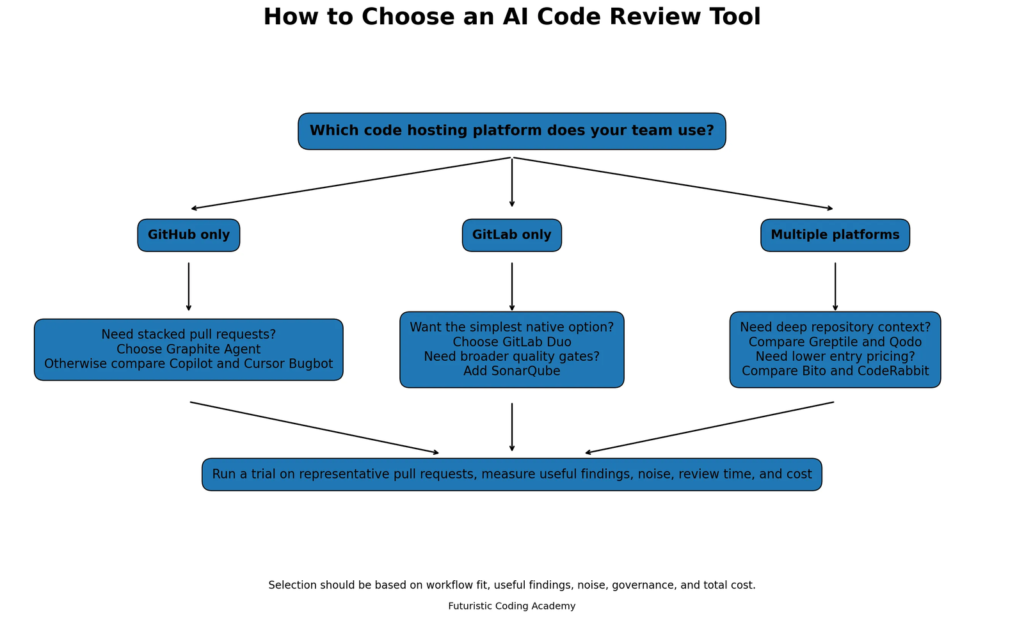
Decision guide for choosing an AI code review tool based on code hosting platform, repository context, workflow, and pricing.
The best choice depends on workflow, code hosting platform, repository complexity, risk profile, and pricing model.
Choose CodeRabbit when
You need a polished dedicated reviewer that supports several code hosting platforms and provides detailed pull request feedback.
Choose Greptile or Qodo when
Your codebase is complex, changes depend on repository context, and custom rules are important.
Choose GitHub Copilot Code Review when
Your team already pays for Copilot and wants the simplest native GitHub experience.
Choose Graphite Agent when
Your team uses stacked pull requests and wants review, discussion, and merging in one workflow.
Choose Cursor Bugbot when
Your developers already use Cursor and want pull request review connected to the same ecosystem.
Choose Bito when
You need broad platform support and want a lower starting per seat price.
Choose DeepSource or SonarQube Cloud when
Your priority is continuous code quality, security, static analysis, and governance rather than only natural language comments.
Choose GitLab Duo when
Your software lifecycle is centered on GitLab and you want a native review option with predictable per review pricing.
Infographic placement: Upload the file named fca_how_to_choose_ai_code_review_tool.webp below this paragraph.
Alt text: Decision guide for choosing an AI code review tool based on code hosting platform, repository context, workflow, and pricing.
How to Test an AI Code Review Tool Before Buying
A product trial should use representative pull requests rather than a small demonstration repository. Select changes that include business logic, data access, authentication, tests, configuration, and a known defect. Then compare the tool against your existing review process.
Measure these factors:
- How many comments identify a genuine issue
- How many comments are irrelevant or too minor
- Whether the tool understands project conventions
- Whether suggested fixes compile and pass tests
- How much review time is saved
- Whether developers act on the comments
- How pricing changes with normal monthly usage
- Whether the security and data controls meet company requirements
Do not select a tool only because it produces more comments. A smaller number of accurate findings is usually more valuable than a long list that developers learn to ignore.
Can AI Code Review Replace Human Review?
No. Current research supports using AI review as an additional quality layer, not as the final authority for merging code.
A 2026 benchmark called c CRAB found that the evaluated code review agents together solved around 40 percent of the benchmark tasks. Another industrial study of 4,335 pull requests found that 73.8 percent of automated review comments were resolved, but average pull request closure time increased in the observed projects. These results show that automated comments can be useful while still creating noise, discussion, or additional work.
The OWASP Code Review Guide also emphasizes that manual security review remains important even as scanners improve. Teams should therefore combine AI review with tests, static analysis, security checks, and accountable human approval.
A sensible review model is:
- Run automated tests, linters, and security checks.
- Use an AI reviewer to identify likely defects and missing context.
- Let the developer respond to or fix valid findings.
- Require a human reviewer for architecture, business logic, security impact, and final approval.
Frequently Asked Questions
What is an AI code review tool?
An AI code review tool analyzes source code or pull request changes and provides feedback about possible bugs, security issues, maintainability problems, coding standards, and suggested fixes. Some tools review only changed lines, while others use wider repository context.
What is the best AI code review tool overall?
CodeRabbit is a strong general choice because it supports several platforms and focuses directly on pull request review. Greptile and Qodo are stronger candidates when repository context and custom rules are the main priorities. The best option depends on the team workflow.
What is the best free AI code review tool?
Greptile offers a free Starter plan for one active developer, while CodeRabbit provides free access for qualifying public open source projects. SonarQube Cloud also has a free tier for smaller codebases. Free plan limits should be checked before adoption.
Can GitHub Copilot review pull requests?
Yes. GitHub Copilot Code Review can review changes inside GitHub pull requests and provide inline comments or suggested changes. Availability and usage depend on the Copilot plan and organization settings.
Do AI code review tools support GitLab?
Yes. CodeRabbit, Greptile, Qodo, Bito, DeepSource, SonarQube Cloud, and GitLab Duo support GitLab workflows in different ways. GitLab Duo provides the most native GitLab experience.
Do AI code reviewers find security vulnerabilities?
They can identify some security problems, but capability differs by product. Dedicated quality and security platforms such as SonarQube and DeepSource use deterministic analysis alongside AI features. AI comments should not replace formal security testing or manual secure code review.
How accurate are AI code review tools?
Accuracy varies by tool, repository context, programming language, pull request size, and issue type. Research shows that current agents can find useful defects but still miss important issues and produce incorrect comments. Teams should measure useful findings and noise during a trial.
Can AI code review reduce pull request time?
It can provide immediate first pass feedback and reduce waiting for simple issues. However, automated comments can also increase discussion or create extra work when they are inaccurate. Review time should be measured using the team own pull requests.
Should small development teams use AI code review?
Small teams can benefit because senior review time is limited. A native tool such as GitHub Copilot Code Review or a lower cost option such as Bito may be enough initially. The team should still keep human approval for important changes.
What is the difference between AI code review and static analysis?
Static analysis uses defined rules and program analysis to find known patterns, quality problems, and security issues. AI review uses language models and project context to reason about intent, logic, and likely defects. Many teams use both because the methods find different classes of problems.
How much do AI code review tools cost?
Pricing ranges from free limited plans to more than $40 per user monthly. Some vendors charge by seat, while others charge by review, credit, contributor, or processed lines of code. Total monthly cost should be estimated using actual pull request volume.
What should an enterprise check before choosing a tool?
Enterprises should evaluate data retention, model training policies, deployment location, self hosted options, single sign on, audit logs, role controls, legal terms, source code access, support commitments, and the ability to apply organization review standards.
Final Verdict
CodeRabbit is the most balanced dedicated AI code review tool for teams that need broad platform support and detailed pull request feedback. Greptile and Qodo are better suited to organizations that prioritize deep repository context and configurable review standards. GitHub Copilot Code Review, Graphite Agent, Cursor Bugbot, and GitLab Duo make the most sense when the team already works inside their respective ecosystems.
Bito offers an accessible entry point for teams that need several integrations, while DeepSource and SonarQube Cloud are stronger choices for organizations that want ongoing code quality, security, and governance in addition to AI review.
The safest approach is not to search for a tool that replaces human reviewers. Select a tool that catches useful issues early, fits the existing workflow, produces manageable noise, and leaves final responsibility with qualified developers.