This comparison is based on public product documentation, current public pricing, platform coverage, workflow fit, and independent research. Futuristic Coding Academy did not accept payment for placement. Prices and features can change, so confirm current terms on the vendor website.
Website security is not a single product category. A small business may need a managed firewall, malware cleanup, and uptime monitoring, while a software company may need authenticated scanning, application testing, vulnerability management, and evidence for compliance. The right platform depends on what must be protected and who will respond when a problem appears.
This guide compares ten options for United States businesses. It is useful for website owners as well as developers using a computer course guide with cybersecurity options to build broader technical skills. The comparison separates edge protection, WordPress security, automated scanning, and enterprise application testing so buyers do not treat unlike products as direct substitutes.
No security platform can eliminate risk. The practical goal is layered protection, fast detection, controlled access, tested recovery, and a clear response process. Prices and product capabilities were checked against public vendor information on August 6, 2026.
Best Options at a Glance
- Best edge protection: Cloudflare
- Best managed cleanup and firewall: Sucuri
- Best WordPress security plugin: Wordfence
- Best scanning and pentest combination: Astra Security
- Best managed application security: AppTrana
- Best external vulnerability monitoring: Intruder
- Best practitioner testing toolkit: Pentest Tools
- Best enterprise dynamic testing: Invicti
- Best WordPress vulnerability intelligence: Patchstack
- Best simple bundled option: GoDaddy Website Security
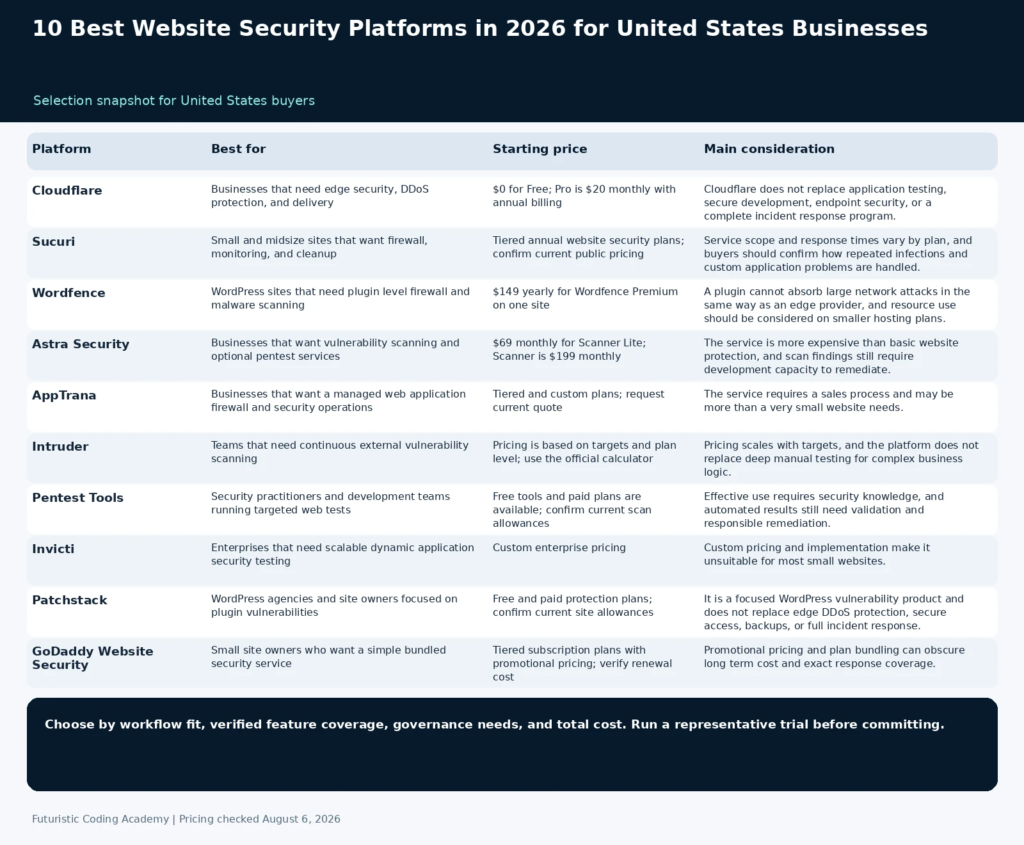
| Platform | Best for | Starting price | Core coverage | Main consideration |
|---|---|---|---|---|
| Cloudflare | Businesses that need edge security, DDoS protection, and delivery | $0 for Free; Pro is $20 monthly with annual billing | CDN, DDoS protection, web application firewall, DNS, bot and edge services | Cloudflare does not replace application testing, secure development, endpoint security, or a complete incident response program. |
| Sucuri | Small and midsize sites that want firewall, monitoring, and cleanup | Tiered annual website security plans; confirm current public pricing | Website firewall, malware monitoring, cleanup, blocklist support | Service scope and response times vary by plan, and buyers should confirm how repeated infections and custom application problems are handled. |
| Wordfence | WordPress sites that need plugin level firewall and malware scanning | $149 yearly for Wordfence Premium on one site | WordPress firewall, malware scanner, login security, threat intelligence | A plugin cannot absorb large network attacks in the same way as an edge provider, and resource use should be considered on smaller hosting plans. |
| Astra Security | Businesses that want vulnerability scanning and optional pentest services | $69 monthly for Scanner Lite; Scanner is $199 monthly | Dynamic scanning, vulnerability management, pentest services, compliance support | The service is more expensive than basic website protection, and scan findings still require development capacity to remediate. |
| AppTrana | Businesses that want a managed web application firewall and security operations | Tiered and custom plans; request current quote | Managed firewall, scanning, DDoS protection, virtual patching, monitoring | The service requires a sales process and may be more than a very small website needs. |
| Intruder | Teams that need continuous external vulnerability scanning | Pricing is based on targets and plan level; use the official calculator | External attack surface, vulnerability scanning, cloud integrations, reporting | Pricing scales with targets, and the platform does not replace deep manual testing for complex business logic. |
| Pentest Tools | Security practitioners and development teams running targeted web tests | Free tools and paid plans are available; confirm current scan allowances | Web scanners, network tools, attack surface, reporting, integrations | Effective use requires security knowledge, and automated results still need validation and responsible remediation. |
| Invicti | Enterprises that need scalable dynamic application security testing | Custom enterprise pricing | Dynamic application scanning, proof based validation, integrations, governance | Custom pricing and implementation make it unsuitable for most small websites. |
| Patchstack | WordPress agencies and site owners focused on plugin vulnerabilities | Free and paid protection plans; confirm current site allowances | WordPress vulnerability intelligence, virtual patches, monitoring | It is a focused WordPress vulnerability product and does not replace edge DDoS protection, secure access, backups, or full incident response. |
| GoDaddy Website Security | Small site owners who want a simple bundled security service | Tiered subscription plans with promotional pricing; verify renewal cost | Firewall, monitoring, malware scanning, cleanup on eligible plans | Promotional pricing and plan bundling can obscure long term cost and exact response coverage. |
How We Evaluated the Platforms
We grouped products by the security outcome they deliver, then checked official plan and product pages. A web application firewall, a WordPress plugin, and an enterprise scanner solve different problems, so the comparison explains where each product fits instead of forcing an artificial single ranking. Products were assessed on prevention, detection, response, coverage, operations, and commercial fit.
- Prevention: Firewall, bot controls, DDoS mitigation, access policy, and virtual patching.
- Detection: Malware monitoring, vulnerability scanning, attack surface discovery, and alert quality.
- Response: Cleanup service, remediation guidance, support access, and incident evidence.
- Coverage: Websites, APIs, WordPress plugins, authenticated applications, and external assets.
- Operations: Deployment effort, false positive management, integrations, reporting, and team workflow.
- Commercial fit: Site count, assets, scans, support, service level, and annual cost.
1. Cloudflare
Best for: Businesses that need edge security, DDoS protection, and delivery
Cloudflare places security and performance controls at a global edge network in front of the website. Its plans combine DNS, content delivery, unmetered DDoS protection, managed firewall rules, certificates, and optional security services. The free plan makes it accessible to small sites, while Business and enterprise contracts add stronger controls and support. It is one of the most practical first layers for publicly accessible websites because deployment can begin at DNS without changing the application. Buyers still need to secure the origin and prevent direct access that bypasses the intended edge controls.
Why It Stands Out
- Integrated edge security and performance
- Free entry plan
- Managed firewall rules and DDoS protection
- Broad ecosystem for growing businesses
Pricing and Plan Structure
$0 for Free; Pro is $20 monthly with annual billing. Check the official pricing page for current limits, billing terms, and promotional conditions.
Important Limitation
Cloudflare does not replace application testing, secure development, endpoint security, or a complete incident response program.
Who Should Choose It
Choose Cloudflare as an edge protection layer when the website needs reliable DNS, DDoS mitigation, firewall controls, and content delivery.
2. Sucuri
Best for: Small and midsize sites that want firewall, monitoring, and cleanup
Sucuri combines a cloud website firewall with malware monitoring, cleanup assistance, blocklist monitoring, and security support. It is attractive to businesses that do not have a dedicated security team and want a service that helps both prevent attacks and recover from a compromised site. The platform supports several website technologies rather than only WordPress. The managed service model can reduce operational burden, but the owner should confirm cleanup response, repeated infection policy, supported platforms, and which underlying application problems remain the responsibility of the developer or host.
Why It Stands Out
- Firewall and cleanup in one service
- Monitoring and blocklist support
- Suitable for businesses without a security team
- Broad website platform coverage
Pricing and Plan Structure
Tiered annual website security plans; confirm current public pricing. Check the official pricing page for current limits, billing terms, and promotional conditions.
Important Limitation
Service scope and response times vary by plan, and buyers should confirm how repeated infections and custom application problems are handled.
Who Should Choose It
Choose Sucuri when the priority is a managed website security service with cleanup assistance, not only a scanning dashboard.
3. Wordfence
Best for: WordPress sites that need plugin level firewall and malware scanning
Wordfence is a WordPress specific security plugin with a firewall, malware scanner, login protections, blocking, and threat intelligence. Because it runs with direct knowledge of WordPress files and behavior, it can provide detailed site level visibility. Premium plans receive current firewall rules and malware signatures, while higher services add hands on response and support. Wordfence can be a strong application layer control, but it works best alongside secure hosting, independent backups, reliable updates, and an edge service for network scale attacks.
Why It Stands Out
- Deep WordPress integration
- Firewall and malware scanning
- Login security and threat intelligence
- Clear single site Premium price
Pricing and Plan Structure
$149 yearly for Wordfence Premium on one site. Check the official pricing page for current limits, billing terms, and promotional conditions.
Important Limitation
A plugin cannot absorb large network attacks in the same way as an edge provider, and resource use should be considered on smaller hosting plans.
Who Should Choose It
Choose Wordfence when WordPress specific visibility and control are required, often alongside an edge service such as Cloudflare.
4. Astra Security
Best for: Businesses that want vulnerability scanning and optional pentest services
Astra Security offers automated web application scanning, vulnerability management, and professional penetration testing services. It is relevant to businesses that need to identify application weaknesses and produce remediation evidence rather than only block traffic. The product can fit growing software companies and commerce sites that want a path from continuous scanning to formal assessment. A buyer should confirm authenticated scan support, asset count, scan frequency, retesting, report format, and whether the selected service meets a customer or compliance requirement.
Why It Stands Out
- Automated application scanning
- Professional pentest services available
- Compliance oriented reporting
- Support for websites and APIs
Pricing and Plan Structure
$69 monthly for Scanner Lite; Scanner is $199 monthly. Check the official pricing page for current limits, billing terms, and promotional conditions.
Important Limitation
The service is more expensive than basic website protection, and scan findings still require development capacity to remediate.
Who Should Choose It
Choose Astra when the business needs continuous vulnerability discovery and may also require a managed penetration test.
5. AppTrana
Best for: Businesses that want a managed web application firewall and security operations
AppTrana combines application scanning, a managed web application firewall, DDoS protection, virtual patching, and security operations support. Its value is the managed layer that helps tune policies and respond to detected vulnerabilities. It is designed for organizations that want more assistance than a self configured firewall but do not want to build a complete application security team. The service should be evaluated on tuning ownership, false positive response, application onboarding, reporting, and the support process during a real attack.
Why It Stands Out
- Managed firewall and tuning
- Scanning linked to virtual patching
- DDoS and application protection
- Security operations support
Pricing and Plan Structure
Tiered and custom plans; request current quote. Check the official pricing page for current limits, billing terms, and promotional conditions.
Important Limitation
The service requires a sales process and may be more than a very small website needs.
Who Should Choose It
Choose AppTrana when managed policy tuning and virtual patching are important to an online business.
6. Intruder
Best for: Teams that need continuous external vulnerability scanning
Intruder focuses on finding weaknesses across internet facing infrastructure, cloud services, and web applications. It continuously monitors assets, prioritizes issues, and integrates with common cloud and development workflows. It is useful for technology companies that need broader external attack surface coverage rather than only one website plugin. The value depends on maintaining an accurate asset inventory and assigning remediation ownership, because a scan result without an accountable owner does not reduce risk.
Why It Stands Out
- Continuous external scanning
- Cloud and integration support
- Prioritization and reporting
- Suitable for growing technology teams
Pricing and Plan Structure
Pricing is based on targets and plan level; use the official calculator. Check the official pricing page for current limits, billing terms, and promotional conditions.
Important Limitation
Pricing scales with targets, and the platform does not replace deep manual testing for complex business logic.
Who Should Choose It
Choose Intruder when the organization needs continuous visibility across several external assets and cloud environments.
7. Pentest Tools
Best for: Security practitioners and development teams running targeted web tests
Pentest Tools provides a collection of web and network security testing tools in a hosted platform. It is designed for practitioners who want to run targeted scans, validate findings, and produce reports without maintaining every scanner locally. The platform can support development teams, consultants, and internal security staff that need more hands on testing than a simple managed service provides. Users must understand scope, authorization, false positives, and safe testing because a powerful scanner is not a substitute for professional judgment.
Why It Stands Out
- Broad collection of hosted testing tools
- Useful for validation and practitioner workflows
- Web and network coverage
- Reporting and integrations on paid plans
Pricing and Plan Structure
Free tools and paid plans are available; confirm current scan allowances. Check the official pricing page for current limits, billing terms, and promotional conditions.
Important Limitation
Effective use requires security knowledge, and automated results still need validation and responsible remediation.
Who Should Choose It
Choose Pentest Tools when the team has the expertise to run and interpret focused security tests.
8. Invicti
Best for: Enterprises that need scalable dynamic application security testing
Invicti is an enterprise dynamic application security testing platform for scanning web applications and APIs at scale. It emphasizes automation, integrations with development workflows, proof based validation, and centralized governance. It is designed for organizations with many applications and formal application security programs rather than a small business seeking a simple firewall. Enterprise buyers should evaluate coverage, scan safety, evidence quality, false positive management, role controls, integrations, and whether the platform helps developers resolve findings within normal delivery workflows.
Why It Stands Out
- Enterprise application security testing
- Scalable scanning and governance
- Development workflow integrations
- Validation features designed to reduce noise
Pricing and Plan Structure
Custom enterprise pricing. Check the official pricing page for current limits, billing terms, and promotional conditions.
Important Limitation
Custom pricing and implementation make it unsuitable for most small websites.
Who Should Choose It
Choose Invicti when an enterprise needs centralized dynamic testing across a large application portfolio.
9. Patchstack
Best for: WordPress agencies and site owners focused on plugin vulnerabilities
Patchstack specializes in WordPress and open source vulnerability intelligence. It monitors plugins, themes, and core issues, and paid services can apply virtual patches when a vulnerable component cannot be updated immediately. This focus is useful for agencies managing many WordPress sites and for businesses that rely on a large plugin ecosystem. A virtual patch reduces exposure while a permanent fix is prepared, but site owners should still remove abandoned plugins, apply supported updates, restrict administrator access, and maintain tested backups.
Why It Stands Out
- Specialized WordPress vulnerability database
- Virtual patching for relevant plans
- Agency and multi site use cases
- Useful complement to normal updates
Pricing and Plan Structure
Free and paid protection plans; confirm current site allowances. Check the official pricing page for current limits, billing terms, and promotional conditions.
Important Limitation
It is a focused WordPress vulnerability product and does not replace edge DDoS protection, secure access, backups, or full incident response.
Who Should Choose It
Choose Patchstack when plugin and theme vulnerability exposure is a central WordPress risk.
10. GoDaddy Website Security
Best for: Small site owners who want a simple bundled security service
GoDaddy Website Security packages common website protections for customers who want a single vendor and a straightforward dashboard. Depending on the plan, it can include a firewall, monitoring, malware scanning, cleanup, certificates, and backups. It is convenient for smaller sites, but buyers should compare normal renewal pricing and service limits with specialist alternatives. The right plan should clearly state whether cleanup, backup, firewall, and monitoring are included and how quickly assistance is provided after an incident.
Why It Stands Out
- Simple bundled purchase
- Firewall and monitoring on relevant plans
- Cleanup and backup features on higher tiers
- Convenient for existing GoDaddy customers
Pricing and Plan Structure
Tiered subscription plans with promotional pricing; verify renewal cost. Check the official pricing page for current limits, billing terms, and promotional conditions.
Important Limitation
Promotional pricing and plan bundling can obscure long term cost and exact response coverage.
Who Should Choose It
Choose GoDaddy Website Security when convenience and a single vendor matter more than specialist security depth.
A Layered Website Security Model
The OWASP Top 10 is a useful starting point for understanding common web application risks, but a secure website also depends on asset inventory, updates, access control, secrets management, logging, backups, and response ownership. A firewall reduces exposure but cannot repair insecure business logic inside an application.
A practical stack often includes an edge provider, platform specific protection, continuous scanning, secure development controls, and tested backups. Larger organizations add centralized identity, security monitoring, application testing, and formal incident response.
Developers working through a full stack Java developer course guide should treat security as part of design and review, not a final plugin added after launch. Authentication, authorization, validation, dependency management, and logging need explicit requirements.
The CISA Known Exploited Vulnerabilities Catalog is also useful for prioritization because it identifies vulnerabilities with evidence of active exploitation. Organizations should use that information with asset exposure and business impact rather than treating every scanner alert as equal.
How to Choose a Website Security Platform
Start with the assets and risks. A WordPress marketing site, an online store, and a software application with authenticated users have different requirements. Record platforms, domains, APIs, cloud assets, payment flows, personal data, and recovery objectives.
Define who responds. Some products only alert, while managed services help tune a firewall or clean malware. A scanner is useful only when someone can validate findings, prioritize risk, and coordinate remediation with developers or hosting providers.
Review evidence and contracts. Confirm data handling, log retention, support hours, cleanup limits, service levels, scan coverage, false positive workflow, and what happens during an active incident. Security buying should be based on operational responsibility, not a badge alone.
Test the response path before an emergency. Create a harmless alert, restore a backup in a safe environment, and document who contacts the provider, host, developer, legal adviser, and affected customers. A platform delivers value only when the organization can act on its output.
A Practical Website Security Rollout
- Inventory domains, applications, APIs, plugins, hosting, accounts, integrations, and data flows.
- Apply updates, remove unused components, strengthen authentication, and restrict administrative access.
- Deploy edge protection and confirm that origin access cannot bypass the intended controls.
- Run authenticated and unauthenticated vulnerability scans, then validate important findings.
- Create tested backups and document the restoration and incident escalation process.
- Monitor alerts, review access, retest after major changes, and track remediation ownership.
Frequently Asked Questions
What is a website security platform?
It is software or a managed service that helps prevent, detect, investigate, or remediate threats affecting websites, web applications, APIs, and related infrastructure.
Which website security platform is best overall?
Cloudflare is a strong overall edge protection layer. Sucuri is useful for managed website firewall and cleanup. Wordfence is a leading WordPress specific choice. Application teams may need a scanner such as Astra, Intruder, or Invicti.
Is Cloudflare enough to secure a website?
No single product is enough. Cloudflare can provide valuable edge security, but secure code, updates, access control, backups, monitoring, and incident response remain necessary.
What is the best security platform for WordPress?
Wordfence and Patchstack provide WordPress specific protection and vulnerability intelligence. Many sites also use Cloudflare or Sucuri at the edge and maintain independent backups.
What is a web application firewall?
A web application firewall inspects requests to a website or application and applies rules intended to block malicious traffic. It should be tuned and combined with secure development and monitoring.
How much does website security software cost?
Basic protection can begin with free plans. Small business services often cost tens or hundreds of dollars monthly or yearly, while enterprise scanning and managed application security use custom contracts.
Can a website security service remove malware?
Some services include malware cleanup, while others only detect problems. Confirm cleanup scope, response time, repeat infection policy, and whether the service repairs application vulnerabilities.
How often should a website be scanned?
Continuous or frequent scanning is appropriate for changing applications and internet facing assets. A stable small site should still be monitored and rescanned after updates, new plugins, or major changes.
What is the difference between vulnerability scanning and penetration testing?
Scanning automates the search for known weaknesses and configuration problems. Penetration testing uses human expertise to validate risk, combine weaknesses, and test business logic within an agreed scope.
Does an SSL certificate make a website secure?
No. It encrypts traffic between the visitor and the server, but it does not prevent vulnerable code, stolen credentials, malware, insecure access, or application attacks.
What should a small business prioritize first?
Use strong authentication, reliable updates, independent backups, an edge firewall, platform specific protection, monitoring, and a clear contact for incident response.
How can a business evaluate security alerts?
Prioritize by exploitability, affected asset, data exposure, business impact, public reachability, and available remediation. Important findings should be validated before large operational changes.
Related Futuristic Coding Academy Resources
- Computer Course Guide With Cybersecurity Options
- Full Stack Java Developer Course Guide
- Full Stack Project Ideas
- Full Stack Developer Career Guide
Final Recommendation
Cloudflare is the most useful general edge layer for many websites. Sucuri is a strong managed choice for businesses that want firewall and cleanup assistance. Wordfence and Patchstack are valuable for WordPress specific risk, while Astra, Intruder, Pentest Tools, and Invicti serve deeper application security needs.
Buy a platform only after assigning responsibility for the alerts and incidents it creates. The strongest program combines prevention, continuous visibility, secure development, tested recovery, and a response process that the business can actually execute.