A content delivery network can reduce latency, protect the origin, absorb traffic spikes, and make static assets faster for users far from the server. It is not a magic speed button. Real results depend on cache strategy, origin performance, routing, image delivery, JavaScript weight, and how the application behaves at the edge. This guide compares CDN and website performance platforms for United States websites by operational fit, pricing model, security, developer control, and the type of workload each platform handles well.
This article targets the primary keyword best CDN and website performance tools and also addresses related buyer questions such as best CDN providers, website performance tools, content delivery network comparison, CDN for WordPress, CDN for web applications. The recommendations use current public product information, current ranking page patterns, official documentation, and independent research. Prices are shown in US dollars when a vendor publishes them and were checked on August 8, 2026.
Quick Recommendations
- Cloudflare: Most websites that want CDN, DNS, security, and performance in one service
- Fastly: Developer teams that need programmable edge behavior and instant delivery control
- Amazon CloudFront: Applications already hosted on AWS
- Bunny CDN: Cost conscious websites and media delivery teams
- KeyCDN: Teams that want simple pay as you go delivery with low minimum usage
- CDN77: High traffic media and enterprise delivery
- Gcore CDN: Global applications that also need cloud, edge compute, or media infrastructure
Comparison Table
| Tool | Best for | Pricing approach | Important limitation |
|---|---|---|---|
| Cloudflare | Most websites that want CDN, DNS, security, and performance in one service | Free; Pro $20 monthly with annual billing; Business $200 monthly with annual billing | The simplicity of the bundled platform can hide complexity once teams need advanced cache keys, custom log pipelines, enterprise support, or detailed performance tuning. Buyers should compare support and observability requirements as carefully as network reach. |
| Fastly | Developer teams that need programmable edge behavior and instant delivery control | 100 GB bandwidth and 1 million requests free, then regional usage pricing | Fastly is more developer oriented than plug and play CDN services. Teams without infrastructure expertise may spend more time configuring and monitoring the service than they would with a more managed product. |
| Amazon CloudFront | Applications already hosted on AWS | Free, Pro, Business, and Premium flat rate plans plus conventional usage pricing | CloudFront configuration can feel complex for teams that only need a simple website CDN. Cross cloud organizations should also consider whether deeper AWS integration increases long term platform dependence. |
| Bunny CDN | Cost conscious websites and media delivery teams | Usage based regional pricing; verify current rates on the official calculator | Organizations that need the broadest global security portfolio, regulated enterprise agreements, or highly specialized edge compute should compare Bunny with larger platforms before standardizing. |
| KeyCDN | Teams that want simple pay as you go delivery with low minimum usage | North America and Europe start at $0.04 per GB for the first 10 TB; $4 monthly minimum usage | The platform is narrower than Cloudflare, Fastly, or AWS if the team also needs extensive edge compute, application security, bot management, or a broad enterprise product portfolio. |
| CDN77 | High traffic media and enterprise delivery | Growth plan $990 monthly for up to 250 TB; Enterprise uses custom pricing | A $990 monthly starting package is far above what a small website needs. Low traffic projects will usually get better economics from free tiers or pure usage based services. |
| Gcore CDN | Global applications that also need cloud, edge compute, or media infrastructure | CDN pricing varies by traffic and package; request a current quote or use the provider calculator | Public pricing is less immediately comparable than KeyCDN or Cloudflare self serve plans. Buyers should ask for a workload specific quote and validate performance in the locations that matter to their audience. |
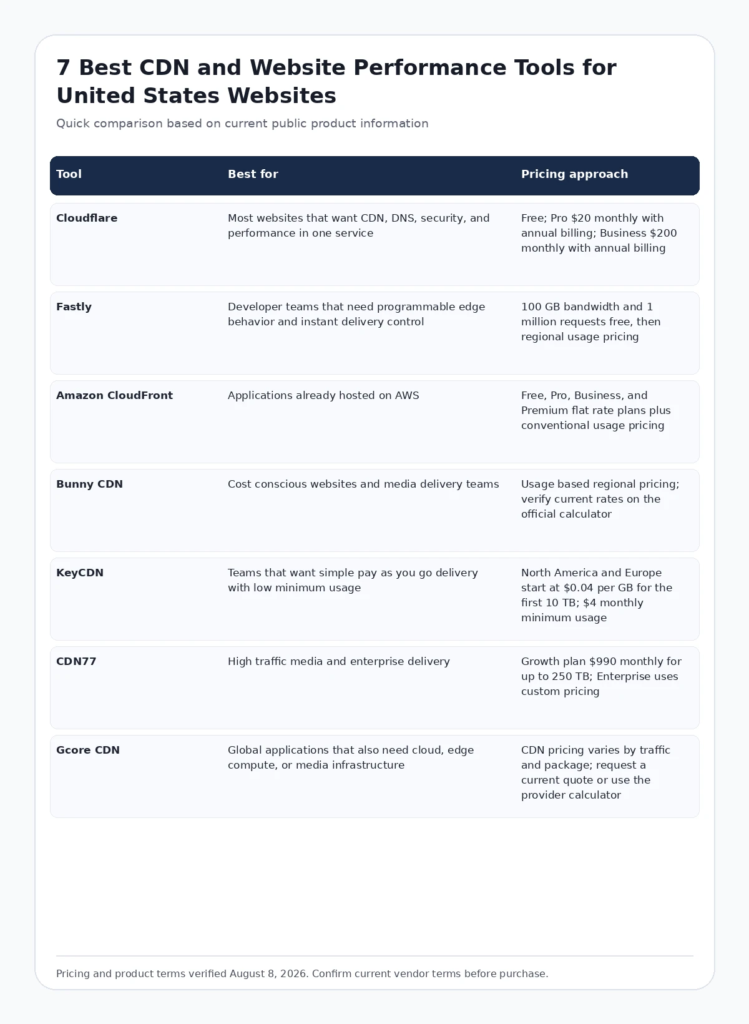
Infographic: Comparison Table
FCA_INFOGRAPHIC
Alt text: Comparison of leading best CDN and website performance tools for United States buyers, including best use case and pricing approach.
How We Evaluated These Tools
- Search intent fit: whether the product genuinely solves the job implied by the query rather than appearing only because it is adjacent to the category.
- Workflow fit: how easily the product connects to the systems, people, and review steps a US team already uses.
- Public evidence: official documentation, current pricing information, current feature pages, and credible independent research were favored over unsourced claims.
- Cost structure: we considered whether buyers pay by seat, usage, workload, traffic, credits, or custom contract because the same headline price can produce very different total cost.
- Operational limitations: every recommendation includes a reason a buyer might choose something else. A useful list should make tradeoffs easier to see, not hide them.
Google recommends that review content provide insightful analysis, original research, meaningful comparisons, and clear evidence rather than thin summaries. See Google Search Central guidance on high quality reviews and Google guidance on helpful, people first content.
Current Data and E E A T Signals to Consider
CloudFront documentation now lists more than 750 edge locations for its flat rate plan architecture, while Cloudflare advertises more than 330 data centers. Raw location counts are useful context, but real user performance still depends on routing, cache hit rate, origin design, and where visitors actually live. Source: AWS CloudFront flat rate plans.
Google recommends evaluating page experience as a collection of signals rather than chasing a single metric. A CDN can help latency and caching, but it cannot compensate for oversized JavaScript, slow application code, poor image strategy, or an overloaded origin. Source: Google page experience guidance.
Detailed Reviews
1. Cloudflare
Best for: Most websites that want CDN, DNS, security, and performance in one service
Cloudflare is the easiest default recommendation for many US websites because CDN, authoritative DNS, TLS, DDoS protection, caching rules, and a large edge network can be managed from one control plane. It is particularly attractive to WordPress and small business sites that need a useful free tier before they need enterprise features.
Where Cloudflare is strongest
- Free plan provides real CDN and DDoS protection rather than a short trial
- Pro and Business plans add deeper optimization and security controls
- Large global edge footprint makes it suitable for US sites with international visitors
Pricing and buying model
Free; Pro $20 monthly with annual billing; Business $200 monthly with annual billing. Check current official pricing
Limitations to consider
The simplicity of the bundled platform can hide complexity once teams need advanced cache keys, custom log pipelines, enterprise support, or detailed performance tuning. Buyers should compare support and observability requirements as carefully as network reach.
Visit the official Cloudflare website
2. Fastly
Best for: Developer teams that need programmable edge behavior and instant delivery control
Fastly is a strong fit for engineering teams that want fine control over caching, edge logic, purge behavior, and observability. Its current public pricing includes a meaningful free tier and usage based network charges, while larger packages combine capacity and support for organizations that want predictable contracts.
Where Fastly is strongest
- Programmable edge and fast purge workflows suit frequently changing applications
- Public usage pricing helps teams model traffic before a sales conversation
- Compute and observability products can extend the same edge platform beyond caching
Pricing and buying model
100 GB bandwidth and 1 million requests free, then regional usage pricing. Check current official pricing
Limitations to consider
Fastly is more developer oriented than plug and play CDN services. Teams without infrastructure expertise may spend more time configuring and monitoring the service than they would with a more managed product.
Visit the official Fastly website
3. Amazon CloudFront
Best for: Applications already hosted on AWS
Amazon CloudFront is a natural choice when origins, storage, identity, logging, and infrastructure already live in AWS. The current flat rate plan model bundles CDN delivery with services such as AWS WAF, DDoS protection, Route 53 DNS, logs, edge compute, and S3 credits, giving teams a more predictable option than traditional request and transfer pricing.
Where Amazon CloudFront is strongest
- Deep integration with S3, load balancers, API Gateway, WAF, and AWS identity
- Flat rate plans reduce the fear of surprise overage charges for eligible workloads
- Strong option for teams that want infrastructure and edge delivery under one cloud account
Pricing and buying model
Free, Pro, Business, and Premium flat rate plans plus conventional usage pricing. Check current official pricing
Limitations to consider
CloudFront configuration can feel complex for teams that only need a simple website CDN. Cross cloud organizations should also consider whether deeper AWS integration increases long term platform dependence.
Visit the official Amazon CloudFront website
4. Bunny CDN
Best for: Cost conscious websites and media delivery teams
Bunny CDN is popular with teams that want transparent usage billing, straightforward configuration, and a performance focused network without buying a large enterprise bundle. It can be especially attractive for image heavy sites, downloads, and smaller SaaS products where per gigabyte economics matter.
Where Bunny CDN is strongest
- Simple operational model for small and midsize teams
- Usage based pricing makes it easy to start without a large contract
- Related image, storage, and optimization products can reduce the number of vendors in a performance stack
Pricing and buying model
Usage based regional pricing; verify current rates on the official calculator. Check current official pricing
Limitations to consider
Organizations that need the broadest global security portfolio, regulated enterprise agreements, or highly specialized edge compute should compare Bunny with larger platforms before standardizing.
Visit the official Bunny CDN website
5. KeyCDN
Best for: Teams that want simple pay as you go delivery with low minimum usage
KeyCDN offers one of the clearest public pricing models in this comparison. North American and European traffic starts at four cents per gigabyte for the first ten terabytes, and the service does not add request charges. That can make cost forecasting simple for smaller web properties with steady traffic.
Where KeyCDN is strongest
- Transparent regional bandwidth pricing with no request fee
- Low monthly minimum makes it practical for small projects
- TLS, instant purge, origin shield, and DDoS protection are available without a complex bundle
Pricing and buying model
North America and Europe start at $0.04 per GB for the first 10 TB; $4 monthly minimum usage. Check current official pricing
Limitations to consider
The platform is narrower than Cloudflare, Fastly, or AWS if the team also needs extensive edge compute, application security, bot management, or a broad enterprise product portfolio.
Visit the official KeyCDN website
6. CDN77
Best for: High traffic media and enterprise delivery
CDN77 is aimed more directly at larger traffic volumes, streaming, and businesses that want hands on technical support. Its Growth plan includes up to 250 TB of monthly traffic, global points of presence, the full CDN feature set, and round the clock technical support.
Where CDN77 is strongest
- Clear packaged option for organizations with substantial monthly traffic
- Strong media and video delivery positioning
- Direct access to technical support and account specialists is part of the enterprise value proposition
Pricing and buying model
Growth plan $990 monthly for up to 250 TB; Enterprise uses custom pricing. Check current official pricing
Limitations to consider
A $990 monthly starting package is far above what a small website needs. Low traffic projects will usually get better economics from free tiers or pure usage based services.
Visit the official CDN77 website
7. Gcore CDN
Best for: Global applications that also need cloud, edge compute, or media infrastructure
Gcore combines CDN delivery with cloud infrastructure, edge products, security, object storage, and media services. It is worth considering when a team wants a broader infrastructure provider but does not want to standardize entirely on a US hyperscaler.
Where Gcore CDN is strongest
- Broad infrastructure portfolio beyond CDN alone
- Useful for global applications that combine delivery, storage, security, and compute
- Can support media and high traffic workloads as the architecture grows
Pricing and buying model
CDN pricing varies by traffic and package; request a current quote or use the provider calculator. Check current official pricing
Limitations to consider
Public pricing is less immediately comparable than KeyCDN or Cloudflare self serve plans. Buyers should ask for a workload specific quote and validate performance in the locations that matter to their audience.
Visit the official Gcore CDN website
How to Choose the Right Platform
Benchmark from real user locations
Measure US regions that matter to the business and any important international markets. Use real user monitoring where possible instead of choosing by a provider marketing map.
Measure origin offload and cache hit rate
A CDN creates more value when cache rules prevent unnecessary origin requests. Track hit rate, transfer reduction, time to first byte, and error rate before and after the change.
Compare security and performance together
DDoS protection, WAF, bot control, TLS, logs, image optimization, and edge compute can change total cost more than raw bandwidth pricing.
Plan migration and rollback
Document DNS changes, certificate handling, cache behavior, purge process, origin bypass, log access, and a rollback path before switching production traffic.
Relevant Futuristic Coding Academy Resources
For related technical and marketing context, explore dedicated server planning guide, full stack Python development guide, full stack Java development guide, .NET full stack developer guide, full stack development guide, and the Futuristic Coding Academy blog library.
Frequently Asked Questions
What does a CDN do?
A content delivery network stores or processes content at distributed edge locations so visitors can receive files and responses from infrastructure closer to them instead of always reaching the origin server.
Which CDN is best for a WordPress website?
Cloudflare is a common starting point because the free plan combines CDN, DNS, TLS, and DDoS protection. Bunny CDN and KeyCDN are also attractive when transparent usage pricing is more important than a broad platform.
Is Cloudflare CDN really free?
Cloudflare offers a permanent free application services plan with CDN and DDoS protection. Advanced optimization, support, security, and enterprise controls require paid plans or add ons.
Is a CDN a Google ranking factor?
Google does not provide a ranking bonus for using a particular CDN. A CDN can improve user experience by reducing latency and origin load, which may help a site deliver a better overall page experience.
What is the difference between a CDN and web hosting?
Hosting stores and runs the origin website or application. A CDN sits in front of the origin and distributes cached content or edge functions across many locations. Most websites use both.
Which CDN is best for AWS applications?
CloudFront is usually the simplest architectural fit for AWS workloads because it integrates with S3, load balancers, API Gateway, WAF, Route 53, logs, identity, and other AWS services.
Which CDN has the simplest pricing?
KeyCDN has a very direct regional per gigabyte model with no request charges. Cloudflare has easy fixed website plans, while Fastly and cloud providers use more detailed usage pricing.
How should I test a CDN before migrating?
Measure real user latency, cache hit rate, origin offload, error rate, purge behavior, TLS performance, image delivery, API behavior, and costs using a representative traffic period. Test from the regions that matter to your users.
Do CDNs protect against DDoS attacks?
Many modern CDN platforms include network level DDoS protection, but coverage, limits, application layer protection, bot controls, and support vary by plan. Review the security terms instead of assuming every CDN provides the same protection.
Can a CDN make a slow website fast?
It can reduce network distance and serve cached assets faster, but it cannot fix slow database queries, excessive client side code, poor rendering, unoptimized images, or a weak hosting environment.
What should a US business consider when choosing a CDN?
Look at performance for US visitors, global reach if customers are international, security features, support hours, log access, privacy requirements, price predictability, integration with the origin platform, and ease of migration.
When should a company use more than one CDN?
Multi CDN architectures can improve resilience or regional performance for very large services, but they add routing, cache consistency, observability, and operational complexity. Most small and midsize sites are better served by one well configured provider.
Final Recommendation
There is no responsible way to choose among Cloudflare, Fastly, Amazon CloudFront, Bunny CDN, KeyCDN, CDN77, Gcore CDN from a feature checklist alone. Start with the job your team needs to improve, test the product on representative work, verify the current price and contract terms, and measure the result that matters to the business. A platform deserves to stay in the stack only when it reduces meaningful work, improves quality, or creates measurable revenue or risk reduction without introducing more operational complexity than it removes.
Editorial note: Product features and pricing change frequently. This guide was verified on August 8, 2026. Always confirm current terms on the linked official vendor pages before purchasing.