
AI code editors are no longer defined by autocomplete alone. The leading products can reason across a repository, edit several files, run commands, generate tests, search documentation, explain code, and in some cases delegate work to cloud agents. That means the right editor depends on workflow, repository size, preferred models, security, extension needs, and how much autonomy a developer wants. This guide compares eight current choices for United States developers without assuming one editor is best for every task.
This guide targets best AI code editors for United States buyers and also covers related searches such as AI code editor, AI IDE, best AI IDE, AI coding editor, Cursor alternatives, coding editor with AI. The structure was informed by recurring sections in current ranking comparison pages, including quick picks, product comparisons, methodology, detailed reviews, buying criteria, tradeoffs, and frequently asked questions. Product facts and pricing models were checked against current official vendor pages wherever public information is available.
Quick Recommendations
- Cursor: Developers who want an AI native editor with strong repository context and agent workflows
- Visual Studio Code with GitHub Copilot: Developers who want a mainstream extensible editor with AI added through GitHub
- Zed: Developers who prioritize editor performance, collaboration, and a modern native code environment
- JetBrains IDEs with Junie: Professional developers using IntelliJ IDEA, PyCharm, WebStorm, and other JetBrains IDEs
- Replit: Browser based development, rapid prototypes, learning, and deployment in one environment
- Kiro: Developers who want specification driven AI development and structured agent workflows
- TRAE: Developers looking for a low cost AI native editor with token based plans
- Devin Desktop and Windsurf workflow: Teams evaluating an agent centered development environment connected to Cognition services
Comparison Table
| Tool | Best for | Pricing approach | Important limitation |
|---|---|---|---|
| Cursor | Developers who want an AI native editor with strong repository context and agent workflows | Hobby free; Pro $20 monthly; Teams $40 per user monthly | Heavy model and agent use can exceed what developers expect from a simple editor subscription. Teams should also validate extension compatibility, data settings, remote development, and how cloud agents interact with private repositories. |
| Visual Studio Code with GitHub Copilot | Developers who want a mainstream extensible editor with AI added through GitHub | VS Code is free; Copilot Pro $10 monthly; Pro Plus $39; Business $19 per user monthly | The experience is assembled from VS Code, Copilot, extensions, GitHub, and optional agents rather than one vertically integrated editor. Teams should manage extension security and organization policy carefully. |
| Zed | Developers who prioritize editor performance, collaboration, and a modern native code environment | Personal free; Pro $10 monthly with included model tokens; Business $30 per seat monthly | The extension ecosystem is smaller than VS Code and some specialized workflows may require adaptation. Teams should confirm language tools, remote workflows, debugger support, and enterprise administration before standardizing. |
| JetBrains IDEs with Junie | Professional developers using IntelliJ IDEA, PyCharm, WebStorm, and other JetBrains IDEs | AI Pro about $8.33 per user monthly annual; AI Ultimate about $25 per user monthly annual, separate from IDE licensing where applicable | Total cost includes the underlying IDE license where required plus AI. Developers who prefer a minimal editor or broad VS Code extension ecosystem may find JetBrains heavier than necessary. |
| Replit | Browser based development, rapid prototypes, learning, and deployment in one environment | Starter free; Core $20 monthly annual; Pro $95 monthly annual under current plans | Professional teams with complex repositories, custom local tooling, regulated environments, or established cloud infrastructure may prefer a traditional editor and separate deployment pipeline. Usage credits and hosted resources should be monitored. |
| Kiro | Developers who want specification driven AI development and structured agent workflows | Free tier with 50 credits; Pro $20 monthly for 1,000 credits; higher tiers scale credits and usage | Credit consumption can vary by task and the workflow may feel heavier for developers who only want fast completion and chat. Teams should test whether specification artifacts improve review or simply add process. |
| TRAE | Developers looking for a low cost AI native editor with token based plans | Token based membership tiers from about $3 to $100 monthly; 14 day Pro trial for new users | Developers should confirm current model access, token allowances, extension support, privacy settings, and enterprise options. Newer editors can change pricing and capabilities quickly, so teams should avoid standardizing from a short personal trial alone. |
| Devin Desktop and Windsurf workflow | Teams evaluating an agent centered development environment connected to Cognition services | Current Windsurf pricing redirects into Devin plans; free and paid tiers vary by developer and cloud agent usage | Branding, packaging, and pricing have changed rapidly. Buyers should rely on current official pages and a live trial rather than older reviews, especially when comparing the product with Cursor or Copilot. |
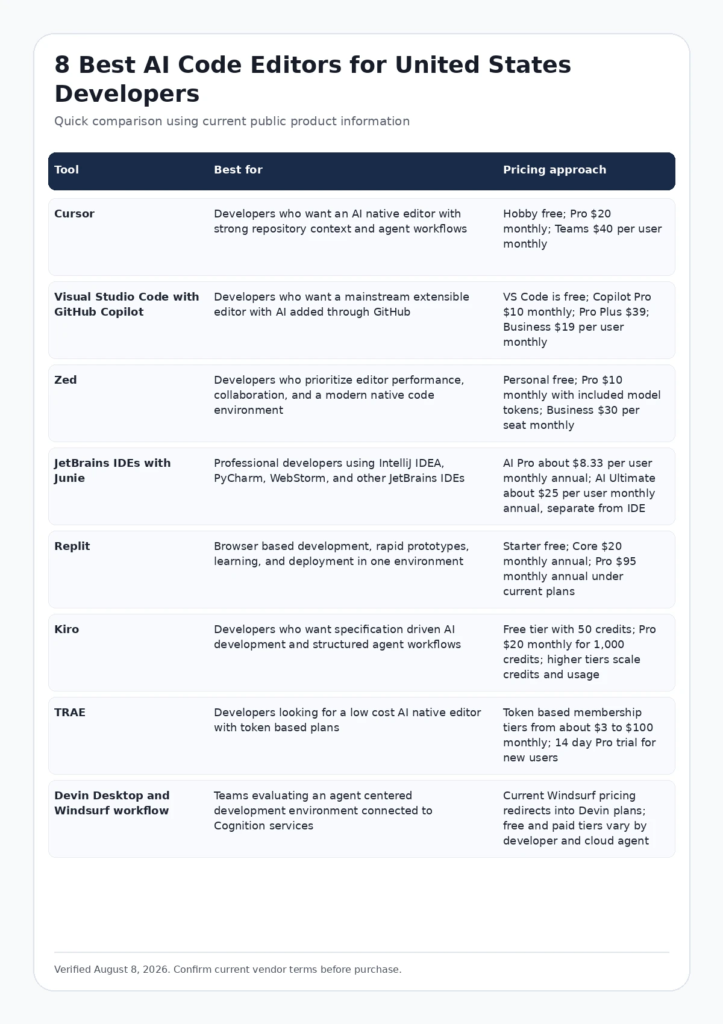
Infographic: Comparison Table
FCA_INFOGRAPHIC
Alt text: Comparison of leading best AI code editors for United States buyers by use case and pricing approach.
How We Evaluated These Tools
- Search intent fit: the product must genuinely solve the job implied by the query rather than appear only because it is adjacent to the category.
- Workflow fit: we considered how naturally the platform connects to the people, systems, approvals, and operating model a US team already uses.
- Current evidence: official pricing, feature pages, documentation, and current authoritative research were favored over unsourced feature claims.
- Total cost: seat price was considered together with usage, credits, data volume, AI outcomes, compute, add ons, onboarding, and administration where relevant.
- Tradeoffs: each product includes a reason a buyer may choose something else. A useful comparison should clarify limitations rather than hide them.
Google recommends product review content that provides original analysis, evidence, meaningful comparisons, benefits, drawbacks, and useful links. See Google Search Central guidance for high quality reviews and Google guidance for helpful content.
Current Evidence and E E A T Signals
A 2026 task stratified study of coding agents found that no single agent dominated every software task type, reinforcing the need to test editors and agents against the work a team actually performs. Source: Task stratified coding agent research.
GitHub current Copilot plans range from individual subscriptions to Business and Enterprise offerings, showing how AI editor adoption is increasingly a team governance and usage question rather than only an individual productivity tool. Source: GitHub Copilot plans.
Detailed Reviews
1. Cursor
Best for: Developers who want an AI native editor with strong repository context and agent workflows
Cursor is one of the most visible AI native code editors because it combines a VS Code familiar interface with repository aware chat, inline editing, tab completion, agents, model choice, rules, and cloud features. It is a strong fit for professional developers who want AI to be central to the editing workflow while retaining a traditional code editor experience.
Where Cursor is strongest
- Repository context and agent workflows are integrated directly into the editor
- VS Code heritage makes extensions, shortcuts, and migration familiar to many developers
- Team plans add centralized billing, privacy controls, and administration
Pricing and buying model
Hobby free; Pro $20 monthly; Teams $40 per user monthly. Check current official pricing
Limitations to consider
Heavy model and agent use can exceed what developers expect from a simple editor subscription. Teams should also validate extension compatibility, data settings, remote development, and how cloud agents interact with private repositories.
Visit the official Cursor website
2. Visual Studio Code with GitHub Copilot
Best for: Developers who want a mainstream extensible editor with AI added through GitHub
Visual Studio Code remains the default editor for a huge number of developers, and GitHub Copilot turns it into a capable AI coding environment without requiring a move to a different editor. Copilot supports completions, chat, agent capabilities, model options, and GitHub integration while VS Code preserves its extensive extension ecosystem and language support.
Where Visual Studio Code with GitHub Copilot is strongest
- Very large extension and language ecosystem reduces switching cost
- Copilot integrates with GitHub workflows and organization administration
- Lower entry price than many AI native editor subscriptions for individual developers
Pricing and buying model
VS Code is free; Copilot Pro $10 monthly; Pro Plus $39; Business $19 per user monthly. Check current official pricing
Limitations to consider
The experience is assembled from VS Code, Copilot, extensions, GitHub, and optional agents rather than one vertically integrated editor. Teams should manage extension security and organization policy carefully.
Visit the official Visual Studio Code with GitHub Copilot website
3. Zed
Best for: Developers who prioritize editor performance, collaboration, and a modern native code environment
Zed is a high performance collaborative editor built as a native application rather than an Electron based fork. Its AI features include assistant and agent workflows while the core product emphasizes speed, multiplayer collaboration, and a clean code focused interface. It is attractive to developers who want AI support without making the entire product feel like a web application around a model.
Where Zed is strongest
- Fast native editor architecture is appealing for developers sensitive to latency
- Built in collaboration supports pair work and shared editing
- Free personal tier and relatively simple Pro pricing lower the barrier to trial
Pricing and buying model
Personal free; Pro $10 monthly with included model tokens; Business $30 per seat monthly. Check current official pricing
Limitations to consider
The extension ecosystem is smaller than VS Code and some specialized workflows may require adaptation. Teams should confirm language tools, remote workflows, debugger support, and enterprise administration before standardizing.
Visit the official Zed website
4. JetBrains IDEs with Junie
Best for: Professional developers using IntelliJ IDEA, PyCharm, WebStorm, and other JetBrains IDEs
JetBrains brings AI into mature language specific IDEs rather than asking developers to abandon deep refactoring, navigation, inspections, debugging, and framework tooling. Junie adds agent style development to that environment. This is especially attractive to Java, Kotlin, Python, JavaScript, and enterprise developers who already depend on JetBrains project intelligence.
Where JetBrains IDEs with Junie is strongest
- Deep language and framework tooling remains stronger than lightweight text editors in many professional workflows
- Junie can use project context while existing IDE inspections and refactoring provide deterministic support
- Good fit for teams already standardized on JetBrains subscriptions and enterprise administration
Pricing and buying model
AI Pro about $8.33 per user monthly annual; AI Ultimate about $25 per user monthly annual, separate from IDE licensing where applicable. Check current official pricing
Limitations to consider
Total cost includes the underlying IDE license where required plus AI. Developers who prefer a minimal editor or broad VS Code extension ecosystem may find JetBrains heavier than necessary.
Visit the official JetBrains IDEs with Junie website
5. Replit
Best for: Browser based development, rapid prototypes, learning, and deployment in one environment
Replit combines a browser IDE, AI development, hosted runtime, collaboration, databases, deployment, and app publishing. It is less comparable to a local code editor because the development environment and infrastructure are bundled together. That makes it useful for fast product experiments, education, internal tools, and teams that want to go from an idea to a hosted application without configuring a local stack first.
Where Replit is strongest
- Browser environment removes local setup friction and is easy to share
- AI development is connected directly to runtime, preview, and deployment
- Useful for prototypes, small applications, learning, and collaborative experiments
Pricing and buying model
Starter free; Core $20 monthly annual; Pro $95 monthly annual under current plans. Check current official pricing
Limitations to consider
Professional teams with complex repositories, custom local tooling, regulated environments, or established cloud infrastructure may prefer a traditional editor and separate deployment pipeline. Usage credits and hosted resources should be monitored.
Visit the official Replit website
6. Kiro
Best for: Developers who want specification driven AI development and structured agent workflows
Kiro is an AI development environment built around structured software work such as specifications, tasks, hooks, steering instructions, and agent execution. Instead of treating AI as a chat box beside the editor, it emphasizes turning requirements into an auditable development process. That can be useful for teams that want more discipline around what an agent changes and why.
Where Kiro is strongest
- Specification driven workflow helps turn requirements into explicit implementation tasks
- Agent hooks and steering can standardize repeated project behavior
- Published credit tiers make it easier to model usage before team adoption
Pricing and buying model
Free tier with 50 credits; Pro $20 monthly for 1,000 credits; higher tiers scale credits and usage. Check current official pricing
Limitations to consider
Credit consumption can vary by task and the workflow may feel heavier for developers who only want fast completion and chat. Teams should test whether specification artifacts improve review or simply add process.
Visit the official Kiro website
7. TRAE
Best for: Developers looking for a low cost AI native editor with token based plans
TRAE is an AI code editor with agent and generation capabilities that moved to a token based membership model in 2026. Its range of lower priced tiers makes it interesting to individual developers who want to experiment with an AI native environment without immediately paying premium editor prices.
Where TRAE is strongest
- Wide range of membership tiers creates a low cost entry point
- AI features are central to the editor rather than installed as an afterthought
- Trial period lets developers evaluate model quality and workflow fit before paying
Pricing and buying model
Token based membership tiers from about $3 to $100 monthly; 14 day Pro trial for new users. Check current official pricing
Limitations to consider
Developers should confirm current model access, token allowances, extension support, privacy settings, and enterprise options. Newer editors can change pricing and capabilities quickly, so teams should avoid standardizing from a short personal trial alone.
Visit the official TRAE website
8. Devin Desktop and Windsurf workflow
Best for: Teams evaluating an agent centered development environment connected to Cognition services
The Windsurf pricing path now redirects into Cognition and Devin oriented plans, reflecting a shift from a standalone AI editor proposition toward a broader agent centered development environment. Developers evaluating Windsurf should therefore look at the current Devin Desktop and cloud agent workflow rather than relying on older Windsurf plan comparisons.
Where Devin Desktop and Windsurf workflow is strongest
- Editor and agent workflow can connect local development with delegated cloud work
- Cognition focus on autonomous software engineering differentiates it from autocomplete first products
- Useful for teams exploring a deeper agent operating model rather than only inline suggestions
Pricing and buying model
Current Windsurf pricing redirects into Devin plans; free and paid tiers vary by developer and cloud agent usage. Check current official pricing
Limitations to consider
Branding, packaging, and pricing have changed rapidly. Buyers should rely on current official pages and a live trial rather than older reviews, especially when comparing the product with Cursor or Copilot.
Visit the official Devin Desktop and Windsurf workflow website
How to Choose the Right Platform
A useful developer tool should improve accepted engineering work, not only increase generated code.
Test the editor on your own repository
Use real navigation, refactoring, bug fixes, tests, dependency changes, migrations, and documentation tasks. A demo repository will not reveal context limits, indexing behavior, extension problems, or agent mistakes.
Measure accepted work instead of suggestion volume
Track how often suggestions compile, pass tests, survive review, and reduce developer time. More generated code can increase review burden if quality falls.
Keep deterministic engineering controls
AI editing should sit behind tests, formatting, linting, type checks, security scanning, branch protection, and human review. The editor should accelerate engineering controls rather than become an exception to them.
Review code privacy and administration
Check source retention, training policy, model providers, telemetry, extension security, identity, repository access, team controls, and the ability to disable risky features. Enterprise adoption requires more than a personal privacy toggle.
Relevant Futuristic Coding Academy Resources
For related technical, analytics, marketing, and software context, explore MERN stack development guide, MERN stack roadmap, Java full stack development guide, Java full stack roadmap, full stack Python guide, full stack developer roadmap, and the Futuristic Coding Academy blog library.
Frequently Asked Questions
What is an AI code editor?
An AI code editor combines a programming editor or IDE with model features such as completion, chat, repository search, multi file editing, code explanation, test generation, and agent workflows that can run tools or commands.
What is the best AI code editor overall?
Cursor is a strong all around AI native option, while VS Code with GitHub Copilot is attractive for developers who want the largest extension ecosystem. JetBrains is strong when deep language and framework tooling matters.
Is Cursor better than VS Code with Copilot?
Cursor provides a more vertically integrated AI first experience, while VS Code preserves a broader extension ecosystem and lets teams add Copilot to an established editor. The better choice depends on workflow and migration cost.
Which AI code editor is best for Java developers?
JetBrains IntelliJ IDEA with Junie and AI features is a strong choice because Java refactoring, navigation, inspections, build tooling, and framework support are mature. VS Code and Cursor can also work well with the right extensions.
Which AI code editor is best for Python?
PyCharm with JetBrains AI, Cursor, VS Code with Copilot, Zed, and Replit are all viable. Python developers should test virtual environments, notebooks, debugging, type checking, remote development, and repository context.
Are there free AI code editors?
Yes. VS Code itself is free, Zed has a free Personal plan, Replit has a Starter tier, Kiro offers free credits, Cursor has a Hobby tier, and several AI tools offer trials or limited free usage.
Do AI code editors send source code to cloud models?
Many AI features send relevant code or context to cloud services, although policies, model providers, retention, and enterprise options differ. Review current vendor privacy and security documentation before using proprietary repositories.
Can an AI code editor replace a developer?
No. Editors can accelerate implementation, research, tests, and repetitive changes, but developers remain responsible for architecture, requirements, security, correctness, review, operations, and business decisions.
What should a company measure in an AI editor pilot?
Measure task completion time, accepted code, review comments, test pass rate, defects, token or credit spend, developer satisfaction, repository compatibility, security controls, and whether the tool works across the team actual languages and frameworks.
What is the difference between an AI editor and a coding agent?
An AI editor is the workspace where developers write and inspect code. A coding agent can take a multi step task and use files, commands, tests, browsers, or source control more autonomously. Many modern editors now include agents.
Which AI editor is best for beginners?
Replit is approachable because development and execution happen in the browser. VS Code with Copilot can also be a good learning environment when the learner wants to build standard local development skills.
Should a development team standardize on one AI editor?
Only if security, support, collaboration, licensing, and workflow benefits justify it. Some organizations standardize policies and approved models while allowing developers to choose among several editors that meet those controls.
Final Recommendation
The best choice among Cursor, Visual Studio Code with GitHub Copilot, Zed, JetBrains IDEs with Junie, Replit, Kiro, TRAE, Devin Desktop and Windsurf workflow depends on the operating problem, existing software stack, team skills, governance requirements, and the cost model at realistic usage. Use a short list of two or three products, test them with representative work, verify current pricing and contract terms, and measure a business outcome rather than a feature count. The strongest platform is the one that improves a real workflow with acceptable risk, cost, and administration.
Editorial note: Product features and pricing change frequently. This guide was verified on August 8, 2026. Confirm current terms on the linked official vendor pages before purchasing.