This comparison is based on current public documentation, official pricing pages, product capabilities, buyer fit, and independent research. Futuristic Coding Academy did not accept payment for placement in this article. Prices and features can change, so confirm current terms on the vendor website before purchasing.
A CRM should make customer information easier to use, not simply collect more of it. The strongest platforms help sales teams understand what happened, what should happen next, who owns the next action, and how pipeline activity connects to revenue. For United States businesses, the real decision is usually a tradeoff between simplicity, customization, marketing integration, sales communication, reporting, and long term cost.
Companies building a stronger digital acquisition process can pair a CRM decision with the Futuristic Coding Academy digital marketing resource and the broader technology blog library. A CRM becomes more valuable when lead sources, website forms, sales follow up, and campaign reporting use consistent data.
Buyer context matters. A 2026 research audit of commercial AI recommendations found that the same best CRM query produced materially different brand recommendations when the buyer persona changed. Mid market brands changed the most. The practical lesson is simple: choose the CRM for a defined workflow and company profile, not because a vendor appears first on a generic list.
Best Options at a Glance
- Salesforce: Growing and enterprise sales organizations that need deep customization
- HubSpot CRM: Small and midsize businesses that want an easy start and integrated marketing tools
- Zoho CRM: Cost conscious businesses that still need broad CRM functionality
- Pipedrive: Sales teams that want a visual pipeline and minimal administrative overhead
- monday CRM: Teams that want sales pipelines connected to flexible work management
- Freshsales: Small and midsize teams that want sales automation at a clear price
- Close: Inside sales teams that rely heavily on calls, email, and fast follow up
- Bigin by Zoho CRM: Very small businesses moving from spreadsheets into a structured pipeline
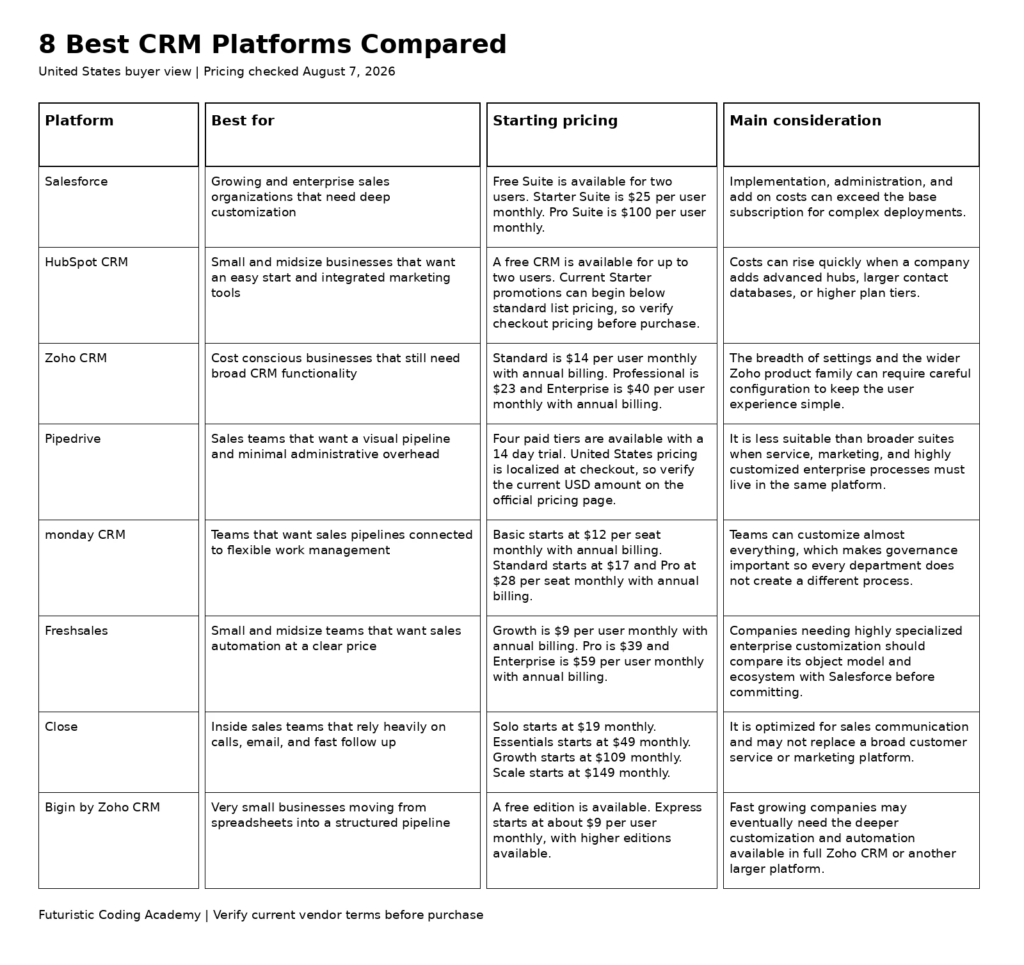
| Platform | Best for | Starting pricing | Core coverage | Main consideration |
|---|---|---|---|---|
| Salesforce | Growing and enterprise sales organizations that need deep customization | Free Suite is available for two users. Starter Suite is $25 per user monthly. Pro Suite is $100 per user monthly. | Sales, service, marketing, automation, analytics, and extensible enterprise CRM | Implementation, administration, and add on costs can exceed the base subscription for complex deployments. |
| HubSpot CRM | Small and midsize businesses that want an easy start and integrated marketing tools | A free CRM is available for up to two users. Current Starter promotions can begin below standard list pricing, so verify checkout pricing before purchase. | CRM with sales, marketing, service, content, and operations tools | Costs can rise quickly when a company adds advanced hubs, larger contact databases, or higher plan tiers. |
| Zoho CRM | Cost conscious businesses that still need broad CRM functionality | Standard is $14 per user monthly with annual billing. Professional is $23 and Enterprise is $40 per user monthly with annual billing. | Sales CRM with automation, analytics, customization, and wider Zoho ecosystem | The breadth of settings and the wider Zoho product family can require careful configuration to keep the user experience simple. |
| Pipedrive | Sales teams that want a visual pipeline and minimal administrative overhead | Four paid tiers are available with a 14 day trial. United States pricing is localized at checkout, so verify the current USD amount on the official pricing page. | Sales pipeline CRM with activity management, automation, email, and reporting | It is less suitable than broader suites when service, marketing, and highly customized enterprise processes must live in the same platform. |
| monday CRM | Teams that want sales pipelines connected to flexible work management | Basic starts at $12 per seat monthly with annual billing. Standard starts at $17 and Pro at $28 per seat monthly with annual billing. | Flexible CRM built on the monday.com work platform | Teams can customize almost everything, which makes governance important so every department does not create a different process. |
| Freshsales | Small and midsize teams that want sales automation at a clear price | Growth is $9 per user monthly with annual billing. Pro is $39 and Enterprise is $59 per user monthly with annual billing. | Sales CRM with email, sequences, automation, scoring, and Freshworks integrations | Companies needing highly specialized enterprise customization should compare its object model and ecosystem with Salesforce before committing. |
| Close | Inside sales teams that rely heavily on calls, email, and fast follow up | Solo starts at $19 monthly. Essentials starts at $49 monthly. Growth starts at $109 monthly. Scale starts at $149 monthly. | Sales CRM with built in calling, email, SMS, sequences, and AI features | It is optimized for sales communication and may not replace a broad customer service or marketing platform. |
| Bigin by Zoho CRM | Very small businesses moving from spreadsheets into a structured pipeline | A free edition is available. Express starts at about $9 per user monthly, with higher editions available. | Simplified pipeline CRM for small teams | Fast growing companies may eventually need the deeper customization and automation available in full Zoho CRM or another larger platform. |
How We Evaluated the Platforms
We reviewed recurring first page comparison patterns for the target United States search intent, then verified current product capabilities and public pricing on official vendor pages. The evaluation does not claim hands on testing where none was performed. It focuses on information a buyer can verify before running a structured trial.
- Sales process fit: How naturally contacts, accounts, opportunities, activities, and follow up map to the way the team sells.
- Adoption: Whether representatives can keep the CRM accurate without excessive administrative work.
- Automation and integration: Email, calendar, forms, workflows, application connections, and process automation.
- Reporting and governance: Forecasting, permissions, data quality, dashboards, and management visibility.
- Total cost: Seats, contacts, implementation, integrations, add ons, support, and administration.
1. Salesforce
Best for: Growing and enterprise sales organizations that need deep customization
Salesforce remains the reference point for highly configurable CRM because organizations can model complex sales processes, add custom objects and automation, connect large application ecosystems, and expand into service, marketing, analytics, and industry products. It is strongest when a business has enough process complexity and administrative capacity to use that flexibility well. Small teams that only need contacts, deals, email, and simple reporting may find the platform heavier than necessary.
Why It Stands Out
- Deep customization and extensibility
- Large partner and application ecosystem
- Strong enterprise governance
- Broad sales and service capabilities
- Scales to complex organizations
Pricing and Plan Structure
Free Suite is available for two users. Starter Suite is $25 per user monthly. Pro Suite is $100 per user monthly. Check the official Salesforce pricing page for current billing terms, usage limits, and promotional conditions.
Important Limitation
Implementation, administration, and add on costs can exceed the base subscription for complex deployments.
Who Should Choose It
Choose Salesforce when CRM is a strategic system of record and the organization can support configuration, administration, and integration work.
2. HubSpot CRM
Best for: Small and midsize businesses that want an easy start and integrated marketing tools
HubSpot is popular because a company can begin with a useful free CRM and add sales, marketing, service, content, and operations capabilities as needs grow. The interface is easier for many small teams to adopt than an enterprise platform, and the marketing connection is particularly valuable when lead generation and sales follow up need to share the same contact history. Buyers should model future hub and contact costs rather than looking only at the free entry point.
Why It Stands Out
- Strong free entry point
- Easy onboarding for small teams
- Integrated marketing and sales data
- Large app marketplace
- Clear contact and pipeline experience
Pricing and Plan Structure
A free CRM is available for up to two users. Current Starter promotions can begin below standard list pricing, so verify checkout pricing before purchase. Check the official HubSpot CRM pricing page for current billing terms, usage limits, and promotional conditions.
Important Limitation
Costs can rise quickly when a company adds advanced hubs, larger contact databases, or higher plan tiers.
Who Should Choose It
Choose HubSpot when ease of adoption and connection between marketing and sales are more important than maximum database customization.
3. Zoho CRM
Best for: Cost conscious businesses that still need broad CRM functionality
Zoho CRM offers a strong feature to price ratio for companies that need pipeline management, automation, forecasting, customization, and analytics without Salesforce level subscription costs. It becomes more compelling when the company also uses Zoho Books, Desk, Campaigns, Projects, or other Zoho applications. The main implementation challenge is deciding which features and modules employees actually need so the interface does not become overloaded.
Why It Stands Out
- Competitive per user pricing
- Strong automation and customization
- Wide Zoho business application ecosystem
- Useful analytics and forecasting
- Good fit for midsize teams
Pricing and Plan Structure
Standard is $14 per user monthly with annual billing. Professional is $23 and Enterprise is $40 per user monthly with annual billing. Check the official Zoho CRM pricing page for current billing terms, usage limits, and promotional conditions.
Important Limitation
The breadth of settings and the wider Zoho product family can require careful configuration to keep the user experience simple.
Who Should Choose It
Choose Zoho CRM when the business wants substantial CRM capability at a moderate per user price and is comfortable configuring the system carefully.
4. Pipedrive
Best for: Sales teams that want a visual pipeline and minimal administrative overhead
Pipedrive is designed around the daily work of sales representatives. Deals move through a visual pipeline, activities stay attached to opportunities, and managers can see where follow up is missing. The product is a good fit for companies that want a focused sales CRM rather than a broad customer platform. Its simplicity can improve adoption because representatives spend less time navigating modules that are not part of their selling workflow.
Why It Stands Out
- Clear visual sales pipeline
- Fast onboarding
- Strong activity and follow up management
- Useful email and automation options
- Good reporting for sales managers
Pricing and Plan Structure
Four paid tiers are available with a 14 day trial. United States pricing is localized at checkout, so verify the current USD amount on the official pricing page. Check the official Pipedrive pricing page for current billing terms, usage limits, and promotional conditions.
Important Limitation
It is less suitable than broader suites when service, marketing, and highly customized enterprise processes must live in the same platform.
Who Should Choose It
Choose Pipedrive when the primary goal is to improve sales execution and pipeline discipline without deploying a large customer platform.
5. monday CRM
Best for: Teams that want sales pipelines connected to flexible work management
monday CRM combines pipeline tracking with the flexible boards, automations, dashboards, and collaboration patterns used across monday.com. It suits organizations that want sales work connected to project delivery or operations without moving information between unrelated tools. The flexibility is useful, but it also means an administrator should define standard fields, stages, and ownership before every team builds its own version of the pipeline.
Why It Stands Out
- Flexible pipelines and dashboards
- Strong work management connection
- Easy automation builder
- Good collaboration features
- Familiar for existing monday.com users
Pricing and Plan Structure
Basic starts at $12 per seat monthly with annual billing. Standard starts at $17 and Pro at $28 per seat monthly with annual billing. Check the official monday CRM pricing page for current billing terms, usage limits, and promotional conditions.
Important Limitation
Teams can customize almost everything, which makes governance important so every department does not create a different process.
Who Should Choose It
Choose monday CRM when sales activity needs to connect closely with projects, delivery, or operations managed in the same workspace.
6. Freshsales
Best for: Small and midsize teams that want sales automation at a clear price
Freshsales gives small and midsize sales teams a practical mix of contact management, deal pipelines, email, sequences, automation, scoring, and reporting. Its pricing is easier to understand than many enterprise CRM contracts, and it connects naturally with other Freshworks products. The platform works best when a business wants a straightforward sales system and values speed of deployment over extensive custom development.
Why It Stands Out
- Clear published pricing
- Useful sales automation
- Email and sequence tools
- Strong fit with Freshworks products
- Fast setup for small teams
Pricing and Plan Structure
Growth is $9 per user monthly with annual billing. Pro is $39 and Enterprise is $59 per user monthly with annual billing. Check the official Freshsales pricing page for current billing terms, usage limits, and promotional conditions.
Important Limitation
Companies needing highly specialized enterprise customization should compare its object model and ecosystem with Salesforce before committing.
Who Should Choose It
Choose Freshsales when the company needs a capable sales CRM with predictable pricing and does not require a deeply customized enterprise data model.
7. Close
Best for: Inside sales teams that rely heavily on calls, email, and fast follow up
Close is built for sales teams that spend much of the day contacting leads. Calling, email, SMS, sequences, tasks, and pipeline data live in the same workspace, which reduces the need to assemble a separate sales engagement stack. This makes it particularly attractive to agencies, software companies, and inside sales teams where response speed and communication volume matter more than complex account hierarchies.
Why It Stands Out
- Built in sales communication tools
- Fast workflow for inside sales
- Email and sequence automation
- Clear pipeline context during outreach
- Useful AI features and reporting
Pricing and Plan Structure
Solo starts at $19 monthly. Essentials starts at $49 monthly. Growth starts at $109 monthly. Scale starts at $149 monthly. Check the official Close pricing page for current billing terms, usage limits, and promotional conditions.
Important Limitation
It is optimized for sales communication and may not replace a broad customer service or marketing platform.
Who Should Choose It
Choose Close when representatives need to call, email, and message leads from the CRM and the business wants fewer separate sales engagement tools.
8. Bigin by Zoho CRM
Best for: Very small businesses moving from spreadsheets into a structured pipeline
Bigin is intentionally simpler than a full CRM suite. It gives small businesses pipelines, contacts, activities, automation, forms, email, and basic reporting without asking them to configure a large enterprise system. For a founder or small service team replacing spreadsheets, that simplicity can be a feature rather than a limitation. The key question is whether the business expects to outgrow the simpler data model quickly.
Why It Stands Out
- Low cost entry point
- Simple pipeline setup
- Good fit for first time CRM users
- Zoho ecosystem connection
- Less administrative overhead
Pricing and Plan Structure
A free edition is available. Express starts at about $9 per user monthly, with higher editions available. Check the official Bigin by Zoho CRM pricing page for current billing terms, usage limits, and promotional conditions.
Important Limitation
Fast growing companies may eventually need the deeper customization and automation available in full Zoho CRM or another larger platform.
Who Should Choose It
Choose Bigin when a small team needs a real CRM now but wants to avoid the complexity of a full enterprise platform.
How to Choose a CRM Platform
Begin by mapping the customer lifecycle. Define how a lead enters the business, which fields are actually needed, how ownership is assigned, what qualifies an opportunity, which activities representatives must complete, and what managers need to see in forecasts. A CRM should support that process without forcing employees to maintain data that nobody uses.
Calculate total cost beyond the advertised seat price. Include paid contacts, marketing hubs, dialers, implementation, data migration, integrations, premium support, sandbox environments, additional storage, and the internal time required for administration. A lower subscription can still be expensive if the platform needs constant manual work.
Test adoption with real representatives. Ask a small group to run a normal week of calls, meetings, email, lead assignment, follow up, pipeline updates, and reporting. The best CRM is the one employees will keep accurate while doing their work.
Implementation Checklist Before You Commit
- Clean customer data before migration. Deduplicate records, standardize company names, remove obsolete fields, and define which system is authoritative for each data type.
- Design one standard pipeline before adding automation. Every stage should have a clear business meaning and an objective condition for moving forward.
- Connect email, calendar, website forms, and the most important acquisition channels first. Add secondary integrations only when there is a clear operational need.
- Create role based dashboards. Sales representatives, managers, marketing teams, and executives need different views of the same underlying data.
Evidence and Current Market Context
A 2026 study of commercial AI recommendations tested how buyer persona affected the answer to questions such as best CRM software. The researchers found that mid market brands could change substantially as persona context changed. The study supports a buyer specific selection method rather than assuming that one CRM ranking is correct for every company. Read the research paper for methodology and limitations.
CRM quality also depends on how well marketing and technical systems share data. Teams can review the full stack developer roadmap to understand the API, database, and application skills that often sit behind custom CRM integrations.
Customer records may contain personal information. The Federal Trade Commission privacy and security guidance for businesses is a useful starting point for thinking about data collection, access, and protection in the United States.
Frequently Asked Questions
What is the best CRM platform for a small business?
HubSpot, Zoho CRM, Freshsales, Pipedrive, and Bigin are all strong small business choices. The best fit depends on whether the company prioritizes free entry, sales activity, marketing integration, customization, or the lowest administrative overhead.
What is the best CRM platform overall?
There is no universal winner. Salesforce is strongest for deep enterprise customization, HubSpot for integrated marketing and simple adoption, Zoho CRM for value, and Pipedrive for focused sales pipeline management.
Is HubSpot CRM really free?
HubSpot offers a free CRM for up to two users with core contact, company, deal, and task features. Advanced automation, reporting, marketing, sales, and service capabilities require paid products or higher tiers.
How much does Salesforce cost?
Salesforce has a free edition for two users, Starter Suite at $25 per user monthly, and Pro Suite at $100 per user monthly, with additional enterprise editions and products available. Implementation and add ons can materially increase total cost.
What CRM is easiest to use?
Pipedrive, HubSpot, Freshsales, and Bigin are among the easier choices for teams that want to begin quickly. Ease still depends on how much customization, data migration, and automation the company adds.
What should a company look for in CRM software?
Evaluate pipeline fit, contact and account structure, email and calendar integration, automation, reporting, permissions, data export, application integrations, mobile access, support, and total cost over at least two years.
Does a CRM need AI features?
AI can help summarize records, draft messages, prioritize opportunities, forecast, and answer questions, but it should not be the main buying criterion. Clean data, adoption, process fit, and reliable reporting usually matter more.
Can a CRM replace marketing automation?
Some platforms combine CRM and marketing tools, but the depth varies. HubSpot has a strong integrated marketing stack, while sales focused products may need a separate marketing platform.
How long does CRM implementation take?
A small team with clean data and a simple pipeline can launch quickly. Larger organizations may need weeks or months for data cleanup, integrations, permissions, process design, training, testing, and change management.
How should a company migrate CRM data?
Clean and deduplicate records before import, map fields carefully, preserve ownership and consent data, test with a small sample, validate totals after migration, and keep a rollback copy of the source data.
Why do CRM recommendations differ by buyer type?
A 2026 study of commercial AI recommendations found that adding buyer persona context materially changed which CRM brands were recommended, especially among mid market vendors. This supports evaluating CRM software against a defined team size, workflow, and geography rather than treating one list as universal.
What is the best CRM for a sales team that makes many calls?
Close is designed around calling, email, SMS, and fast sales follow up. Pipedrive is another strong option when the priority is visual pipeline management and activity discipline.
Final Recommendation
Salesforce is the strongest choice for organizations that need deep customization and enterprise scale. HubSpot is easier for companies that want marketing and sales connected, Zoho CRM offers strong value, and Pipedrive is excellent for focused pipeline execution. Freshsales, Close, monday CRM, and Bigin serve specific team shapes well. Select the platform that representatives will keep accurate and that managers can trust for decisions.
Related Futuristic Coding Academy Resources
- Digital marketing learning resource
- Futuristic Coding Academy technology blogs
- Computer courses resource