This comparison is based on public product documentation, current public pricing, platform coverage, workflow fit, and independent research. Futuristic Coding Academy did not accept payment for placement. Prices and features can change, so confirm current terms on the vendor website.
Social media management platforms now cover publishing, approvals, analytics, engagement, listening, content planning, client collaboration, and assisted content workflows. The right product depends less on the number of supported networks and more on the workflow around each post. A solo business needs speed, while an agency needs permissions, client approval, reporting, and predictable account limits.
This guide compares ten products for United States teams. It can be used alongside a broader digital marketing internship guide to understand how publishing, reporting, community management, and campaign measurement fit into a professional marketing operation.
Prices and plan details were checked against public vendor information on August 6, 2026. Social networks change their interfaces and publishing rules regularly, so confirm support for the exact post types, channels, and analytics required by the organization.
Best Options at a Glance
- Best simple publishing: Buffer
- Best mature suite for larger teams: Hootsuite
- Best analytics and engagement: Sprout Social
- Best value for agencies: SocialPilot
- Best approval workflow: Planable
- Best analytics for creators: Metricool
- Best for the Zoho ecosystem: Zoho Social
- Best broad midmarket agency suite: Vista Social
- Best visual planning: Later
- Best client dashboards: Sendible
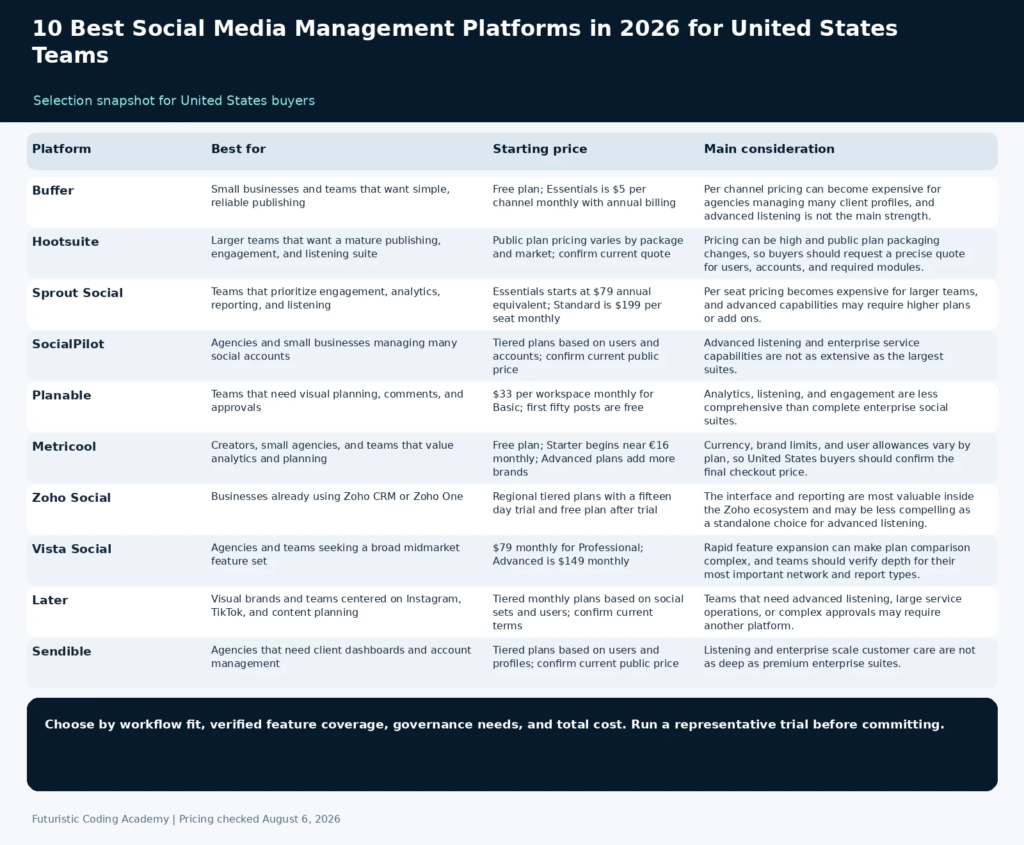
| Platform | Best for | Starting price | Core coverage | Main consideration |
|---|---|---|---|---|
| Buffer | Small businesses and teams that want simple, reliable publishing | Free plan; Essentials is $5 per channel monthly with annual billing | Publishing, calendar, analytics, engagement, landing pages | Per channel pricing can become expensive for agencies managing many client profiles, and advanced listening is not the main strength. |
| Hootsuite | Larger teams that want a mature publishing, engagement, and listening suite | Public plan pricing varies by package and market; confirm current quote | Publishing, inbox, analytics, listening, employee advocacy, integrations | Pricing can be high and public plan packaging changes, so buyers should request a precise quote for users, accounts, and required modules. |
| Sprout Social | Teams that prioritize engagement, analytics, reporting, and listening | Essentials starts at $79 annual equivalent; Standard is $199 per seat monthly | Publishing, engagement, analytics, listening, customer care, reporting | Per seat pricing becomes expensive for larger teams, and advanced capabilities may require higher plans or add ons. |
| SocialPilot | Agencies and small businesses managing many social accounts | Tiered plans based on users and accounts; confirm current public price | Publishing, bulk scheduling, analytics, client management, inbox | Advanced listening and enterprise service capabilities are not as extensive as the largest suites. |
| Planable | Teams that need visual planning, comments, and approvals | $33 per workspace monthly for Basic; first fifty posts are free | Content calendar, approvals, comments, workspaces, publishing | Analytics, listening, and engagement are less comprehensive than complete enterprise social suites. |
| Metricool | Creators, small agencies, and teams that value analytics and planning | Free plan; Starter begins near €16 monthly; Advanced plans add more brands | Planning, analytics, inbox, advertising reports, competitor tracking | Currency, brand limits, and user allowances vary by plan, so United States buyers should confirm the final checkout price. |
| Zoho Social | Businesses already using Zoho CRM or Zoho One | Regional tiered plans with a fifteen day trial and free plan after trial | Publishing, monitoring, inbox, analytics, CRM integration, agency plans | The interface and reporting are most valuable inside the Zoho ecosystem and may be less compelling as a standalone choice for advanced listening. |
| Vista Social | Agencies and teams seeking a broad midmarket feature set | $79 monthly for Professional; Advanced is $149 monthly | Publishing, inbox, listening, reviews, analytics, employee advocacy | Rapid feature expansion can make plan comparison complex, and teams should verify depth for their most important network and report types. |
| Later | Visual brands and teams centered on Instagram, TikTok, and content planning | Tiered monthly plans based on social sets and users; confirm current terms | Visual calendar, publishing, link tools, analytics, creator workflows | Teams that need advanced listening, large service operations, or complex approvals may require another platform. |
| Sendible | Agencies that need client dashboards and account management | Tiered plans based on users and profiles; confirm current public price | Publishing, engagement, reporting, client dashboards, collaboration | Listening and enterprise scale customer care are not as deep as premium enterprise suites. |
How We Evaluated the Platforms
We analyzed current first page comparisons and then checked official product and pricing pages. The evaluation focuses on complete social operations rather than scheduling alone. Platform support is considered useful only when the required post formats, approvals, analytics, and permissions are available on the selected plan. Products were assessed on publishing, collaboration, engagement, analytics, listening, and the total cost for users, brands, channels, and workspaces.
- Publishing: Networks, post types, queues, calendars, bulk actions, and asset workflows.
- Collaboration: Roles, approvals, comments, client access, and auditability.
- Engagement: Unified inbox, assignments, response workflow, and conversation history.
- Analytics: Channel reporting, campaign views, exports, benchmarks, and client reports.
- Listening: Brand, topic, competitor, and sentiment monitoring where available.
- Commercial fit: Users, brands, channels, workspaces, reports, and total cost at the intended scale.
1. Buffer
Best for: Small businesses and teams that want simple, reliable publishing
Buffer is one of the most approachable social media management platforms. It centers on planning, scheduling, publishing, and basic analytics, with additional collaboration and engagement capabilities depending on the plan. Its per channel pricing makes costs easy to understand for a small account set, and the free plan is useful for evaluation. The product is strongest when the goal is a clean publishing process rather than enterprise listening or a complex service desk. Small teams can adopt it quickly because the calendar and queue do not require a long implementation project.
Why It Stands Out
- Simple publishing and calendar experience
- Free plan for evaluation
- Clear per channel pricing
- Good fit for small businesses and creators
Pricing and Plan Structure
Free plan; Essentials is $5 per channel monthly with annual billing. Check the official pricing page for current limits, billing terms, and promotional conditions.
Important Limitation
Per channel pricing can become expensive for agencies managing many client profiles, and advanced listening is not the main strength.
Who Should Choose It
Choose Buffer when the organization wants straightforward scheduling, a manageable learning curve, and a small number of channels.
2. Hootsuite
Best for: Larger teams that want a mature publishing, engagement, and listening suite
Hootsuite is a mature platform with publishing, engagement, analytics, listening, advertising connections, employee advocacy, and a broad integration ecosystem. It is designed for organizations that need governance across several users and channels. The product can support complex operations, but smaller teams should confirm whether they will use enough of the suite to justify the price. Enterprise buyers should evaluate permissions, account ownership, support, auditability, and the exact modules included in the quote rather than comparing only the general feature page.
Why It Stands Out
- Broad enterprise feature coverage
- Mature permissions and governance
- Engagement and listening capabilities
- Large integration ecosystem
Pricing and Plan Structure
Public plan pricing varies by package and market; confirm current quote. Check the official pricing page for current limits, billing terms, and promotional conditions.
Important Limitation
Pricing can be high and public plan packaging changes, so buyers should request a precise quote for users, accounts, and required modules.
Who Should Choose It
Choose Hootsuite when a larger team needs a mature multi function suite and can support the implementation and subscription cost.
3. Sprout Social
Best for: Teams that prioritize engagement, analytics, reporting, and listening
Sprout Social combines publishing, engagement, analytics, customer care workflows, reporting, and listening in a polished platform. It is frequently selected by organizations that need strong reporting and a unified inbox rather than only a scheduler. The current product line includes a lower priced Essentials option as well as per seat Standard, Professional, and Advanced plans. Teams should compare the cost of every user who needs inbox or reporting access because a premium per seat model can change the economics of a distributed marketing operation.
Why It Stands Out
- Strong analytics and reporting
- Unified engagement workflows
- Listening and customer care options
- Polished experience for professional teams
Pricing and Plan Structure
Essentials starts at $79 annual equivalent; Standard is $199 per seat monthly. Check the official pricing page for current limits, billing terms, and promotional conditions.
Important Limitation
Per seat pricing becomes expensive for larger teams, and advanced capabilities may require higher plans or add ons.
Who Should Choose It
Choose Sprout Social when reporting quality, engagement management, and professional team workflows justify a premium price.
4. SocialPilot
Best for: Agencies and small businesses managing many social accounts
SocialPilot is positioned as a value focused platform for agencies and small businesses. It offers scheduling, bulk publishing, analytics, client management, collaboration, and inbox capabilities across several networks. Its plan structure can be more economical than per channel products when an agency manages many profiles. Buyers should map every client, profile, user, approval step, and reporting requirement before selecting a tier because the value advantage depends on fitting the account structure into the included limits.
Why It Stands Out
- Agency friendly account allowances
- Bulk scheduling and content calendar
- Client management and collaboration
- Competitive value for several accounts
Pricing and Plan Structure
Tiered plans based on users and accounts; confirm current public price. Check the official pricing page for current limits, billing terms, and promotional conditions.
Important Limitation
Advanced listening and enterprise service capabilities are not as extensive as the largest suites.
Who Should Choose It
Choose SocialPilot when an agency needs broad account capacity, client workflows, and predictable cost.
5. Planable
Best for: Teams that need visual planning, comments, and approvals
Planable is built around content collaboration and approval. Teams can organize posts in visual calendars, collect comments in context, apply approval stages, and keep client review separate from internal discussion. Unlimited users on relevant workspace pricing can make it attractive to agencies with many reviewers who do not all need full publishing administration. It is particularly useful when the main bottleneck is approval delay, version confusion, or feedback spread across email and messaging applications rather than a lack of publishing features.
Why It Stands Out
- Excellent approval and feedback workflow
- Visual content planning
- Unlimited users on workspace based plans
- Useful for agency and client collaboration
Pricing and Plan Structure
$33 per workspace monthly for Basic; first fifty posts are free. Check the official pricing page for current limits, billing terms, and promotional conditions.
Important Limitation
Analytics, listening, and engagement are less comprehensive than complete enterprise social suites.
Who Should Choose It
Choose Planable when the greatest problem is getting content reviewed and approved efficiently.
6. Metricool
Best for: Creators, small agencies, and teams that value analytics and planning
Metricool combines publishing, analytics, inbox features, advertising reporting, link tools, and competitor analysis. It is popular with creators and smaller agencies because a single workspace can cover planning and performance across several networks. Plan pricing is organized partly around brands, so agencies should compare the exact number of client brands and users required. Its analytical breadth is useful when a team wants organic and paid results in one reporting environment, but every required network and metric should be tested during the free or trial period.
Why It Stands Out
- Strong analytics for the price
- Publishing and inbox features
- Free plan for evaluation
- Useful advertising and competitor reporting
Pricing and Plan Structure
Free plan; Starter begins near €16 monthly; Advanced plans add more brands. Check the official pricing page for current limits, billing terms, and promotional conditions.
Important Limitation
Currency, brand limits, and user allowances vary by plan, so United States buyers should confirm the final checkout price.
Who Should Choose It
Choose Metricool when analytics and multi network planning are priorities for creators or smaller agencies.
7. Zoho Social
Best for: Businesses already using Zoho CRM or Zoho One
Zoho Social provides scheduling, monitoring, engagement, analytics, team roles, and agency plans. Its key advantage is integration with the wider Zoho ecosystem, particularly Zoho CRM, where social activity can become part of a broader customer record. It is a practical choice for businesses that already use Zoho and want social workflows connected to sales or service operations. The benefit is strongest when lead capture, contact history, and team responsibilities already depend on Zoho rather than when the buyer wants an isolated best in class social product.
Why It Stands Out
- Connection to Zoho CRM and business applications
- Publishing, monitoring, and analytics
- Agency editions available
- Free plan after trial for basic use
Pricing and Plan Structure
Regional tiered plans with a fifteen day trial and free plan after trial. Check the official pricing page for current limits, billing terms, and promotional conditions.
Important Limitation
The interface and reporting are most valuable inside the Zoho ecosystem and may be less compelling as a standalone choice for advanced listening.
Who Should Choose It
Choose Zoho Social when the business already relies on Zoho and wants social activity connected to customer operations.
8. Vista Social
Best for: Agencies and teams seeking a broad midmarket feature set
Vista Social offers publishing, engagement, listening, review management, analytics, link tools, and employee advocacy in a broad platform. Its pricing is attractive to agencies and teams that want several capabilities without moving immediately to enterprise suite pricing. The current plans provide different profile and user allowances, so buyers should map the account structure carefully. A structured trial should test the exact inbox workflow, approval process, reports, and social networks the team uses because a broad feature list does not guarantee equal depth in every module.
Why It Stands Out
- Broad feature set for the price
- Publishing, inbox, listening, and reviews
- Agency friendly positioning
- Fourteen day trial
Pricing and Plan Structure
$79 monthly for Professional; Advanced is $149 monthly. Check the official pricing page for current limits, billing terms, and promotional conditions.
Important Limitation
Rapid feature expansion can make plan comparison complex, and teams should verify depth for their most important network and report types.
Who Should Choose It
Choose Vista Social when an agency wants a broad suite at a midmarket price and can validate the required workflows during the trial.
9. Later
Best for: Visual brands and teams centered on Instagram, TikTok, and content planning
Later began as a visual scheduling product and has expanded into broader social media management, analytics, link tools, and creator marketing. Its visual planning experience is especially relevant to brands whose content depends on feed layout, media libraries, and creator assets. It is less oriented toward enterprise service workflows than Hootsuite or Sprout Social. Visual brands should test media organization, preview accuracy, collaboration, publishing support for video formats, and whether analytics are detailed enough for campaign decisions.
Why It Stands Out
- Strong visual planning
- Useful for Instagram and creator workflows
- Media library and link tools
- Accessible to small brand teams
Pricing and Plan Structure
Tiered monthly plans based on social sets and users; confirm current terms. Check the official pricing page for current limits, billing terms, and promotional conditions.
Important Limitation
Teams that need advanced listening, large service operations, or complex approvals may require another platform.
Who Should Choose It
Choose Later when visual planning and creator oriented workflows are more important than enterprise engagement management.
10. Sendible
Best for: Agencies that need client dashboards and account management
Sendible is designed for agencies and businesses managing several brands. It combines scheduling, engagement, reporting, content suggestions, collaboration, and client dashboards. The platform can reduce the need to assemble separate tools for approval and reporting, although agencies should compare profile and user limits carefully. Its value is strongest when account organization, recurring reports, and client access are more important than advanced enterprise listening or a large customer care operation.
Why It Stands Out
- Agency and client management focus
- Customizable reporting
- Publishing and engagement workflows
- Useful for several brands
Pricing and Plan Structure
Tiered plans based on users and profiles; confirm current public price. Check the official pricing page for current limits, billing terms, and promotional conditions.
Important Limitation
Listening and enterprise scale customer care are not as deep as premium enterprise suites.
Who Should Choose It
Choose Sendible when client dashboards, reporting, and managing multiple brands are central agency requirements.
What Matters More Than the Number of Supported Networks
A platform can list support for a social network while omitting the exact post format, analytics, inbox action, approval stage, or publishing method the team needs. Buyers should test video, stories, carousels, collaboration, reporting, and link tracking with real content before making a decision.
Workflow cost is also important. A lower subscription price can be offset by manual reporting, duplicated approvals, missing permissions, and time spent moving assets between tools. The best platform reduces avoidable coordination without removing necessary editorial review.
A professional digital marketing institute comparison should teach measurement and audience understanding alongside publishing. A management platform supports the process, but channel strategy and content quality remain human responsibilities.
Compliance and account ownership also deserve attention. Confirm who controls each social profile, how former employees are removed, how client approval is recorded, and how the team handles endorsements, disclosures, and sensitive responses.
How to Choose a Social Media Management Platform
Map the account structure first. Count brands, profiles, users, clients, approvers, and regions. Then list the post formats, inbox actions, reports, and listening topics the team uses. This prevents a low headline price from becoming expensive after profiles and users are added.
Separate essential capabilities from attractive extras. A small business may need only scheduling, a calendar, and simple analytics. An agency may require workspaces, client comments, approval stages, branded reports, permissions, and several account groups. A customer care team may prioritize inbox routing and response history.
Trial the complete workflow. Plan a week of content, request approval, publish different formats, respond to comments, export a report, and add a second user. The team should understand the daily experience before signing an annual contract.
Review exit and ownership. Confirm that media, reports, calendars, account connections, tags, and approval history can be exported or transferred. The organization should be able to change platforms without losing control of its profiles or essential records.
A Safe Migration to a New Social Platform
- Inventory every profile, owner, administrator, connected advertising account, and current integration.
- Export scheduled content, reports, media, tags, and approval records where possible.
- Connect a limited group of profiles and validate permissions before adding the full portfolio.
- Test every required post format, inbox action, approval stage, and report.
- Document naming, campaign tags, responsibilities, and escalation rules for the new workspace.
- Run the old and new systems in parallel briefly, then remove unnecessary access from the previous platform.
Frequently Asked Questions
What is a social media management platform?
It is software for planning, scheduling, publishing, approving, monitoring, engaging, analyzing, and reporting across one or more social networks.
Which social media management platform is best overall?
Buffer is a strong overall choice for simple publishing. Hootsuite offers a broader mature suite. Sprout Social is strong for analytics and engagement. The best option depends on team size and workflow.
What is the best platform for a small business?
Buffer, Metricool, Zoho Social, and SocialPilot are practical small business options. Compare the number of channels, required users, reports, and engagement features.
What is the best social media platform for agencies?
SocialPilot, Planable, Vista Social, Sendible, Hootsuite, and Sprout Social are agency candidates. Planable is especially useful for approvals, while Sendible and SocialPilot emphasize client account management.
Is Buffer better than Hootsuite?
Buffer is simpler and usually easier for smaller publishing workflows. Hootsuite offers broader engagement, listening, governance, and enterprise capabilities. The better choice depends on complexity and budget.
Which platform has the best approval workflow?
Planable is designed specifically around visual review, comments, workspaces, and approval stages. Other agency products also support approvals, but the experience and limits vary.
Do social media tools publish every post type automatically?
No. Network interfaces and plan capabilities differ. Some formats may require mobile reminders or have limitations for audio, tags, collaborators, stickers, or interactive features.
How much does social media management software cost?
Free plans are available, while small team products often cost from a few dollars per channel to around one hundred dollars monthly. Premium suites can cost several hundred dollars per user or package.
What is social listening?
Social listening monitors public conversations, topics, brands, competitors, and sentiment beyond direct messages or comments on owned profiles. It is different from a normal engagement inbox.
Can a platform replace a social media manager?
No. Software can automate publishing and organize work, but strategy, creative judgment, audience understanding, risk decisions, and meaningful engagement still require people.
Which platform is best for Instagram planning?
Later, Planable, Buffer, and Metricool all support visual planning in different ways. Later is particularly associated with visual and creator workflows.
How should an agency compare platform pricing?
Calculate the total for brands, profiles, users, workspaces, client reviewers, reports, listening, and add ons. A plan that appears inexpensive can become costly when the agency portfolio grows.
Related Futuristic Coding Academy Resources
- Digital Marketing Learning Path
- Digital Marketing Training Guide
- Digital Marketing Internship Guide
- Digital Marketing Institute Comparison
Final Recommendation
Buffer is the most approachable choice for simple social publishing. Hootsuite and Sprout Social serve larger teams that need engagement, analytics, governance, and listening. SocialPilot, Vista Social, Sendible, and Planable are strong agency candidates with different strengths in account capacity, approvals, and reporting.
Choose by complete workflow rather than supported network logos. The right platform should make planning, review, publishing, response, and reporting more reliable without adding unnecessary administration or locking the team into unused features.