This comparison is based on current public documentation, official pricing pages, product capabilities, buyer fit, and independent research. Futuristic Coding Academy did not accept payment for placement in this article. Prices and features can change, so confirm current terms on the vendor website before purchasing.
Workflow automation platforms are moving from simple app connectors into operating layers that can route data, apply business rules, call AI models, trigger approvals, and coordinate work across many systems. For a United States team, the buying decision is no longer only about how many integrations a vendor offers. Reliability, governance, pricing units, debugging, data handling, and the ability to maintain workflows after the original builder leaves are equally important.
Futuristic Coding Academy readers who are building technical skills can connect this topic with the full stack developer roadmap and full stack Python learning path. Modern developers increasingly work with APIs, webhooks, authentication, and automation even when they are not building a dedicated automation product.
Current research also argues for measured expectations around autonomous agents. AutomationBench, a 2026 benchmark based on realistic cross application workflows, reported that even leading agents scored below 10 percent on tasks that required API discovery, policy adherence, and correct end state execution. That does not make AI automation unhelpful. It means production workflows need explicit permissions, observability, error handling, and human ownership.
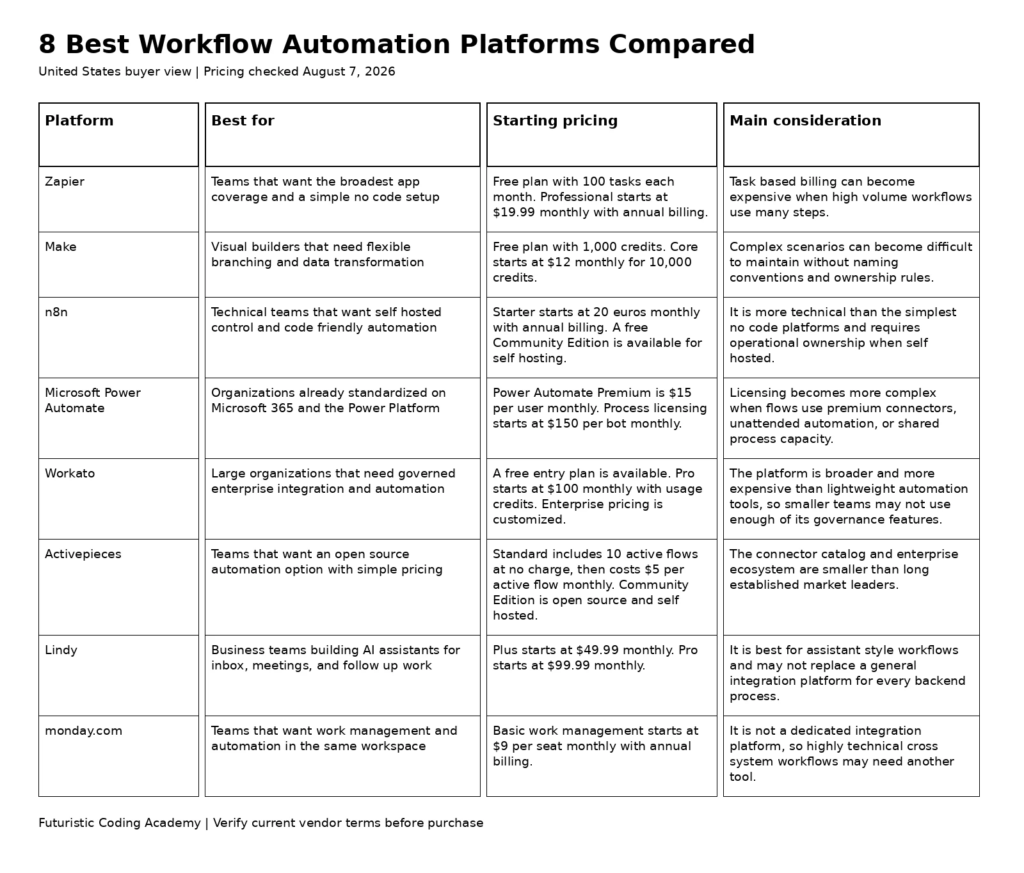
Best Options at a Glance
- Zapier: Teams that want the broadest app coverage and a simple no code setup
- Make: Visual builders that need flexible branching and data transformation
- n8n: Technical teams that want self hosted control and code friendly automation
- Microsoft Power Automate: Organizations already standardized on Microsoft 365 and the Power Platform
- Workato: Large organizations that need governed enterprise integration and automation
- Activepieces: Teams that want an open source automation option with simple pricing
- Lindy: Business teams building AI assistants for inbox, meetings, and follow up work
- monday.com: Teams that want work management and automation in the same workspace
| Platform | Best for | Starting pricing | Core coverage | Main consideration |
|---|---|---|---|---|
| Zapier | Teams that want the broadest app coverage and a simple no code setup | Free plan with 100 tasks each month. Professional starts at $19.99 monthly with annual billing. | Cloud automation with more than 9,000 app connections | Task based billing can become expensive when high volume workflows use many steps. |
| Make | Visual builders that need flexible branching and data transformation | Free plan with 1,000 credits. Core starts at $12 monthly for 10,000 credits. | Cloud visual automation with more than 3,000 apps | Complex scenarios can become difficult to maintain without naming conventions and ownership rules. |
| n8n | Technical teams that want self hosted control and code friendly automation | Starter starts at 20 euros monthly with annual billing. A free Community Edition is available for self hosting. | Cloud or self hosted workflow automation | It is more technical than the simplest no code platforms and requires operational ownership when self hosted. |
| Microsoft Power Automate | Organizations already standardized on Microsoft 365 and the Power Platform | Power Automate Premium is $15 per user monthly. Process licensing starts at $150 per bot monthly. | Microsoft cloud automation with desktop and robotic process automation options | Licensing becomes more complex when flows use premium connectors, unattended automation, or shared process capacity. |
| Workato | Large organizations that need governed enterprise integration and automation | A free entry plan is available. Pro starts at $100 monthly with usage credits. Enterprise pricing is customized. | Enterprise integration and workflow automation | The platform is broader and more expensive than lightweight automation tools, so smaller teams may not use enough of its governance features. |
| Activepieces | Teams that want an open source automation option with simple pricing | Standard includes 10 active flows at no charge, then costs $5 per active flow monthly. Community Edition is open source and self hosted. | Cloud or self hosted open source automation | The connector catalog and enterprise ecosystem are smaller than long established market leaders. |
| Lindy | Business teams building AI assistants for inbox, meetings, and follow up work | Plus starts at $49.99 monthly. Pro starts at $99.99 monthly. | AI assistant and workflow automation with more than 100 integrations | It is best for assistant style workflows and may not replace a general integration platform for every backend process. |
| monday.com | Teams that want work management and automation in the same workspace | Basic work management starts at $9 per seat monthly with annual billing. | Work management with built in automations and integrations | It is not a dedicated integration platform, so highly technical cross system workflows may need another tool. |
How We Evaluated the Platforms
We reviewed recurring first page comparison patterns for the target United States search intent, then verified current product capabilities and public pricing on official vendor pages. The evaluation does not claim hands on testing where none was performed. It focuses on information a buyer can verify before running a structured trial.
- Workflow fit: Whether the platform matches the real process and users rather than forcing an unnecessary technical model.
- Integration and coverage: Which systems, channels, deployment options, or workflows the product can support.
- Control and governance: Permissions, administration, logging, privacy, and the ability to manage production use.
- Pricing clarity: The unit that drives cost and how easily a team can estimate a normal month.
- Long term maintainability: How easily another employee can understand, operate, and improve the system after launch.
1. Zapier
Best for: Teams that want the broadest app coverage and a simple no code setup
Zapier remains the easiest starting point for many United States teams because it combines a large integration catalog with a workflow builder that nontechnical users can learn quickly. It works well for marketing, sales, support, finance, and operations tasks that move information between common business applications. The platform now also includes AI focused building blocks, agents, tables, interfaces, and orchestration features, so buyers can start with a simple trigger and action workflow and add more logic later.
Why It Stands Out
- Very broad application coverage
- Fast setup for common business workflows
- Strong templates and documentation
- Useful AI actions and agent features
- Good fit for teams without dedicated automation engineers
Pricing and Plan Structure
Free plan with 100 tasks each month. Professional starts at $19.99 monthly with annual billing. Check the official Zapier pricing page for current billing terms, usage limits, and promotional conditions.
Important Limitation
Task based billing can become expensive when high volume workflows use many steps.
Who Should Choose It
Choose Zapier when speed of implementation and app coverage matter more than having the lowest possible cost per execution.
2. Make
Best for: Visual builders that need flexible branching and data transformation
Make is a strong choice for teams that want to see the entire workflow as a visual map. Routers, filters, iterators, data transformation, error handlers, and reusable components make it easier to build processes that are more sophisticated than a simple linear automation. The visual model is especially useful when an operations manager needs to understand how information moves between systems without reading code.
Why It Stands Out
- Flexible visual workflow canvas
- Strong branching and transformation controls
- Competitive entry pricing
- Large integration library
- Useful AI and agent capabilities
Pricing and Plan Structure
Free plan with 1,000 credits. Core starts at $12 monthly for 10,000 credits. Check the official Make pricing page for current billing terms, usage limits, and promotional conditions.
Important Limitation
Complex scenarios can become difficult to maintain without naming conventions and ownership rules.
Who Should Choose It
Choose Make when workflows require several branches, transformations, or conditional paths and the team wants those rules visible in one canvas.
3. n8n
Best for: Technical teams that want self hosted control and code friendly automation
n8n is particularly attractive to development teams because workflows can combine visual nodes with JavaScript, Python, API calls, custom credentials, and self hosted infrastructure. Pricing is based on workflow executions rather than charging for every individual step, which can be favorable for complex processes. The Community Edition also gives technical organizations a route to run the platform on their own infrastructure.
Why It Stands Out
- Self hosted Community Edition
- JavaScript and Python support
- Execution based pricing model
- Strong API and webhook capabilities
- Good fit for engineering led automation
Pricing and Plan Structure
Starter starts at 20 euros monthly with annual billing. A free Community Edition is available for self hosting. Check the official n8n pricing page for current billing terms, usage limits, and promotional conditions.
Important Limitation
It is more technical than the simplest no code platforms and requires operational ownership when self hosted.
Who Should Choose It
Choose n8n when developers or technical operations staff will own automation and control over hosting, code, and credentials matters.
4. Microsoft Power Automate
Best for: Organizations already standardized on Microsoft 365 and the Power Platform
Power Automate fits naturally inside organizations that already rely on Microsoft 365, Teams, SharePoint, Dynamics, Azure, and the wider Power Platform. It handles cloud flows, approvals, desktop automation, and process automation in one ecosystem. The platform is often a better enterprise fit than a standalone connector tool when identity, governance, and Microsoft administration are already centralized.
Why It Stands Out
- Deep Microsoft ecosystem integration
- Cloud and desktop automation
- Enterprise identity and governance
- Approvals and business process tools
- Robotic process automation options
Pricing and Plan Structure
Power Automate Premium is $15 per user monthly. Process licensing starts at $150 per bot monthly. Check the official Microsoft Power Automate pricing page for current billing terms, usage limits, and promotional conditions.
Important Limitation
Licensing becomes more complex when flows use premium connectors, unattended automation, or shared process capacity.
Who Should Choose It
Choose Power Automate when Microsoft applications are central to daily work and the organization wants automation governed through the same enterprise environment.
5. Workato
Best for: Large organizations that need governed enterprise integration and automation
Workato is built for companies that need automation across many business systems while maintaining enterprise controls. It combines application integration, workflow automation, data movement, API management, and AI capabilities. The platform is most relevant when automation is no longer a collection of departmental shortcuts and has become part of core business operations.
Why It Stands Out
- Enterprise governance and administration
- Large application and connector ecosystem
- Strong integration and data capabilities
- API and workflow management
- Suitable for cross department automation programs
Pricing and Plan Structure
A free entry plan is available. Pro starts at $100 monthly with usage credits. Enterprise pricing is customized. Check the official Workato pricing page for current billing terms, usage limits, and promotional conditions.
Important Limitation
The platform is broader and more expensive than lightweight automation tools, so smaller teams may not use enough of its governance features.
Who Should Choose It
Choose Workato when automation spans critical enterprise systems and governance, auditability, and central administration justify a larger platform.
6. Activepieces
Best for: Teams that want an open source automation option with simple pricing
Activepieces combines a friendly visual builder with an open source Community Edition. Its pricing model is based on active flows instead of counting every run, which can be easy to forecast for teams with a stable set of automations. The product also supports AI actions and agent style workflows, making it a practical alternative for companies that want more control without adopting a highly technical orchestration platform.
Why It Stands Out
- Open source Community Edition
- Straightforward active flow pricing
- Unlimited runs on standard cloud flows
- Simple visual builder
- Growing AI automation capabilities
Pricing and Plan Structure
Standard includes 10 active flows at no charge, then costs $5 per active flow monthly. Community Edition is open source and self hosted. Check the official Activepieces pricing page for current billing terms, usage limits, and promotional conditions.
Important Limitation
The connector catalog and enterprise ecosystem are smaller than long established market leaders.
Who Should Choose It
Choose Activepieces when open source flexibility and predictable workflow pricing are more important than having the largest integration marketplace.
7. Lindy
Best for: Business teams building AI assistants for inbox, meetings, and follow up work
Lindy focuses on AI assistants that can act across communication and productivity tools. Common use cases include email triage, meeting preparation, scheduling, note handling, lead follow up, and routine operations. That makes it different from a traditional integration builder because the user often defines an outcome and a set of permissions rather than manually connecting every deterministic step.
Why It Stands Out
- Strong assistant style workflow experience
- Useful email and meeting automations
- Simple setup for business users
- More than 100 integrations
- Designed around AI driven tasks
Pricing and Plan Structure
Plus starts at $49.99 monthly. Pro starts at $99.99 monthly. Check the official Lindy pricing page for current billing terms, usage limits, and promotional conditions.
Important Limitation
It is best for assistant style workflows and may not replace a general integration platform for every backend process.
Who Should Choose It
Choose Lindy when the main goal is to delegate repetitive knowledge work to assistants rather than build a large library of deterministic backend integrations.
8. monday.com
Best for: Teams that want work management and automation in the same workspace
monday.com is useful when the workflow itself is managed inside boards, projects, sales pipelines, or operational processes. Teams can trigger notifications, assignments, status changes, date actions, and integrations without moving into a separate automation product. This can reduce tool sprawl for companies that already use monday.com as the operating layer for work.
Why It Stands Out
- Automation lives inside work management
- Easy for nontechnical teams
- Useful templates for operations and projects
- Built in integrations
- Clear connection between workflow data and automation
Pricing and Plan Structure
Basic work management starts at $9 per seat monthly with annual billing. Check the official monday.com pricing page for current billing terms, usage limits, and promotional conditions.
Important Limitation
It is not a dedicated integration platform, so highly technical cross system workflows may need another tool.
Who Should Choose It
Choose monday.com when most automation begins or ends in project and operational workflows that already live inside the monday.com platform.
How to Choose a Workflow Automation Platform
Start with the process, not the product. List the trigger, systems involved, data that moves between them, decisions that require approval, failure conditions, and the person responsible for recovery. A workflow that saves five minutes once a week does not deserve the same architecture as a process that updates customer records or moves financial data hundreds of times a day.
Compare pricing using the unit that actually drives the bill. Zapier counts tasks, Make uses credits, n8n prices cloud plans around executions, Activepieces uses active flows, and enterprise platforms may combine users, bots, connectors, or usage commitments. Model a normal month and a peak month before buying.
Governance matters as soon as automation touches production systems. Use dedicated service accounts, least privilege access, credential rotation, logs, alerting, and documented owners. When AI is involved, validate structured outputs before they are written to a CRM, database, billing system, or customer channel.
Implementation Checklist Before You Commit
- Choose one measurable process with a clear owner and a stable input. Build the simplest version first, then add branching and AI only when the deterministic workflow is reliable.
- Create a test dataset that includes normal records, missing values, duplicate records, permission failures, and unexpected formats. A workflow that only works on clean examples is not ready for production.
- Add failure notifications and a retry strategy. Decide what should happen when an external API is unavailable, a credential expires, or a model returns an invalid response.
- Document every production workflow in a shared inventory. Record the business purpose, owner, connected systems, credentials used, data sensitivity, and last review date.
Evidence and Current Market Context
A 2026 research benchmark called AutomationBench evaluated agents on cross application workflows that required API discovery, policy adherence, and correct end state execution. The strongest frontier models in the benchmark scored below 10 percent. The finding is a useful warning against treating AI agents as unsupervised replacements for production workflow design.
For technical teams, workflow automation increasingly overlaps with API development and integration skills. The Java full stack roadmap and digital marketing learning resource show two different areas where reliable system connections and automation can become practical skills.
Frequently Asked Questions
What is a workflow automation platform?
A workflow automation platform connects applications, data, rules, and actions so repetitive business processes can run with less manual work. Some products focus on simple app connections, while others support code, AI assistants, desktop automation, or enterprise integration.
Which workflow automation platform is best overall?
Zapier is the easiest general recommendation for teams that value app coverage and quick setup. Make is stronger for visual branching, n8n is better for technical control, and Workato is a better fit for large enterprise integration programs.
Is Zapier or Make better?
Zapier is usually easier for straightforward workflows and has broader app coverage. Make offers more visual control over branching, transformation, and complex scenarios. The better choice depends on workflow complexity and expected monthly usage.
Is n8n free?
n8n offers a free Community Edition that can be self hosted. Its managed cloud service is paid. Self hosting removes the cloud subscription for the software but adds infrastructure, security, backups, upgrades, and operational responsibility.
What is the best workflow automation tool for Microsoft 365?
Microsoft Power Automate is usually the strongest fit because it integrates closely with Microsoft 365, Teams, SharePoint, Dynamics, Azure, and the Power Platform.
Can workflow automation platforms use AI?
Yes. Current platforms can call AI models, classify content, summarize documents, generate text, extract structured data, or run agent style tasks. AI steps should still have permission boundaries, validation, and human review when the outcome affects customers, money, security, or important records.
What should a small business pay for workflow automation?
Small businesses can begin with free plans or entry tiers and then scale according to tasks, credits, executions, users, or active flows. The correct budget depends on workflow volume and how much paid staff time the automation removes.
What is the difference between workflow automation and robotic process automation?
Workflow automation usually connects applications through APIs and business logic. Robotic process automation can imitate actions in desktop applications or interfaces when an API is unavailable. Microsoft Power Automate is an example of a platform that supports both approaches.
How should a company test an automation platform?
Build two or three real workflows that include errors, approvals, branching, and realistic data volume. Measure setup time, failure recovery, monthly usage cost, connector quality, auditability, and how easily another employee can maintain the workflow.
Are AI agents ready to run business processes without oversight?
Not for every workflow. A 2026 benchmark called AutomationBench found that leading agents scored below 10 percent on difficult cross application tasks that required API discovery and policy compliance. High impact automation should include clear rules, logs, validation, and accountable human review.
Which automation platform is best for developers?
n8n is a strong choice for developers because it supports self hosting, JavaScript, Python, APIs, webhooks, and execution based pricing. Make can also work well when developers want a visual model with less infrastructure responsibility.
How do I avoid automation sprawl?
Create naming standards, assign an owner to every production workflow, document credentials and dependencies, monitor failures, review inactive automations, and keep critical processes in a central inventory.
Final Recommendation
Zapier is the easiest starting point for broad business automation, Make is the strongest visual choice for complex scenarios, and n8n is the better fit when technical control and self hosting matter. Microsoft Power Automate fits Microsoft centered organizations, while Workato is designed for enterprise scale governance. Activepieces, Lindy, and monday.com each serve narrower needs well. Run real workflows before committing because pricing, maintainability, and failure recovery matter more than the longest feature list.
Related Futuristic Coding Academy Resources
- Full stack developer roadmap
- Full stack Python resource
- Java full stack developer roadmap
- Digital marketing learning resource
- Futuristic Coding Academy technology blogs