AI coding agents have moved beyond autocomplete. The useful products in this category can inspect repositories, plan changes, edit files, run tools, execute tests, and return work for review. For a United States development team, the buying decision is therefore less about which model writes the prettiest snippet and more about which agent fits the repository, security model, source control workflow, and cost structure. This guide compares current options without pretending there is one universal winner.
This article targets the primary keyword best AI coding agents and also addresses related buyer questions such as AI coding agent, autonomous coding agent, AI software development tools, coding agent for GitHub, AI developer agent. The recommendations use current public product information, current ranking page patterns, official documentation, and independent research. Prices are shown in US dollars when a vendor publishes them and were checked on August 8, 2026.
Quick Recommendations
- Claude Code: Complex repository work and terminal first engineering
- OpenAI Codex: Parallel cloud coding tasks and ticket to pull request workflows
- GitHub Copilot coding agent: GitHub native teams that want issues turned into pull requests
- Cursor: IDE first development with local and cloud agents
- Devin: Longer autonomous software tasks with a managed workspace
- Replit Agent: Browser based application building and rapid prototypes
- Amazon Q Developer: AWS focused development and modernization work
- Cline: Open source control and bring your own model workflows
Comparison Table
| Tool | Best for | Pricing approach | Important limitation |
|---|---|---|---|
| Claude Code | Complex repository work and terminal first engineering | Paid Claude plans or API usage | Pricing is tied to the Claude plan or model usage, so heavy agent use should be monitored. Teams also need clear repository permissions and review rules before allowing broad command execution. |
| OpenAI Codex | Parallel cloud coding tasks and ticket to pull request workflows | Included in eligible ChatGPT plans with token based Codex credits | Actual cost varies widely with repository size, context, output volume, and model choice. Organizations should pilot common tasks and set budgets before treating an agent as a default developer workflow. |
| GitHub Copilot coding agent | GitHub native teams that want issues turned into pull requests | Copilot Pro from $10 monthly; Business from $19 per user monthly | The value falls quickly when a team uses GitLab, Bitbucket, or a mixed source control environment. Premium requests and Actions usage can also change the effective cost beyond the headline seat price. |
| Cursor | IDE first development with local and cloud agents | Hobby free; Pro $20 monthly; Teams from $40 per user monthly | Teams can incur additional on demand usage after included limits. Organizations should also decide whether they want their editor to become the primary orchestration layer for code generation, review, and cloud agents. |
| Devin | Longer autonomous software tasks with a managed workspace | Self serve plans use included quota and on demand credits; enterprise pricing is customized | Autonomy makes task specification more important. Vague tickets can produce expensive wandering work, so teams need good acceptance criteria, test coverage, and a clear review checkpoint. |
| Replit Agent | Browser based application building and rapid prototypes | Starter free; Core $20 monthly when billed annually; Pro $95 monthly when billed annually | Teams building complex systems may prefer a repository first agent that fits their existing infrastructure. Credit usage and platform dependence should also be evaluated before moving production workloads into a single hosted environment. |
| Amazon Q Developer | AWS focused development and modernization work | Free tier; Pro $19 per user monthly | Teams that are cloud neutral or heavily invested in another provider may not benefit from the AWS specific depth. Free tier agent requests are intentionally limited, so regular professional use generally requires Pro. |
| Cline | Open source control and bring your own model workflows | Open source client is free; users pay model inference costs | The free client does not mean free inference. Costs depend on the selected model and task size, and teams that need SSO, centralized billing, role controls, or enterprise support need the enterprise offering. |
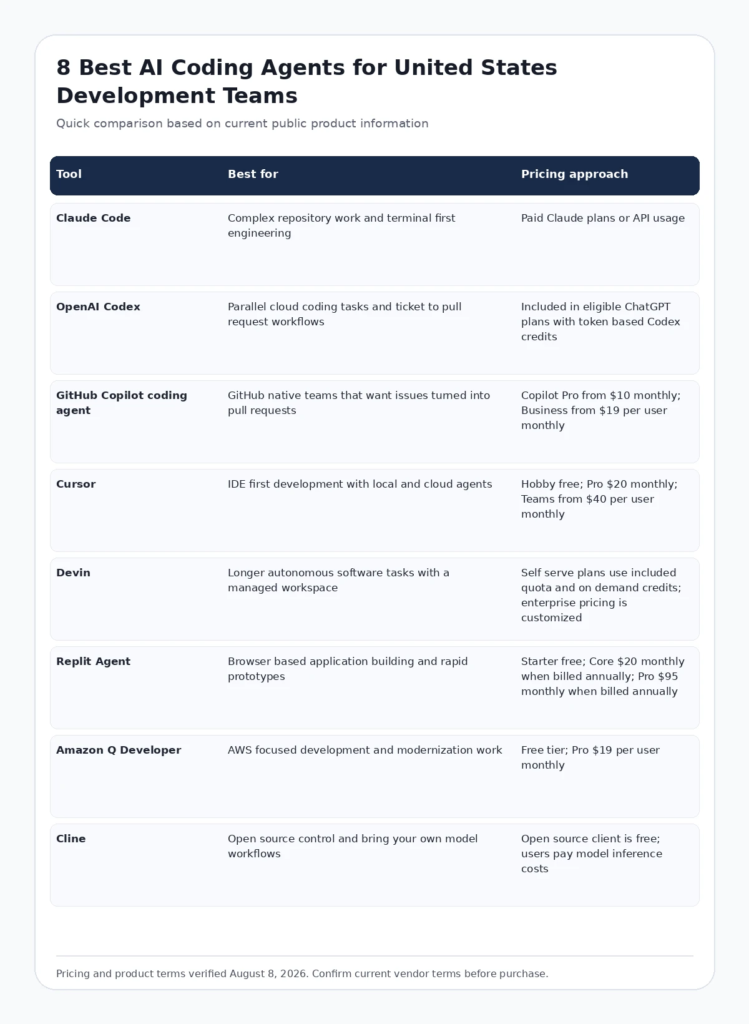
Infographic: Comparison Table
FCA_INFOGRAPHIC
Alt text: Comparison of leading best AI coding agents for United States buyers, including best use case and pricing approach.
How We Evaluated These Tools
- Search intent fit: whether the product genuinely solves the job implied by the query rather than appearing only because it is adjacent to the category.
- Workflow fit: how easily the product connects to the systems, people, and review steps a US team already uses.
- Public evidence: official documentation, current pricing information, current feature pages, and credible independent research were favored over unsourced claims.
- Cost structure: we considered whether buyers pay by seat, usage, workload, traffic, credits, or custom contract because the same headline price can produce very different total cost.
- Operational limitations: every recommendation includes a reason a buyer might choose something else. A useful list should make tradeoffs easier to see, not hide them.
Google recommends that review content provide insightful analysis, original research, meaningful comparisons, and clear evidence rather than thin summaries. See Google Search Central guidance on high quality reviews and Google guidance on helpful, people first content.
Current Data and E E A T Signals to Consider
A 2026 task stratified study analyzed 7,156 pull requests across five coding agents and found that no single agent performed best across every task type. Documentation changes were accepted more often than feature work, which supports evaluating agents by the work you actually delegate. Source: AI coding agent pull request study.
The AIDev dataset documents 932,791 agentic pull requests across more than 116,000 repositories, showing that coding agents are now used at a scale large enough to study as a real engineering workflow rather than a novelty. Source: AIDev agentic development dataset.
Detailed Reviews
1. Claude Code
Best for: Complex repository work and terminal first engineering
Claude Code is a terminal centered coding agent designed to read a codebase, edit files, run commands, work with version control, and carry multi step implementation tasks through a developer controlled workflow. Its biggest appeal is not a separate editor. It is the ability to work inside the tools engineers already use while keeping the repository and shell in view.
Where Claude Code is strongest
- Strong fit for complex codebases where context spans many files
- Works naturally with terminal, Git, tests, and developer tooling
- Project instructions can shape behavior across a repository
Pricing and buying model
Paid Claude plans or API usage. Check current official pricing
Limitations to consider
Pricing is tied to the Claude plan or model usage, so heavy agent use should be monitored. Teams also need clear repository permissions and review rules before allowing broad command execution.
Visit the official Claude Code website
2. OpenAI Codex
Best for: Parallel cloud coding tasks and ticket to pull request workflows
OpenAI Codex is designed for agentic software work across local and cloud environments. Teams can delegate coding tasks, ask the agent to inspect repositories, produce changes, run tests, and work on several tasks in parallel. For organizations already using ChatGPT Business or Enterprise, Codex can fit into an existing identity and governance setup.
Where OpenAI Codex is strongest
- Parallel task execution is useful for backlogs with many independent engineering jobs
- Strong fit for teams that already use OpenAI workspace controls
- Token based rate card makes heavy usage measurable rather than hiding it behind unlimited language
Pricing and buying model
Included in eligible ChatGPT plans with token based Codex credits. Check current official pricing
Limitations to consider
Actual cost varies widely with repository size, context, output volume, and model choice. Organizations should pilot common tasks and set budgets before treating an agent as a default developer workflow.
Visit the official OpenAI Codex website
3. GitHub Copilot coding agent
Best for: GitHub native teams that want issues turned into pull requests
GitHub Copilot coding agent is compelling when the source of truth already lives in GitHub. A developer can delegate work from an issue and keep the result inside the familiar pull request review process. Repository policies, branch protection, Actions, code review, and organization controls remain close to the agent output.
Where GitHub Copilot coding agent is strongest
- Low workflow friction for GitHub centered engineering teams
- Agent work lands in pull requests where existing reviews and checks already happen
- Business and Enterprise plans provide organization administration and policy controls
Pricing and buying model
Copilot Pro from $10 monthly; Business from $19 per user monthly. Check current official pricing
Limitations to consider
The value falls quickly when a team uses GitLab, Bitbucket, or a mixed source control environment. Premium requests and Actions usage can also change the effective cost beyond the headline seat price.
Visit the official GitHub Copilot coding agent website
4. Cursor
Best for: IDE first development with local and cloud agents
Cursor combines a code editor with agentic development, model choice, repository context, cloud agents, and team controls. It is a strong option for developers who want to move between direct editing and delegated work without changing products. Current team plans also include shared context, usage analytics, privacy controls, and agentic review through Bugbot.
Where Cursor is strongest
- Smooth transition between manual editing and agent work
- Multiple model choices support different coding tasks
- Team features include administration, privacy mode, shared context, and usage visibility
Pricing and buying model
Hobby free; Pro $20 monthly; Teams from $40 per user monthly. Check current official pricing
Limitations to consider
Teams can incur additional on demand usage after included limits. Organizations should also decide whether they want their editor to become the primary orchestration layer for code generation, review, and cloud agents.
Visit the official Cursor website
5. Devin
Best for: Longer autonomous software tasks with a managed workspace
Devin is positioned as a managed software engineering agent that can take a defined task, inspect a codebase, work in its own environment, execute commands, and return a result for human review. It is most relevant when the team wants to delegate a meaningful chunk of engineering work rather than use an assistant for line by line completion.
Where Devin is strongest
- Designed around longer task ownership instead of only inline assistance
- Managed environment can reduce local setup for delegated jobs
- Useful for issue based work where success can be checked with tests and acceptance criteria
Pricing and buying model
Self serve plans use included quota and on demand credits; enterprise pricing is customized. Check current official pricing
Limitations to consider
Autonomy makes task specification more important. Vague tickets can produce expensive wandering work, so teams need good acceptance criteria, test coverage, and a clear review checkpoint.
Visit the official Devin website
6. Replit Agent
Best for: Browser based application building and rapid prototypes
Replit Agent is especially useful when a team wants a browser based path from an idea to a running application. It can build full stack projects, use Replit services such as databases and deployments, and keep coding, hosting, and collaboration in one environment. That makes it attractive for prototypes, internal tools, and smaller web applications.
Where Replit Agent is strongest
- Very short path from prompt to a deployed application
- Integrated hosting, database, collaboration, and agent workflow
- Useful for non specialist builders who still want working software rather than code snippets
Pricing and buying model
Starter free; Core $20 monthly when billed annually; Pro $95 monthly when billed annually. Check current official pricing
Limitations to consider
Teams building complex systems may prefer a repository first agent that fits their existing infrastructure. Credit usage and platform dependence should also be evaluated before moving production workloads into a single hosted environment.
Visit the official Replit Agent website
7. Amazon Q Developer
Best for: AWS focused development and modernization work
Amazon Q Developer combines IDE and command line assistance with agentic coding and AWS focused development knowledge. It is particularly relevant to teams that already build on AWS or need Java and .NET transformation workflows. The Pro plan adds higher agent limits and organization controls through AWS Identity Center.
Where Amazon Q Developer is strongest
- Natural fit for AWS infrastructure and developer workflows
- Pro pricing is straightforward at $19 per user monthly
- Includes modernization capabilities for supported Java and .NET workloads
Pricing and buying model
Free tier; Pro $19 per user monthly. Check current official pricing
Limitations to consider
Teams that are cloud neutral or heavily invested in another provider may not benefit from the AWS specific depth. Free tier agent requests are intentionally limited, so regular professional use generally requires Pro.
Visit the official Amazon Q Developer website
8. Cline
Best for: Open source control and bring your own model workflows
Cline is a strong choice for developers who want an open source agent and direct control over model providers. The extension can use a wide range of model APIs, work with MCP tools, edit files, and run commands while keeping model cost visible. This is useful for teams that care about provider flexibility or want to avoid a single vendor subscription.
Where Cline is strongest
- Open source client with broad model provider support
- Bring your own API key model makes cost and provider choice explicit
- Good fit for developers who want extensibility through MCP and local tooling
Pricing and buying model
Open source client is free; users pay model inference costs. Check current official pricing
Limitations to consider
The free client does not mean free inference. Costs depend on the selected model and task size, and teams that need SSO, centralized billing, role controls, or enterprise support need the enterprise offering.
Visit the official Cline website
How to Choose the Right Platform
Start with tasks, not demos
Choose five to ten real backlog tasks that represent bug fixes, feature work, tests, migrations, documentation, and repository maintenance. Measure accepted changes, review time, rework, test failures, and total cost.
Keep human review in the loop
Branch protection, code owners, tests, secret scanning, and production approval should remain independent checks. Agent autonomy is useful only when the verification path is stronger than the generation path.
Model cost per completed task
Seat price alone is misleading. Include premium requests, model tokens, cloud agent usage, retries, developer review time, and the cost of rejected work.
Review data and permission boundaries
Document what repositories an agent can read, which commands it may execute, whether source code is used for model training, where data is processed, and how administrators can revoke access.
Relevant Futuristic Coding Academy Resources
For related technical and marketing context, explore full stack Python development guide, full stack Java development guide, .NET full stack developer guide, full stack development guide, full stack development syllabus, and the Futuristic Coding Academy blog library.
Frequently Asked Questions
What is an AI coding agent?
An AI coding agent is software that can inspect a codebase, plan changes, edit files, run tools or commands, and return code or a pull request with less step by step prompting than a conventional coding assistant.
How is a coding agent different from code completion?
Code completion predicts the next lines while you type. A coding agent can take a broader objective, navigate files, use tools, execute tests, and work through several steps before asking for review.
Which AI coding agent is best for GitHub teams?
GitHub Copilot coding agent is the most natural starting point for teams that want agent work to stay inside GitHub issues and pull requests. Cursor, Codex, Claude Code, Devin, and Cline can also work with GitHub depending on the workflow.
Which coding agent is best for complex repositories?
Claude Code, Codex, and strong repository aware IDE agents are worth piloting when changes span many files. The decisive factor is whether the agent can find the right context and whether your test suite can verify its changes.
Are AI coding agents safe for private code?
They can be used with private repositories, but security depends on the vendor plan, data handling terms, identity controls, retention settings, network access, and permissions you grant. Enterprise teams should review those terms before rollout.
Can coding agents replace software engineers?
They can automate parts of implementation, testing, migration, documentation, and maintenance. They do not remove the need for architecture decisions, product judgment, security review, acceptance criteria, and accountability for production changes.
How should a startup evaluate a coding agent?
Choose five to ten representative tasks from your own backlog, record completion quality, review time, rework, test results, security issues, and total cost. A short internal benchmark is more useful than choosing from a generic leaderboard.
Do coding agents work with Python and Java?
Yes. Major coding agents support common languages including Python and Java. Performance still depends on framework conventions, repository documentation, dependency complexity, and the quality of tests.
What is the cheapest AI coding agent?
Cline has a free open source client, but model inference still costs money. GitHub Copilot and Amazon Q Developer have relatively low public paid entry points, while actual value depends on how much agent work each developer performs.
Why do coding agent costs vary so much?
Long tasks can require large repository context, repeated tool calls, testing, and several model responses. Seat price therefore does not always equal total cost. Usage based products should be measured on real tasks before broad rollout.
Should coding agents be allowed to merge code automatically?
Most teams should keep branch protection, tests, code owners, and human review for meaningful production changes. Automatic merging is safer only for narrowly defined low risk changes with strong deterministic checks.
What should be included in a coding agent policy?
Define approved repositories, allowed models, data handling requirements, command permissions, secrets access, required tests, human review rules, spend limits, audit expectations, and the types of tasks that may or may not be delegated.
Final Recommendation
There is no responsible way to choose among Claude Code, OpenAI Codex, GitHub Copilot coding agent, Cursor, Devin, Replit Agent, Amazon Q Developer, Cline from a feature checklist alone. Start with the job your team needs to improve, test the product on representative work, verify the current price and contract terms, and measure the result that matters to the business. A platform deserves to stay in the stack only when it reduces meaningful work, improves quality, or creates measurable revenue or risk reduction without introducing more operational complexity than it removes.
Editorial note: Product features and pricing change frequently. This guide was verified on August 8, 2026. Always confirm current terms on the linked official vendor pages before purchasing.