AI agent builders sit between conventional automation and custom software. They let teams give a model instructions, tools, data, triggers, memory, and rules so it can perform a multi step job instead of returning one answer. The category now ranges from simple no code workers for sales and operations to enterprise platforms that manage identity, governance, evaluation, cloud runtime, and agent orchestration. A United States buyer should therefore start with the job, the systems the agent must access, and the level of control required before comparing flashy demos.
This guide targets best AI agent builders for United States buyers and also covers related searches such as no code AI agent builders, AI agent platforms, AI workflow builders, business AI agents, agent automation platforms, AI workforce software. The structure was informed by recurring sections in current ranking comparison pages, including quick picks, product comparisons, methodology, detailed reviews, buying criteria, tradeoffs, and frequently asked questions. Product facts and pricing models were checked against current official vendor pages wherever public information is available.
Quick Recommendations
- Relevance AI: Business teams building configurable AI workforces without maintaining infrastructure
- Lindy: Fast deployment of business agents for inbox, meetings, support, and revenue operations
- Gumloop: Visual AI workflows that mix data movement, browser tasks, models, and business automation
- Zapier Agents: Companies already using Zapier that want agents connected to a very large app ecosystem
- n8n: Technical teams that want flexible workflow automation with AI agents and self hosted options
- Microsoft Copilot Studio: Microsoft 365 and Power Platform organizations that need governed enterprise agents
- Salesforce Agentforce: CRM centered sales, service, and commerce agents using Salesforce data and workflows
- Google Vertex AI Agent Builder: Engineering teams building governed agents on Google Cloud
Comparison Table
| Tool | Best for | Pricing approach | Important limitation |
|---|---|---|---|
| Relevance AI | Business teams building configurable AI workforces without maintaining infrastructure | Free plan available; Pro around $19 monthly and Team around $234 monthly under current action based plans | Action allowances, vendor model credits, and concurrency can affect real cost as usage grows. Complex agents still require careful testing, clear tool descriptions, permission boundaries, and human escalation. |
| Lindy | Fast deployment of business agents for inbox, meetings, support, and revenue operations | Plus $49.99 monthly; Pro $99.99; Max $199.99; Enterprise custom | A team with highly custom data infrastructure or complex software engineering requirements may prefer a more programmable platform. Usage should be modeled against recurring agent runs, not only the subscription price. |
| Gumloop | Visual AI workflows that mix data movement, browser tasks, models, and business automation | Free plan with credits; Pro from about $37 monthly under the current credit model | Large workflows can become difficult to maintain if teams do not use naming, reusable components, tests, and ownership standards. Credit consumption should be measured using representative production runs. |
| Zapier Agents | Companies already using Zapier that want agents connected to a very large app ecosystem | Free tier with 400 activities monthly; Pro about $33.33 monthly with annual billing for 1,500 activities | Agent activities can add up quickly in repetitive workflows. Teams should also decide when a deterministic Zap is safer and cheaper than an agent that reasons through every run. |
| n8n | Technical teams that want flexible workflow automation with AI agents and self hosted options | Community edition can be self hosted; cloud plans use execution based pricing | Self hosting transfers reliability, updates, secrets, observability, and scaling responsibility to the organization. Cloud and self hosted total cost should be compared using actual operational requirements. |
| Microsoft Copilot Studio | Microsoft 365 and Power Platform organizations that need governed enterprise agents | Uses Copilot Credits through prepaid or pay as you go licensing | Copilot Credit licensing requires careful workload modeling. The platform is most compelling inside a Microsoft centered environment and can be more complex than lightweight agent builders for small teams. |
| Salesforce Agentforce | CRM centered sales, service, and commerce agents using Salesforce data and workflows | Flex Credits $500 per 100,000 credits; Conversations about $2 each; Agentforce user license $5 per user monthly plus usage | The economic case depends on Salesforce adoption and agent usage. Teams outside the Salesforce ecosystem will face higher integration and platform dependency than with a neutral builder. |
| Google Vertex AI Agent Builder | Engineering teams building governed agents on Google Cloud | Usage based Agent Engine runtime, sessions, memory, and model charges; new Google Cloud customers can receive trial credits | It is not the fastest choice for a small business user who wants to build a simple inbox agent without cloud engineering. Model, runtime, session, memory, and surrounding cloud costs should be estimated together. |
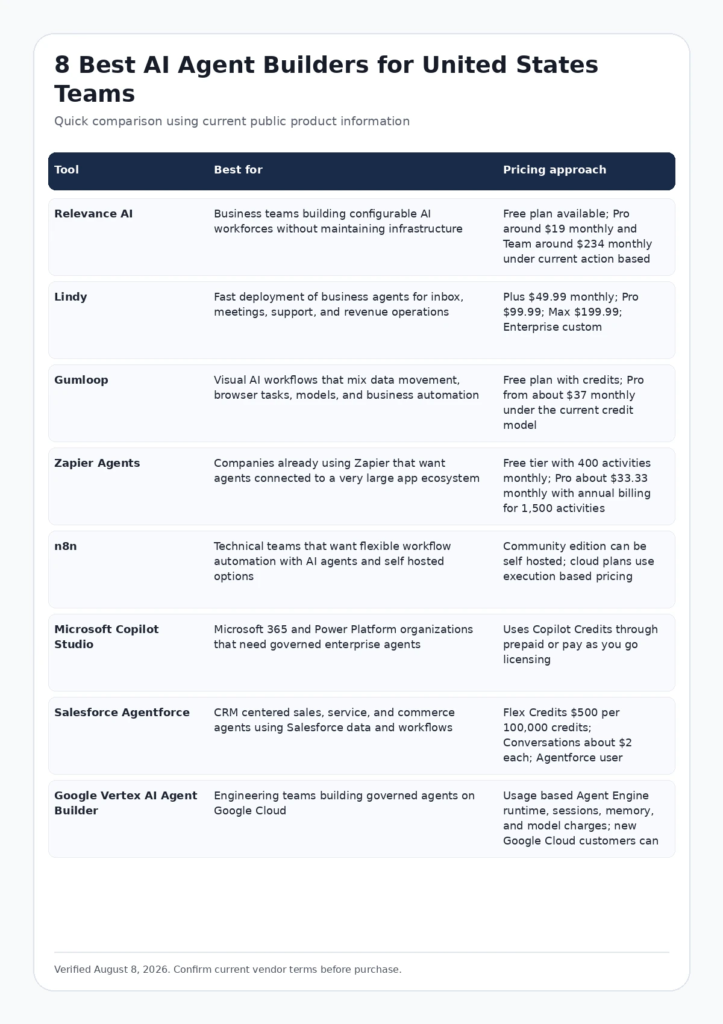
Infographic: Comparison Table
FCA_INFOGRAPHIC
Alt text: Comparison of leading best AI agent builders for United States buyers by use case and pricing approach.
How We Evaluated These Tools
- Search intent fit: the product must genuinely solve the job implied by the query rather than appear only because it is adjacent to the category.
- Workflow fit: we considered how naturally the platform connects to the people, systems, approvals, and operating model a US team already uses.
- Current evidence: official pricing, feature pages, documentation, and current authoritative research were favored over unsourced feature claims.
- Total cost: seat price was considered together with usage, credits, data volume, AI outcomes, compute, add ons, onboarding, and administration where relevant.
- Tradeoffs: each product includes a reason a buyer may choose something else. A useful comparison should clarify limitations rather than hide them.
Google recommends product review content that provides original analysis, evidence, meaningful comparisons, benefits, drawbacks, and useful links. See Google Search Central guidance for high quality reviews and Google guidance for helpful content.
Current Evidence and E E A T Signals
Relevance AI reports more than one million agent tasks per month across customer workloads on its current platform, illustrating how quickly agent operations can become a measurable production system rather than an isolated experiment. Source: Relevance AI platform metrics.
Salesforce current Agentforce pricing shows several billing models, including Flex Credits and conversation based usage. This is a reminder that agent economics should be measured by completed work and business outcome rather than only by a seat price. Source: Salesforce Agentforce pricing.
Detailed Reviews
1. Relevance AI
Best for: Business teams building configurable AI workforces without maintaining infrastructure
Relevance AI is designed around teams of specialist agents that can use business tools, knowledge, triggers, and workflows. It is more structured than a simple prompt builder because users can define agents, tools, workforces, escalations, scheduled work, and connected applications. The product is attractive to revenue, operations, marketing, and support teams that want to build internal AI workers without first creating a full engineering platform.
Where Relevance AI is strongest
- No code approach makes agent creation accessible to operations and business teams
- Workforces support multiple specialist agents instead of one monolithic assistant
- Large integration catalog and bring your own model options support varied workflows
Pricing and buying model
Free plan available; Pro around $19 monthly and Team around $234 monthly under current action based plans. Check current official pricing
Limitations to consider
Action allowances, vendor model credits, and concurrency can affect real cost as usage grows. Complex agents still require careful testing, clear tool descriptions, permission boundaries, and human escalation.
Visit the official Relevance AI website
2. Lindy
Best for: Fast deployment of business agents for inbox, meetings, support, and revenue operations
Lindy focuses on practical business agents that interact with email, calendars, CRMs, support tools, calls, documents, and other SaaS products. It is well suited to teams that want to automate human style workflows such as lead qualification, meeting preparation, inbox triage, follow up, and support without designing a cloud architecture first.
Where Lindy is strongest
- Fast path from a business process to a working agent
- Templates and integrations reduce setup effort for common office workflows
- Human approval and escalation can be incorporated into sensitive processes
Pricing and buying model
Plus $49.99 monthly; Pro $99.99; Max $199.99; Enterprise custom. Check current official pricing
Limitations to consider
A team with highly custom data infrastructure or complex software engineering requirements may prefer a more programmable platform. Usage should be modeled against recurring agent runs, not only the subscription price.
Visit the official Lindy website
3. Gumloop
Best for: Visual AI workflows that mix data movement, browser tasks, models, and business automation
Gumloop gives teams a visual canvas for connecting AI models, data, web actions, documents, and SaaS applications. It is a good fit for operations and growth teams that want flexible workflows where some steps require deterministic automation and other steps require model judgment. The platform can feel familiar to users of visual automation products while adding agent style reasoning and research steps.
Where Gumloop is strongest
- Visual workflow design makes multi step automations easier to inspect
- Useful mix of AI actions, web tasks, data extraction, and SaaS integrations
- Credit based plans let teams start small and scale with usage
Pricing and buying model
Free plan with credits; Pro from about $37 monthly under the current credit model. Check current official pricing
Limitations to consider
Large workflows can become difficult to maintain if teams do not use naming, reusable components, tests, and ownership standards. Credit consumption should be measured using representative production runs.
Visit the official Gumloop website
4. Zapier Agents
Best for: Companies already using Zapier that want agents connected to a very large app ecosystem
Zapier Agents extends the familiar Zapier integration ecosystem into agent driven work. The main advantage is not only the model. It is the ability to connect agent decisions with thousands of business applications without building and maintaining each API connection independently. That makes it attractive to small and mid sized US teams that already rely on Zapier for operational automation.
Where Zapier Agents is strongest
- Very broad app ecosystem reduces integration work
- Familiar environment for teams already using Zapier automation
- Activity based plans create a simple way to begin testing agent workloads
Pricing and buying model
Free tier with 400 activities monthly; Pro about $33.33 monthly with annual billing for 1,500 activities. Check current official pricing
Limitations to consider
Agent activities can add up quickly in repetitive workflows. Teams should also decide when a deterministic Zap is safer and cheaper than an agent that reasons through every run.
Visit the official Zapier Agents website
5. n8n
Best for: Technical teams that want flexible workflow automation with AI agents and self hosted options
n8n is a workflow automation platform with strong developer appeal because it combines visual nodes with code, custom APIs, self hosting, credentials, queues, and AI agent components. It is a good choice when a team wants control over integrations and infrastructure and is willing to own more configuration than with a fully managed no code product.
Where n8n is strongest
- Self hosting and extensibility appeal to engineering and technical operations teams
- Visual workflows can include code, APIs, databases, AI tools, and human steps
- Execution based model can be attractive for workflows with many internal actions per run
Pricing and buying model
Community edition can be self hosted; cloud plans use execution based pricing. Check current official pricing
Limitations to consider
Self hosting transfers reliability, updates, secrets, observability, and scaling responsibility to the organization. Cloud and self hosted total cost should be compared using actual operational requirements.
Visit the official n8n website
6. Microsoft Copilot Studio
Best for: Microsoft 365 and Power Platform organizations that need governed enterprise agents
Copilot Studio is strongest when an organization already uses Microsoft 365, Azure, Power Platform, Dataverse, and Microsoft identity. Teams can build agents that use enterprise knowledge and actions while administrators manage access and governance through the wider Microsoft ecosystem. It is less about a standalone no code novelty and more about deploying agents within an established enterprise control plane.
Where Microsoft Copilot Studio is strongest
- Strong Microsoft identity, data, connector, and governance integration
- Supports conversational agents as well as actions across business systems
- Enterprise administrators can align agent access with existing Microsoft controls
Pricing and buying model
Uses Copilot Credits through prepaid or pay as you go licensing. Check current official pricing
Limitations to consider
Copilot Credit licensing requires careful workload modeling. The platform is most compelling inside a Microsoft centered environment and can be more complex than lightweight agent builders for small teams.
Visit the official Microsoft Copilot Studio website
7. Salesforce Agentforce
Best for: CRM centered sales, service, and commerce agents using Salesforce data and workflows
Agentforce is designed to put agents directly inside Salesforce business processes. This is valuable for companies where customer data, cases, leads, opportunities, knowledge, and workflows already live in Salesforce because the agent can operate within an established data and permission model. The platform is especially relevant to service and revenue teams that want to automate high volume CRM work.
Where Salesforce Agentforce is strongest
- Native access to Salesforce data, workflow, permissions, and customer context
- Multiple commercial models support employee agents and customer facing conversations
- Strong fit when Salesforce is already the operational system of record
Pricing and buying model
Flex Credits $500 per 100,000 credits; Conversations about $2 each; Agentforce user license $5 per user monthly plus usage. Check current official pricing
Limitations to consider
The economic case depends on Salesforce adoption and agent usage. Teams outside the Salesforce ecosystem will face higher integration and platform dependency than with a neutral builder.
Visit the official Salesforce Agentforce website
8. Google Vertex AI Agent Builder
Best for: Engineering teams building governed agents on Google Cloud
Vertex AI Agent Builder is an engineering oriented platform for building, deploying, evaluating, and operating agents on Google Cloud. It is relevant when the organization needs production infrastructure, cloud identity, observability, model choice, data access, runtime controls, and scalable services rather than a simple drag and drop office automation product.
Where Google Vertex AI Agent Builder is strongest
- Deep integration with Google Cloud data, identity, models, and infrastructure
- Usage based components make architecture and cost measurable at cloud scale
- Appropriate for teams that need evaluation, deployment control, and custom application integration
Pricing and buying model
Usage based Agent Engine runtime, sessions, memory, and model charges; new Google Cloud customers can receive trial credits. Check current official pricing
Limitations to consider
It is not the fastest choice for a small business user who wants to build a simple inbox agent without cloud engineering. Model, runtime, session, memory, and surrounding cloud costs should be estimated together.
Visit the official Google Vertex AI Agent Builder website
How to Choose the Right Platform
A useful agent platform should automate a defined job with clear permissions, observability, and failure handling.
Define the job and failure boundary first
Write the task as an operating procedure. Specify the systems the agent can read, actions it can take, decisions it may make, conditions that require approval, and what happens when data is missing.
Use deterministic automation where judgment is unnecessary
A fixed trigger and action is cheaper and easier to test when the logic is known. Add an agent only where classification, research, interpretation, writing, planning, or flexible tool selection creates value.
Test permissions and secrets before autonomy
Agents often need email, CRM, documents, databases, calendars, and APIs. Use least privilege access, separate service identities where possible, logs, revocation, and human approval for irreversible actions.
Measure completed work, not agent activity
Track successful tasks, manual corrections, escalation rate, error cost, model spend, latency, user adoption, and hours saved. A busy agent is not automatically a useful agent.
Relevant Futuristic Coding Academy Resources
For related technical, analytics, marketing, and software context, explore full stack developer roadmap, full stack Python guide, MERN stack development guide, Java full stack development guide, and the Futuristic Coding Academy blog library.
Frequently Asked Questions
What is an AI agent builder?
An AI agent builder is software for creating agents that can use instructions, data, tools, integrations, memory, and triggers to complete multi step tasks. Many products add no code interfaces so business teams can build agents without creating every integration from scratch.
What is the difference between an AI agent and a chatbot?
A chatbot mainly converses with a user. An agent can take actions such as updating a CRM, reading documents, sending messages, researching the web, creating records, or invoking APIs as part of a workflow.
What is the best no code AI agent builder for a small business?
Lindy, Relevance AI, Zapier Agents, and Gumloop are strong starting points because they reduce infrastructure work. The best choice depends on the applications the agent must access and the monthly task volume.
Which AI agent builder is best for developers?
n8n and Google Vertex AI Agent Builder offer more technical control. Developers may prefer them when custom APIs, code, self hosting, cloud infrastructure, or production evaluation are important.
Which AI agent platform is best for Microsoft companies?
Copilot Studio is the natural candidate when Microsoft 365, Azure, Dataverse, Entra identity, and Power Platform are already central to the organization.
Which AI agent platform is best for Salesforce users?
Agentforce is a strong fit when CRM data and workflows already live in Salesforce. It can use customer context, cases, leads, opportunities, and Salesforce permissions without creating a separate operational layer.
How much does an AI agent builder cost?
Costs range from free starter plans to enterprise contracts. Many platforms also charge for actions, executions, model tokens, conversations, cloud runtime, or credits, so total cost depends heavily on how often agents run.
Do AI agents need human approval?
Sensitive workflows should have approval points for money movement, destructive changes, customer commitments, account access, legal decisions, and other high impact actions. Lower risk repetitive work can often run automatically after testing.
How do I test an AI agent before production?
Create a representative test set with normal cases, missing data, ambiguous requests, malicious inputs, permission failures, and system outages. Measure task success, incorrect actions, escalation, cost, and recovery behavior.
Can AI agents replace Zapier or workflow automation?
Sometimes, but not always. Deterministic automation remains better when logic is known and repeatable. Agents are useful when a workflow requires judgment, flexible interpretation, research, or choosing among several possible actions.
What security controls matter for AI agents?
Important controls include least privilege access, secret storage, audit logs, data retention, model training policies, human approval, network controls, identity management, tool restrictions, and a reliable method to disable an agent quickly.
Should a company build one general agent or several specialist agents?
Specialist agents are usually easier to test and govern because each one has a narrow job and tool set. A coordinator can route work among specialists when the business process requires several domains.
Final Recommendation
The best choice among Relevance AI, Lindy, Gumloop, Zapier Agents, n8n, Microsoft Copilot Studio, Salesforce Agentforce, Google Vertex AI Agent Builder depends on the operating problem, existing software stack, team skills, governance requirements, and the cost model at realistic usage. Use a short list of two or three products, test them with representative work, verify current pricing and contract terms, and measure a business outcome rather than a feature count. The strongest platform is the one that improves a real workflow with acceptable risk, cost, and administration.
Editorial note: Product features and pricing change frequently. This guide was verified on August 8, 2026. Confirm current terms on the linked official vendor pages before purchasing.