This comparison is based on public product documentation, current public pricing, platform coverage, workflow fit, and independent research. Futuristic Coding Academy did not accept payment for placement. Prices and features can change, so confirm current terms on the vendor website.
Managed WordPress hosting combines infrastructure with platform specific operations such as updates, caching, backups, security controls, staging, and specialist support. The category can reduce maintenance work, but the label does not guarantee the same performance or service level. Plans differ in traffic limits, storage, workers, backup retention, scaling, support access, and how they handle unexpected demand.
This guide compares ten providers for United States businesses, publishers, developers, and agencies. It is especially relevant for teams moving from a learning project such as full stack PHP development to a production website where uptime, recovery, security, and support have direct business consequences.
Prices below reflect public information checked on August 6, 2026. Hosting promotions and renewal terms change frequently. Confirm the normal renewal price, included resources, overage policy, and migration scope before purchasing. A reliable comparison must examine the full operating model rather than a single speed test.
Best Options at a Glance
- Best premium managed experience: Kinsta
- Best mature enterprise ecosystem: WP Engine
- Best flexible cloud infrastructure: Cloudways
- Best for agencies and multiple sites: Pressable
- Best edge focused option: Rocket.net
- Best for commerce workloads: Nexcess
- Best designer and agency workflow: Flywheel
- Best lower cost established option: SiteGround
- Best promotional value: Hostinger
- Best WordPress plan from an established host: DreamPress
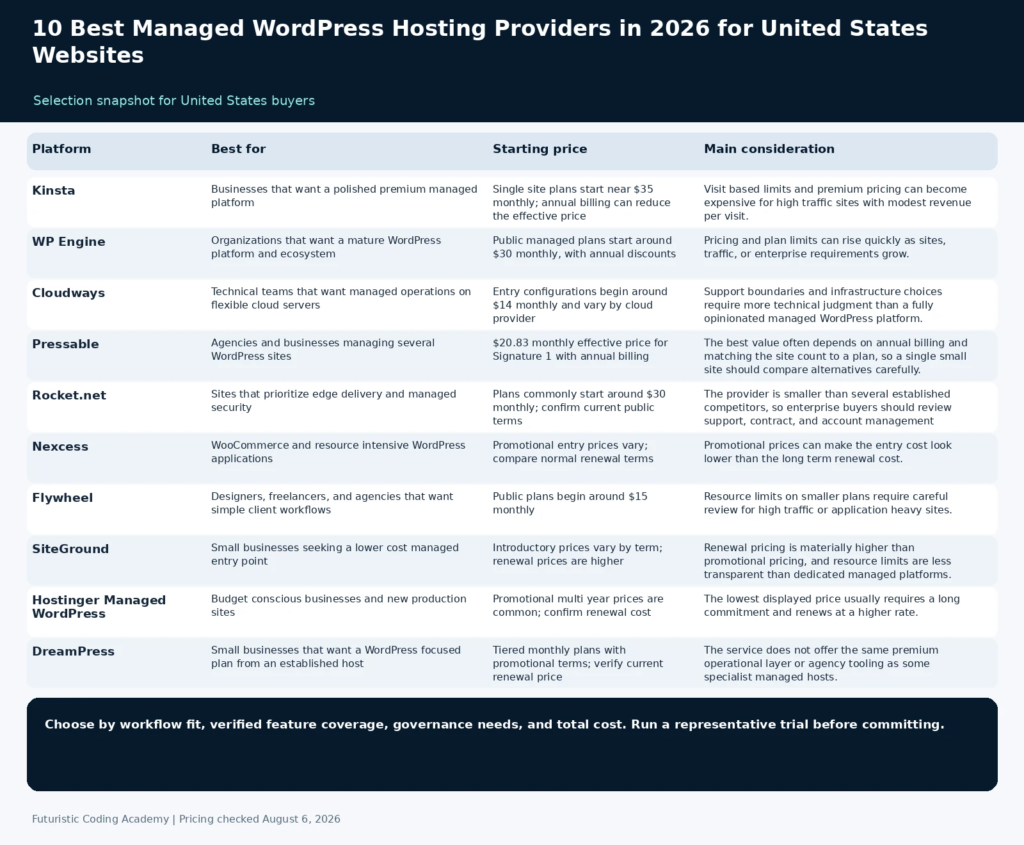
| Platform | Best for | Starting price | Core coverage | Main consideration |
|---|---|---|---|---|
| Kinsta | Businesses that want a polished premium managed platform | Single site plans start near $35 monthly; annual billing can reduce the effective price | Cloud infrastructure, edge caching, staging, backups, analytics | Visit based limits and premium pricing can become expensive for high traffic sites with modest revenue per visit. |
| WP Engine | Organizations that want a mature WordPress platform and ecosystem | Public managed plans start around $30 monthly, with annual discounts | Managed WordPress, staging, backups, security, agency tools | Pricing and plan limits can rise quickly as sites, traffic, or enterprise requirements grow. |
| Cloudways | Technical teams that want managed operations on flexible cloud servers | Entry configurations begin around $14 monthly and vary by cloud provider | Managed cloud servers, caching, backups, staging, team access | Support boundaries and infrastructure choices require more technical judgment than a fully opinionated managed WordPress platform. |
| Pressable | Agencies and businesses managing several WordPress sites | $20.83 monthly effective price for Signature 1 with annual billing | Managed WordPress, edge cache, staging, backups, multi site plans | The best value often depends on annual billing and matching the site count to a plan, so a single small site should compare alternatives carefully. |
| Rocket.net | Sites that prioritize edge delivery and managed security | Plans commonly start around $30 monthly; confirm current public terms | Edge network, managed security, staging, backups, WordPress tools | The provider is smaller than several established competitors, so enterprise buyers should review support, contract, and account management requirements in detail. |
| Nexcess | WooCommerce and resource intensive WordPress applications | Promotional entry prices vary; compare normal renewal terms | Managed WordPress and WooCommerce, autoscaling, testing, backups | Promotional prices can make the entry cost look lower than the long term renewal cost. |
| Flywheel | Designers, freelancers, and agencies that want simple client workflows | Public plans begin around $15 monthly | Managed WordPress, local development, staging, billing transfer, collaboration | Resource limits on smaller plans require careful review for high traffic or application heavy sites. |
| SiteGround | Small businesses seeking a lower cost managed entry point | Introductory prices vary by term; renewal prices are higher | Managed updates, caching, backups, staging on eligible plans | Renewal pricing is materially higher than promotional pricing, and resource limits are less transparent than dedicated managed platforms. |
| Hostinger Managed WordPress | Budget conscious businesses and new production sites | Promotional multi year prices are common; confirm renewal cost | Managed WordPress tools, caching, backups, staging on eligible plans | The lowest displayed price usually requires a long commitment and renews at a higher rate. |
| DreamPress | Small businesses that want a WordPress focused plan from an established host | Tiered monthly plans with promotional terms; verify current renewal price | Managed WordPress, backups, caching, staging on eligible tiers | The service does not offer the same premium operational layer or agency tooling as some specialist managed hosts. |
How We Evaluated the Platforms
We compared current first page buyer guides with official plan pages. The evaluation prioritizes resources and operational details that affect a real production site. No provider receives a performance claim that cannot be supported by public plan information or independent testing. The comparison weighs infrastructure, WordPress operations, security, plan limits, support, and the normal annual cost after promotions.
- Infrastructure: Data centers, edge delivery, caching, scaling, and resource isolation.
- WordPress operations: Updates, staging, backups, migrations, developer tools, and support expertise.
- Security: Firewall coverage, malware response, access controls, and recovery options.
- Plan limits: Sites, visits, storage, bandwidth, workers, and overage rules.
- Support: Availability, channel, escalation, and whether specialists handle application issues.
- Total cost: Normal renewal price, add ons, overages, and the operational work the plan replaces.
1. Kinsta
Best for: Businesses that want a polished premium managed platform
Kinsta is a premium managed WordPress platform with a clear dashboard, staging, backups, analytics, edge delivery, and developer tools. It is designed for organizations that want the host to handle much of the platform operation while keeping deployments and diagnostics accessible. Kinsta is a strong fit for business critical marketing sites, publishers, and agencies that value support and a consistent management layer. The platform reduces routine operations, but buyers still need to size the plan against visits, storage, sites, and application behavior rather than assuming every workload fits the entry tier.
Why It Stands Out
- Managed platform with a polished control panel
- Staging, backups, analytics, and developer tools
- Edge delivery and performance features
- Strong fit for business critical WordPress sites
Pricing and Plan Structure
Single site plans start near $35 monthly; annual billing can reduce the effective price. Check the official pricing page for current limits, billing terms, and promotional conditions.
Important Limitation
Visit based limits and premium pricing can become expensive for high traffic sites with modest revenue per visit.
Who Should Choose It
Choose Kinsta when operational simplicity, support, and a premium managed experience justify a higher monthly cost.
2. WP Engine
Best for: Organizations that want a mature WordPress platform and ecosystem
WP Engine is one of the longest established managed WordPress providers. Its platform includes development environments, backups, security controls, caching, workflow tools, and a broad agency and enterprise ecosystem. It is well suited to teams that want documented processes and support around WordPress operations. Buyers should compare plan limits carefully because visits, storage, sites, and additional capabilities vary by tier. The company is a practical shortlist choice for agencies and larger organizations that value a mature partner and standardized WordPress operations.
Why It Stands Out
- Mature managed WordPress platform
- Strong agency and enterprise ecosystem
- Development and staging workflows
- Extensive WordPress specific resources
Pricing and Plan Structure
Public managed plans start around $30 monthly, with annual discounts. Check the official pricing page for current limits, billing terms, and promotional conditions.
Important Limitation
Pricing and plan limits can rise quickly as sites, traffic, or enterprise requirements grow.
Who Should Choose It
Choose WP Engine when the organization values a mature platform, agency ecosystem, and WordPress specific operational support.
3. Cloudways
Best for: Technical teams that want managed operations on flexible cloud servers
Cloudways provides a management layer over cloud infrastructure from several providers. It gives teams more server choice and resource flexibility than many visit based managed hosts while still handling common operations such as deployment, caching, backups, and monitoring. It is attractive to developers and agencies comfortable making more infrastructure decisions. Pricing is tied more closely to server resources, which can be useful for applications with unusual traffic patterns, but it also places more responsibility on the customer to choose an appropriate provider and server size.
Why It Stands Out
- Choice of cloud infrastructure
- Resource based pricing rather than only visits
- Staging, backups, caching, and team tools
- Flexible scaling for technical users
Pricing and Plan Structure
Entry configurations begin around $14 monthly and vary by cloud provider. Check the official pricing page for current limits, billing terms, and promotional conditions.
Important Limitation
Support boundaries and infrastructure choices require more technical judgment than a fully opinionated managed WordPress platform.
Who Should Choose It
Choose Cloudways when the team wants managed operations but still values server selection, resource control, and flexible scaling.
4. Pressable
Best for: Agencies and businesses managing several WordPress sites
Pressable is a managed WordPress host owned by Automattic, the company closely associated with WordPress.com and WooCommerce. Its plans emphasize site management, automated operations, staging, backups, edge caching, and support. The plan structure becomes especially relevant for agencies because higher tiers include several installs and shared resource allowances. Public plans show clear site, visit, and storage limits, which makes it easier to compare a portfolio against the subscription before migration.
Why It Stands Out
- WordPress focused managed service
- Agency friendly multi site plan structure
- Staging, backups, and edge cache
- Thirty day money back guarantee on public plans
Pricing and Plan Structure
$20.83 monthly effective price for Signature 1 with annual billing. Check the official pricing page for current limits, billing terms, and promotional conditions.
Important Limitation
The best value often depends on annual billing and matching the site count to a plan, so a single small site should compare alternatives carefully.
Who Should Choose It
Choose Pressable when an agency or business wants a WordPress focused platform with predictable multi site management.
5. Rocket.net
Best for: Sites that prioritize edge delivery and managed security
Rocket.net positions its managed WordPress hosting around an integrated edge network, security, caching, and a simple management experience. It is designed to reduce the number of separate performance and security services a website owner must configure. The platform is attractive to publishers, agencies, and commerce sites that want edge delivery included in the hosting layer. Buyers should test administrative workflow, support response, cache behavior, and application compatibility rather than relying only on general speed claims.
Why It Stands Out
- Edge focused delivery and security
- Simple managed WordPress dashboard
- Staging, backups, and migrations
- Useful for globally distributed visitors
Pricing and Plan Structure
Plans commonly start around $30 monthly; confirm current public terms. Check the official pricing page for current limits, billing terms, and promotional conditions.
Important Limitation
The provider is smaller than several established competitors, so enterprise buyers should review support, contract, and account management requirements in detail.
Who Should Choose It
Choose Rocket.net when edge delivery and a compact managed stack are major priorities.
6. Nexcess
Best for: WooCommerce and resource intensive WordPress applications
Nexcess offers managed WordPress and WooCommerce plans with tools aimed at commerce, plugins, updates, backups, and variable demand. It is part of Liquid Web and is often considered by stores that want more application support than a generic shared host. Commerce buyers should look beyond the first year promotion and compare workers, storage, bandwidth, scaling, and support for store specific issues. A store also needs to validate checkout, background jobs, inventory connections, payment callbacks, and recovery time during the trial or migration period.
Why It Stands Out
- WordPress and WooCommerce specialization
- Autoscaling and application tools
- Staging and backup capabilities
- Suitable for stores and heavier applications
Pricing and Plan Structure
Promotional entry prices vary; compare normal renewal terms. Check the official pricing page for current limits, billing terms, and promotional conditions.
Important Limitation
Promotional prices can make the entry cost look lower than the long term renewal cost.
Who Should Choose It
Choose Nexcess when WooCommerce operations and application support matter more than the lowest introductory price.
7. Flywheel
Best for: Designers, freelancers, and agencies that want simple client workflows
Flywheel focuses on an approachable managed WordPress experience for designers, freelancers, and agencies. It provides staging, backups, collaboration, local development integration, and workflows for transferring billing to clients. The product is appealing when the team wants to manage client sites without exposing staff to complex infrastructure decisions. Its workflow features can save administrative time for a creative agency, although larger or more demanding sites should be matched carefully to visit, storage, and performance allowances.
Why It Stands Out
- Simple agency and designer workflow
- Client billing transfer features
- Local development integration
- Staging and collaboration tools
Pricing and Plan Structure
Public plans begin around $15 monthly. Check the official pricing page for current limits, billing terms, and promotional conditions.
Important Limitation
Resource limits on smaller plans require careful review for high traffic or application heavy sites.
Who Should Choose It
Choose Flywheel when a creative or agency team values simple site and client management more than infrastructure customization.
8. SiteGround
Best for: Small businesses seeking a lower cost managed entry point
SiteGround offers managed WordPress features within a more traditional hosting structure. It includes caching, security tools, backups, updates, and support, with staging and advanced features available on relevant plans. It can be a strong entry option for small businesses that need assistance but are not ready for premium managed pricing. The decision should be based on the normal renewal cost and the resource policy, not only the first term discount shown in advertising.
Why It Stands Out
- Lower introductory cost
- WordPress tools and support
- Caching and backup features
- Data center options for different regions
Pricing and Plan Structure
Introductory prices vary by term; renewal prices are higher. Check the official pricing page for current limits, billing terms, and promotional conditions.
Important Limitation
Renewal pricing is materially higher than promotional pricing, and resource limits are less transparent than dedicated managed platforms.
Who Should Choose It
Choose SiteGround when budget matters, the website is moderate in complexity, and the owner understands the renewal price.
9. Hostinger Managed WordPress
Best for: Budget conscious businesses and new production sites
Hostinger offers managed WordPress plans with an accessible control panel, caching, backups, security features, and assisted site tools. Its low promotional entry point can be attractive to new businesses and smaller sites. Buyers should compare the full term commitment and renewal price rather than evaluating only the advertised monthly equivalent. The platform is best suited to sites with clear resource needs and an owner who is comfortable reviewing plan limits before a longer subscription.
Why It Stands Out
- Low promotional entry price
- Accessible control panel
- Managed WordPress and backup features
- Suitable for new and smaller sites
Pricing and Plan Structure
Promotional multi year prices are common; confirm renewal cost. Check the official pricing page for current limits, billing terms, and promotional conditions.
Important Limitation
The lowest displayed price usually requires a long commitment and renews at a higher rate.
Who Should Choose It
Choose Hostinger when the website is cost sensitive and the buyer is comfortable with a longer initial term and future renewal increase.
10. DreamPress
Best for: Small businesses that want a WordPress focused plan from an established host
DreamPress is DreamHost managed WordPress offering. It combines WordPress updates, backups, caching, staging, and support within an established hosting company. It is relevant for buyers who want a recognizable provider and a plan more focused than basic shared hosting without moving immediately to a premium enterprise platform. The platform should be evaluated on support boundaries, current resource allowances, renewal terms, and whether the selected tier includes every staging and backup feature the website requires.
Why It Stands Out
- Established hosting provider
- WordPress focused plan structure
- Backups, caching, and support
- Straightforward option for smaller businesses
Pricing and Plan Structure
Tiered monthly plans with promotional terms; verify current renewal price. Check the official pricing page for current limits, billing terms, and promotional conditions.
Important Limitation
The service does not offer the same premium operational layer or agency tooling as some specialist managed hosts.
Who Should Choose It
Choose DreamPress when a smaller business wants a familiar provider and a straightforward managed WordPress package.
Managed WordPress Hosting Versus Shared Hosting
Shared hosting is usually optimized for low cost and broad compatibility. Managed WordPress hosting adds platform specific operations, support, and performance controls. The value is not only server speed. It is the time saved on backups, staging, updates, recovery, caching, and troubleshooting.
A simple brochure site may not require a premium platform. A store, high traffic publisher, lead generation site, or website managed by several contributors has more to gain from recovery tools, support, auditability, and predictable deployment workflows.
Developers moving from a MERN stack learning environment to production should also evaluate source control, deployment, environment variables, database migration, background jobs, and monitoring. WordPress hosting is only one part of the application operations plan.
Support boundaries matter. Some providers assist with WordPress configuration and plugin conflicts, while others limit support to the hosting platform. Ask a real application question during the evaluation so the team understands what happens when the site fails outside normal business hours.
How to Choose Managed WordPress Hosting
Begin with the website workload. Record monthly visits, peak concurrency, storage, database size, number of sites, commerce activity, geographic audience, and any plugins that require heavy background processing. Ask each provider how the selected plan handles those specific conditions.
Review operational details. Confirm backup frequency and retention, restore process, staging behavior, update policy, malware response, migration scope, support channels, and whether the provider helps with application problems or only infrastructure.
Calculate the normal annual cost. Include renewal pricing, overages, additional sites, premium support, email, domain services, content delivery, security products, and developer tools. The cheapest advertised monthly number is rarely the full cost of a production website.
Evaluate recovery, not only performance. A fast website still creates business risk when backups cannot be restored quickly, support ownership is unclear, or a migration breaks forms and integrations.
A Safe Hosting Migration Process
- Create a complete file and database backup outside the current host.
- Inventory DNS, email, redirects, scheduled tasks, plugins, integrations, and environment settings.
- Use the new host migration service or migrate into a staging environment.
- Test forms, payments, search, logins, analytics, redirects, caching, and administrative workflows.
- Reduce DNS time to live before the final switch and schedule a low traffic change window.
- Monitor errors, performance, transactions, and indexing after launch while keeping the old environment available for rollback.
Frequently Asked Questions
What is managed WordPress hosting?
It is hosting where the provider manages WordPress specific operations such as caching, updates, backups, security controls, staging, and specialist support in addition to the server infrastructure.
Which managed WordPress host is best overall?
Kinsta is a strong premium overall choice. WP Engine is attractive for mature agency and enterprise workflows. Cloudways is better for teams that want more infrastructure flexibility.
What is the best managed WordPress hosting for agencies?
Pressable, WP Engine, Flywheel, Kinsta, and Cloudways are common agency candidates. Compare site allowances, client access, billing transfer, collaboration, migrations, and support.
Is managed WordPress hosting worth the cost?
It is often worthwhile when downtime, recovery, security, developer time, or support delays have meaningful business cost. A simple low traffic site may not need a premium plan.
How much does managed WordPress hosting cost?
Entry plans can begin near fifteen to thirty five dollars monthly, while commerce, agency, and high traffic plans cost substantially more. Promotions, annual discounts, and renewal pricing vary.
Does managed WordPress hosting include email?
Some providers include email, while premium specialist hosts often expect customers to use a separate email service. Confirm this before migration.
Can managed hosting improve Core Web Vitals?
A strong platform can improve server response, caching, and delivery, but Core Web Vitals also depend on theme code, images, scripts, fonts, layout, and third party services.
What happens if a site exceeds the traffic limit?
Providers may charge overages, recommend an upgrade, limit resources, or use autoscaling. Review the policy for visits, bandwidth, storage, and workers before launch.
Is Cloudways fully managed WordPress hosting?
Cloudways manages much of the cloud server and application stack, but it gives customers more infrastructure choice and responsibility than a highly opinionated specialist host.
Which host is best for WooCommerce?
Nexcess is designed around managed WordPress and WooCommerce workloads. Kinsta, WP Engine, Pressable, Rocket.net, and Cloudways can also support stores on appropriately sized plans.
Do managed hosts migrate websites for free?
Many offer one or more assisted migrations, but the number, complexity, email handling, and cleanup included vary. Confirm the exact scope in writing.
How often should WordPress backups run?
A brochure site may be protected by daily backups, while an active store or membership site may need more frequent database backups. The recovery point should match the amount of data the business can afford to lose.
Related Futuristic Coding Academy Resources
Final Recommendation
Kinsta is the most balanced premium choice for businesses that want a polished managed platform. WP Engine is a strong fit for mature agency and enterprise workflows. Cloudways offers more infrastructure flexibility, while Pressable and Flywheel are attractive for agencies managing several client sites.
The best host is the one that matches the real workload and reduces operational risk at a justifiable annual cost. Compare normal renewal terms, support boundaries, resource limits, backup recovery, and migration quality before focusing on headline speed claims.