Email attacks are difficult because the dangerous message often looks ordinary. A business email compromise attempt may contain no malware. It can arrive from a compromised supplier account, imitate an executive or ask a finance employee to change payment details. Traditional spam filtering still matters, but modern email security also needs identity context, behavior analysis, URL inspection, attachment analysis and strong account controls.
For United States organizations, the best email security platform depends heavily on the existing mail environment and security team. A Microsoft 365 business may start with Microsoft Defender for Office 365. A large enterprise may want Proofpoint or Mimecast. A security team focused on behavior based attacks may prefer Abnormal. Teams that want transparent detection logic may find Sublime unusually attractive.
Quick answer: Microsoft Defender for Office 365 is the natural baseline for Microsoft centered organizations. Proofpoint is a leading fit for complex enterprise programs. Abnormal is strong for business email compromise and account takeover patterns. Sublime is excellent for teams that want detection engineering control. Barracuda provides a practical packaged option for the mid market.
Prices and packages in this article were checked against current vendor pages in August 2026. Custom quote vendors are labeled as such rather than assigned an estimated price.
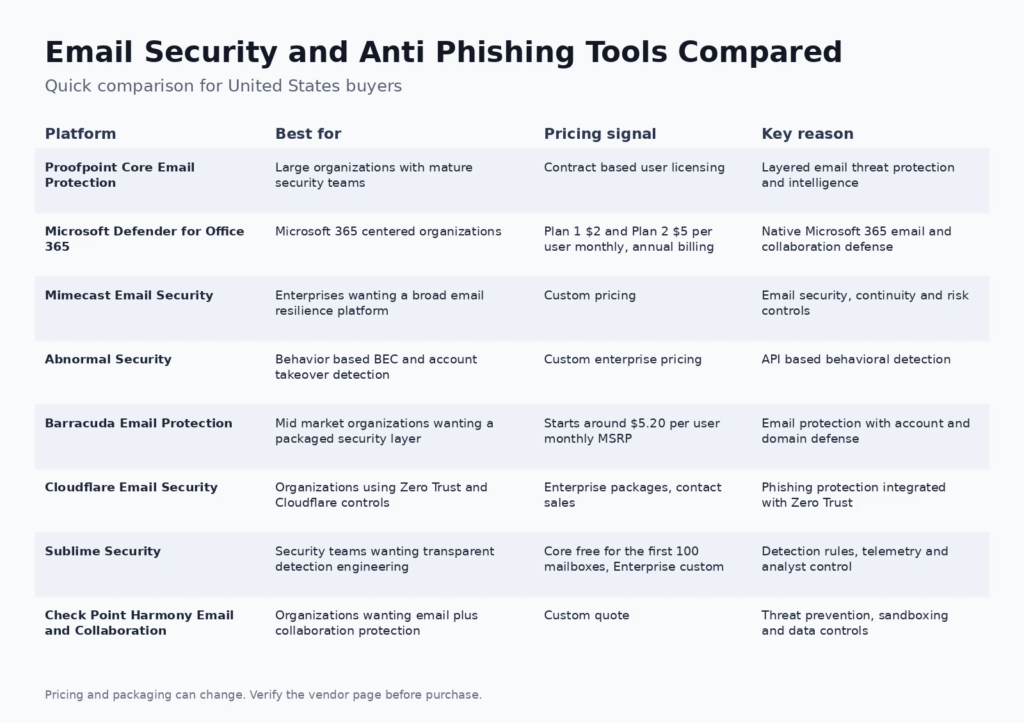
Best email security and anti phishing tools at a glance
| Platform | Best for | Current pricing signal | Core strength |
|---|---|---|---|
| Proofpoint Core Email Protection | Large organizations with mature security teams | Contract based user licensing | Layered email threat protection and intelligence |
| Microsoft Defender for Office 365 | Microsoft 365 centered organizations | Plan 1 $2 and Plan 2 $5 per user monthly, annual billing | Native Microsoft 365 email and collaboration defense |
| Mimecast Email Security | Enterprises wanting a broad email resilience platform | Custom pricing | Email security, continuity and risk controls |
| Abnormal Security | Behavior based BEC and account takeover detection | Custom enterprise pricing | API based behavioral detection |
| Barracuda Email Protection | Mid market organizations wanting a packaged security layer | Starts around $5.20 per user monthly MSRP | Email protection with account and domain defense |
| Cloudflare Email Security | Organizations using Zero Trust and Cloudflare controls | Enterprise packages, contact sales | Phishing protection integrated with Zero Trust |
| Sublime Security | Security teams wanting transparent detection engineering | Core free for the first 100 mailboxes, Enterprise custom | Detection rules, telemetry and analyst control |
| Check Point Harmony Email and Collaboration | Organizations wanting email plus collaboration protection | Custom quote | Threat prevention, sandboxing and data controls |
Readers building broader technical foundations can use FCA resources on technical course topics and development and operations concepts for context on application, infrastructure and operational responsibilities. Those pages are not security product recommendations, but the underlying systems thinking is relevant when email controls need to connect with identity and incident response.
How we evaluated email security platforms
We looked at the attack types a platform is designed to stop, deployment model, administrative visibility, collaboration coverage, account takeover detection, policy depth and public pricing transparency. We also considered whether the product is designed as a complete enterprise control plane or a focused layer that complements Microsoft 365 or Google Workspace.
We did not treat artificial intelligence as a ranking factor by itself. Nearly every modern security vendor uses machine learning or AI language in some form. The useful question is what signals the system analyzes, what attack path it can interrupt and whether the security team can understand and operate the decision.
The comparison also follows Google guidance for product review content by including limitations and buyer fit. Security procurement is high stakes enough that a product should be piloted against your actual mail flow and policies before a wide rollout.
1. Proofpoint Core Email Protection: best for large organizations with mature security teams
Proofpoint Core Email Protection is built for organizations that treat email as a major security control point. It combines message inspection, threat intelligence, malicious URL and attachment analysis, impersonation defenses and administrative policy controls across enterprise mail environments.
Where it fits: It is strongest when a security team needs a mature email security platform with broad policy depth and threat visibility. Enterprises with complex executive protection, supplier risk and compliance needs are the natural audience.
Pricing: Contract based user licensing. Review the current Proofpoint Core Email Protection plan information for contract terms and included capabilities.
What to watch: Proofpoint is a platform decision rather than a lightweight mailbox add on. Licensing is contract based, and buyers should define which modules are actually required so an enterprise suite does not become more complex than the operating team can use.
2. Microsoft Defender for Office 365: best for microsoft 365 centered organizations
Microsoft Defender for Office 365 protects email and collaboration surfaces inside Microsoft 365. Plan 1 covers advanced protection across email, Teams, SharePoint and OneDrive, while Plan 2 adds capabilities such as advanced threat hunting, automation and attack simulation training.
Where it fits: It is a logical first comparison for organizations already standardized on Microsoft 365 because identity, email, collaboration and security operations can be managed in a connected ecosystem.
Pricing: Plan 1 $2 and Plan 2 $5 per user monthly, annual billing. Review the current Microsoft Defender for Office 365 plan information for contract terms and included capabilities.
What to watch: Native integration does not mean the configuration is automatic. Teams still need to tune policies, protect privileged accounts and decide whether their risk profile requires another specialist layer for behavior based or supplier focused detection.
3. Mimecast Email Security: best for enterprises wanting a broad email resilience platform
Mimecast combines email threat protection with a wider set of resilience and risk capabilities. Its security stack addresses phishing, impersonation, malicious URLs, attachments and other common email attack paths, while the broader platform can support continuity and archiving requirements.
Where it fits: It works well for organizations that want email security to sit inside a broader email resilience strategy rather than as a single filter in front of the inbox.
Pricing: Custom pricing. Review the current Mimecast Email Security plan information for contract terms and included capabilities.
What to watch: The breadth of the platform makes scoping important. Compare the exact modules in the quote with what Microsoft or Google already provides so you can identify the incremental protection you are paying for.
4. Abnormal Security: best for behavior based bec and account takeover detection
Abnormal Security uses behavioral analysis and cloud email integrations to identify attacks that may look legitimate at the message content level. That makes it especially relevant for business email compromise, vendor impersonation, payment fraud and account takeover patterns where the attacker relies on trust rather than obvious malware.
Where it fits: It is a strong option for Microsoft 365 or Google Workspace organizations that want an additional behavior centered detection layer without routing every message through a traditional gateway architecture.
Pricing: Custom enterprise pricing. Review the current Abnormal Security plan information for contract terms and included capabilities.
What to watch: Behavior models depend on good integration and enough organizational context. Buyers should test real workflow compatibility, administrative visibility and how the product handles false positives in the roles most exposed to payment or executive impersonation.
5. Barracuda Email Protection: best for mid market organizations wanting a packaged security layer
Barracuda Email Protection packages multiple email security functions for organizations that want an approachable managed stack. Coverage includes phishing defense, malware filtering and broader controls that can be expanded based on the selected package.
Where it fits: It is a practical fit for mid market IT teams that need strong protection without assembling several specialist tools. Its product packaging is easier to evaluate when a buyer wants a known per user starting point.
Pricing: Starts around $5.20 per user monthly MSRP. Review the current Barracuda Email Protection plan information for contract terms and included capabilities.
What to watch: The meaningful comparison is the feature set of the exact package, not the entry price alone. Confirm whether account takeover, archiving, backup or incident response features are included in the plan you are evaluating.
6. Cloudflare Email Security: best for organizations using zero trust and cloudflare controls
Cloudflare Email Security, originating from Area 1 technology, focuses on phishing and malicious email detection while fitting into the broader Cloudflare Zero Trust platform. It can analyze email threats and connect email security decisions with a wider set of access and web controls.
Where it fits: The strongest fit is an organization already using Cloudflare for Zero Trust, secure web access or network security and looking to consolidate another control point.
Pricing: Enterprise packages, contact sales. Review the current Cloudflare Email Security plan information for contract terms and included capabilities.
What to watch: Email security can be purchased as part of a much larger architecture, so buyers should avoid assuming that broader platform consolidation is always cheaper. Compare the operational benefit and the incremental email capability separately.
7. Sublime Security: best for security teams wanting transparent detection engineering
Sublime Security is designed for teams that want more visibility into how email detections are built and tuned. It emphasizes rule driven detection, message telemetry and a workflow that security engineers can inspect and adapt instead of relying only on an opaque vendor decision.
Where it fits: It is particularly compelling for security teams that like detection engineering and want to experiment with controls using a free core before moving to an enterprise deployment.
Pricing: Core free for the first 100 mailboxes, Enterprise custom. Review the current Sublime Security plan information for contract terms and included capabilities.
What to watch: The flexibility is most valuable when someone owns the detection program. A smaller organization that wants a fully managed experience may prefer a more packaged service with less tuning responsibility.
8. Check Point Harmony Email and Collaboration: best for organizations wanting email plus collaboration protection
Check Point Harmony Email and Collaboration protects email and cloud collaboration environments using phishing analysis, account protection, malicious URL inspection, sandboxing and data controls. The Complete tier extends the platform with deeper prevention and data protection functions.
Where it fits: It is a sensible comparison for organizations that already use Check Point security products or want email security connected to a broader threat prevention stack.
Pricing: Custom quote. Review the current Check Point Harmony Email and Collaboration plan information for contract terms and included capabilities.
What to watch: The product can cover many controls, so procurement should map required features to the Advanced or Complete packaging rather than assuming every capability is included in the entry configuration.
How to choose an email security platform
Start with the attacks that matter to your organization
A product optimized for malware attachment detection is not necessarily the best product for executive impersonation or supplier payment fraud. Review recent incidents, near misses and the roles that handle money, credentials or sensitive information. Use that threat model to define the evaluation rather than buying the platform with the largest feature table.
Understand gateway, API and native controls
Traditional secure email gateways inspect mail as it flows through a filtering layer. API based products connect to the cloud mail environment and can use mailbox or identity context without changing the message route in the same way. Native Microsoft and Google controls sit directly in the collaboration stack. Many large organizations combine approaches because each architecture has strengths and limitations.
Protect the account, not only the message
Business email compromise often becomes more dangerous after an attacker obtains a legitimate account. Multifactor authentication, conditional access, session protection, suspicious login detection and rapid account recovery are therefore part of email security even when they live in an identity product. A perfect filter cannot compensate for an administrator account that is easy to take over.
Measure false positives during the pilot
Blocking more messages is not automatically safer if finance, legal or customer teams start missing legitimate business communication. A pilot should measure detection quality and operational friction. Review quarantined messages, analyst workload, user release processes and how quickly the team can explain why a message was classified as dangerous.
Include user reporting and incident workflow
Employees need a simple way to report suspicious messages. Security teams then need a process to investigate the message, find similar copies, remove them where possible and determine whether any account or endpoint was affected. Procurement should test this end to end workflow, not just the detection dashboard.
Email security controls that should exist beside the product
Technical filtering works best with authenticated email domains and strong identity controls. Maintain SPF, DKIM and DMARC correctly for the domains you send from. Use phishing resistant authentication where practical for high risk users. Review third party applications that can access mailboxes. Train teams that handle payments to verify changes through a separate trusted channel. Keep an incident process that covers mailbox compromise, token revocation and recovery.
Security also overlaps with the wider digital environment. FCA’s digital marketing overview provides a broader view of how email fits within digital marketing, while the computer and web technology overview can help less technical team members understand the surrounding web and software concepts. Use those resources for foundational context, not as substitutes for current security vendor documentation.
Frequently asked questions
What is the best email security tool for Microsoft 365?
Microsoft Defender for Office 365 is the most direct native option. Organizations with higher risk or specialist requirements may add platforms such as Proofpoint, Abnormal, Mimecast or another third party layer after testing the incremental benefit.
What is anti phishing software?
Anti phishing software identifies and blocks messages, links, attachments or account behavior associated with phishing attacks. Modern products often combine reputation data, language analysis, identity context, sandboxing and user reporting workflows.
What is business email compromise?
Business email compromise is fraud that abuses trusted business identities or communication patterns. An attacker may impersonate an executive, compromise a supplier mailbox or change payment instructions without sending obvious malware.
Is Microsoft Defender for Office 365 Plan 1 enough?
Plan 1 provides advanced protection across Microsoft 365 email and collaboration. Plan 2 adds capabilities such as threat hunting, automation and attack simulation. Whether Plan 1 is enough depends on your threat model, security operations maturity and other controls.
Can email security stop account takeover?
Some platforms detect suspicious account behavior or malicious activity after compromise, but account takeover prevention also depends on identity controls such as strong authentication, conditional access, session security and rapid credential recovery.
Do small businesses need a separate secure email gateway?
Not always. A small business using Microsoft 365 or Google Workspace may start with strong native controls and account security. A separate product becomes more compelling when risk, regulatory requirements or repeated phishing attacks justify additional detection and response capabilities.
What is the difference between phishing and spam?
Spam is unwanted bulk email and is often commercial. Phishing is a malicious attempt to make the recipient reveal information, open a harmful resource or perform an action that benefits the attacker. A message can be phishing even if it is highly targeted and sent only once.
How does API based email security work?
An API based product connects to the cloud email environment through supported interfaces and analyzes messages, identities and activity using the data available through that integration. It can complement or replace parts of a traditional gateway workflow depending on the product.
Should a company use DMARC if it buys email security software?
Yes. DMARC, SPF and DKIM help protect domain authentication and reduce certain spoofing risks. They solve a different layer of the problem from inbox threat detection and should be maintained alongside the security product.
How should email security tools be tested?
Use a controlled pilot with real mailboxes representing high risk and normal users. Evaluate detection, false positives, analyst workflow, user reporting, message remediation, integration effort and the quality of administrative evidence.
Why do many email security vendors use custom pricing?
Enterprise email security costs can depend on user count, modules, support level, contract length and the wider platform bundle. Custom pricing allows the vendor to scope those variables, but it also makes side by side purchasing comparisons more important.
What should finance teams do when a supplier changes payment details by email?
Treat the change as a verification event. Confirm it through a trusted channel that does not rely on the same email thread, such as a known phone number or established vendor process. Email security can reduce risk but should not replace payment controls.
Final recommendation
Start with your mail platform and threat model. Microsoft centered organizations should understand Defender for Office 365 before buying an overlapping layer. Complex enterprises should compare Proofpoint and Mimecast. Organizations worried about subtle payment and impersonation fraud should test Abnormal. Detection engineering teams should look closely at Sublime. Barracuda offers an approachable packaged option, while Cloudflare and Check Point are compelling when email security is part of a broader security architecture.
No email product eliminates phishing risk. The strongest program combines message security, identity protection, domain authentication, user reporting and payment verification processes.