WordPress maintenance and WordPress security overlap, but they are not the same job. Maintenance is the operational discipline of keeping core, themes, plugins, backups and performance healthy. Security adds prevention, detection, access control, vulnerability response and recovery. A tool can be excellent at one side and only basic on the other.
That distinction matters in 2026 because WordPress remains a fast moving software ecosystem. WordPress 7.0.3, released in August 2026, included multiple security fixes. The lesson is not that every WordPress site is unsafe. The lesson is that routine updates, tested backups and a defined vulnerability response are normal operating requirements for a business site.
Quick answer: WP Umbrella is the strongest general pick for agencies selling recurring care plans. ManageWP is attractive when you want a free management core and modular paid services. MainWP is best for teams that want a self hosted control layer. Wordfence Premium and Solid Security are strong WordPress native security choices, while Sucuri is better when a cloud firewall and expert cleanup are priorities.
This guide uses public vendor information checked in August 2026. Pricing changes frequently, especially for bundles and annual promotions, so always confirm the linked vendor page before purchase.
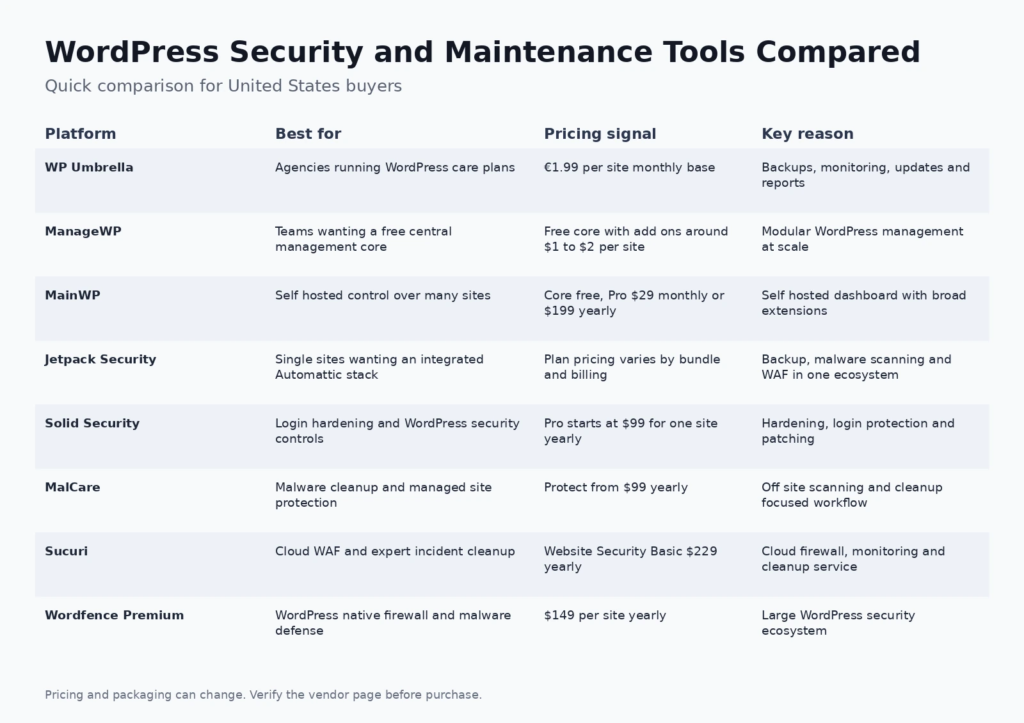
Best WordPress security and maintenance tools at a glance
| Tool | Best for | Current pricing signal | Core strength |
|---|---|---|---|
| WP Umbrella | Agencies running WordPress care plans | €1.99 per site monthly base | Backups, monitoring, updates and reports |
| ManageWP | Teams wanting a free central management core | Free core with add ons around $1 to $2 per site | Modular WordPress management at scale |
| MainWP | Self hosted control over many sites | Core free, Pro $29 monthly or $199 yearly | Self hosted dashboard with broad extensions |
| Jetpack Security | Single sites wanting an integrated Automattic stack | Plan pricing varies by bundle and billing | Backup, malware scanning and WAF in one ecosystem |
| Solid Security | Login hardening and WordPress security controls | Pro starts at $99 for one site yearly | Hardening, login protection and patching |
| MalCare | Malware cleanup and managed site protection | Protect from $99 yearly | Off site scanning and cleanup focused workflow |
| Sucuri | Cloud WAF and expert incident cleanup | Website Security Basic $229 yearly | Cloud firewall, monitoring and cleanup service |
| Wordfence Premium | WordPress native firewall and malware defense | $149 per site yearly | Large WordPress security ecosystem |
If you are building the operational skills behind a care plan, FCA has older training resources covering WordPress and web development basics and broader technical course topics. Those pages reflect the academy era of the site, but they are useful internal references for understanding the difference between site development and ongoing operations.
How we evaluated the tools
We evaluated these products across six practical dimensions: update management, backup and restore workflow, security prevention, vulnerability or malware response, multi site administration, and reporting. We also considered architecture. A plugin based firewall, a cloud firewall and an external fleet management console solve different problems even when all three use the word security.
Google review guidance favors detailed research and useful tradeoffs over thin lists, so this comparison does not treat the tool with the longest feature list as the automatic winner. A small business site, an ecommerce site and an agency managing two hundred client sites need different operating models.
1. WP Umbrella: best for agencies running wordpress care plans
WP Umbrella is designed around recurring WordPress maintenance across many client sites. It brings uptime monitoring, backups, safe updates, performance signals and maintenance reporting into one agency oriented console.
Where it fits: It is particularly useful for agencies that sell a care plan and need to prove that routine maintenance is happening. The reporting layer can turn otherwise invisible operational work into a client deliverable.
Pricing: €1.99 per site monthly base. Verify the current WP Umbrella pricing and plan page before purchase.
What to watch: Security and backup options can add to the base cost. Agencies should model the full protection level they intend to sell rather than comparing only the entry site fee.
2. ManageWP: best for teams wanting a free central management core
ManageWP gives administrators one dashboard for multiple WordPress sites and keeps the core management layer free. Premium capabilities such as backups, uptime monitoring, security checks, performance monitoring and white label reporting can be added per site.
Where it fits: The modular model works well when a team has many low risk sites but only needs premium protection on a subset. It is also familiar to agencies that want to start with central updates and add services as their care plans mature.
Pricing: Free core with add ons around $1 to $2 per site. Verify the current ManageWP pricing and plan page before purchase.
What to watch: A low entry cost can become a more complex bill when many premium add ons are enabled on every site. Build a standard service bundle so technicians do not configure a different stack for every client.
3. MainWP: best for self hosted control over many sites
MainWP is a self hosted management system, so the central dashboard lives in an environment you control. It can manage updates, backups, security connections, reporting and many operational tasks through extensions and third party integrations.
Where it fits: It suits technical agencies that want ownership of the management layer and prefer to connect their chosen backup and security products rather than depend on one hosted vendor. The free core is also attractive for teams willing to manage the infrastructure themselves.
Pricing: Core free, Pro $29 monthly or $199 yearly. Verify the current MainWP pricing and plan page before purchase.
What to watch: Self hosting creates responsibility. The dashboard itself needs updates, security and reliable hosting, and the extension ecosystem requires more design decisions than a tightly packaged hosted service.
4. Jetpack Security: best for single sites wanting an integrated automattic stack
Jetpack Security combines VaultPress Backup, malware scanning, activity logging, spam protection and web application firewall capabilities in a product family maintained by Automattic. It is built for site owners who want a cohesive service rather than a collection of unrelated plugins.
Where it fits: It is a practical choice for publishers and businesses that value integrated backup and recovery as much as malware prevention. Teams already using Jetpack services may also prefer a consistent account and support experience.
Pricing: Plan pricing varies by bundle and billing. Verify the current Jetpack Security pricing and plan page before purchase.
What to watch: The product family has several bundles and promotions, so buyers should compare the exact current package rather than relying on an old price reference. Agencies managing many sites may prefer a dedicated fleet management console.
5. Solid Security: best for login hardening and wordpress security controls
Solid Security focuses on WordPress hardening, account protection, login security, vulnerability awareness and related controls. Its Pro offering also incorporates virtual patching capabilities through its security ecosystem.
Where it fits: It fits sites that need stronger authentication and WordPress specific security policies without replacing the entire maintenance workflow. Agencies can pair it with their preferred backup and site management platform.
Pricing: Pro starts at $99 for one site yearly. Verify the current Solid Security pricing and plan page before purchase.
What to watch: Security plugins are only one layer. Backups, hosting security, updates, least privilege access and incident response still need to be part of the operating plan.
6. MalCare: best for malware cleanup and managed site protection
MalCare is centered on malware detection, cleanup and WordPress protection. Its scanning architecture is designed to reduce the amount of heavy security work performed on the customer site, and paid plans add protection and cleanup capabilities.
Where it fits: It is worth considering when the primary concern is a reliable malware response workflow rather than a broad maintenance dashboard. Agencies that regularly inherit compromised sites may value a product designed around cleanup as well as prevention.
Pricing: Protect from $99 yearly. Verify the current MalCare pricing and plan page before purchase.
What to watch: A security cleanup product does not replace maintenance. Teams still need update discipline, backups, staging and change management to reduce the chance that a vulnerable component becomes an incident.
7. Sucuri: best for cloud waf and expert incident cleanup
Sucuri provides a cloud security platform with website monitoring, malware response and a web application firewall. Because the firewall sits in front of the site, it can filter malicious traffic before requests reach WordPress or the hosting environment.
Where it fits: This approach is useful for businesses that want a network edge security layer and access to a cleanup service. It also makes sense when security responsibility is shared between a web team and a business owner who wants a clearly defined external service.
Pricing: Website Security Basic $229 yearly. Verify the current Sucuri pricing and plan page before purchase.
What to watch: The platform is security oriented rather than a complete WordPress maintenance console. Agencies may still need a separate tool for mass updates, client reports, routine performance checks and workflow management.
8. Wordfence Premium: best for wordpress native firewall and malware defense
Wordfence Premium combines a WordPress firewall, malware scanning, threat intelligence and additional security controls in a plugin centered approach. Each protected installation uses its own license, while corresponding staging and development environments can be covered under the production license rules described by Wordfence.
Where it fits: It is a strong option for site owners who want a mature WordPress specific security product and prefer security controls close to the application. The free edition also makes it easy to evaluate the interface before upgrading.
Pricing: $149 per site yearly. Verify the current Wordfence Premium pricing and plan page before purchase.
What to watch: Plugin level inspection uses site resources, and licensing scales by installation. High traffic or resource constrained sites should test operational impact and compare the architecture with cloud based protection.
How to build a WordPress maintenance stack
Start with recoverability
Before adding security dashboards, prove that the site can be restored. Backups should be automatic, stored away from the primary hosting failure domain and tested periodically. A backup that has never been restored is an assumption, not a recovery plan. For high value stores or membership sites, the acceptable recovery point may be much shorter than a once daily backup.
Separate safe updates from blind updates
Automatic updates reduce exposure time, but a business site can also break when a plugin or theme change conflicts with another component. Use staging, visual checks or rollback capable update workflows for critical sites. Low risk maintenance should be automated while high risk changes receive a defined test path.
Protect identities as well as files
Many incidents begin with compromised credentials or excessive permissions. Use strong authentication, remove dormant administrators, limit privileged accounts and review who can install plugins or edit code. Security software is far more effective when access control is disciplined.
Choose a firewall architecture deliberately
A cloud firewall can block malicious traffic before it reaches WordPress. A WordPress native firewall has rich application context because it runs close to the application. Neither model is universally superior. Evaluate latency, hosting resources, bypass risk, configuration effort and the type of attacks you are trying to reduce.
Make maintenance visible to clients
Agencies should report outcomes, not just task counts. A useful care plan report can show backup health, uptime, updates completed, vulnerabilities handled, performance movement and any issue that needs client action. This is one reason tools such as WP Umbrella and ManageWP are different from security only products.
For teams moving from development into ongoing operations, FCA also has a DevOps versus full stack overview that explains how development and operations responsibilities differ. The page is older, so use it for concepts rather than current product recommendations.
Security baseline for a United States business website
A practical baseline includes current WordPress core, supported plugins and themes, multifactor authentication for privileged users, least privilege access, off site backups, uptime monitoring, a malware or vulnerability monitoring layer, and an incident contact. Ecommerce and regulated organizations may need stronger logging, retention, access reviews and vendor governance based on their own obligations.
The current WordPress ecosystem also changes quickly enough that a maintenance provider should maintain an inventory. If a plugin is abandoned or repeatedly vulnerable, a team needs to know which sites depend on it. Central management tools help because they make that inventory visible across many installations.
Frequently asked questions
What is the best WordPress maintenance tool for agencies?
WP Umbrella, ManageWP and MainWP are the strongest fits in this comparison for multi site operations. WP Umbrella emphasizes care plan workflow, ManageWP offers a free modular core, and MainWP gives technical teams a self hosted control model.
Do I need both a maintenance tool and a security plugin?
Often yes. A maintenance platform may manage updates, backups and reports while a security product handles firewall rules, malware detection or access protection. Some products overlap, but few are equally deep in every function.
Is Wordfence Premium worth it for one WordPress site?
It can be when you want WordPress specific firewall and malware capabilities with current threat intelligence. The decision should include site value, hosting resources, existing security layers and whether you already have a cloud firewall.
What is the difference between Sucuri and Wordfence?
Sucuri emphasizes a cloud security platform and web application firewall in front of the site. Wordfence runs security controls inside the WordPress environment. Their architectures, resource use and operational workflows are different.
How often should WordPress be backed up?
The frequency should match how quickly important data changes. A brochure site may tolerate daily backups. An ecommerce or membership site with frequent transactions may need much shorter intervals. Restore testing is as important as backup frequency.
Should WordPress plugins update automatically?
Low risk updates can be automated when you have reliable backups and monitoring. Critical sites should use a safe update workflow with staging, visual checks or rollback options for changes that could affect checkout, forms or custom functionality.
Can a security plugin stop every WordPress attack?
No. Security depends on layers including hosting, access control, software updates, backups, firewall rules, application configuration and incident response. A plugin can reduce risk but cannot make weak operations safe.
What is virtual patching in WordPress security?
Virtual patching applies a protective rule that blocks exploitation of a known vulnerability without changing the vulnerable plugin code itself. It can reduce exposure while a vendor patch is pending, but the underlying software should still be updated when a safe fix is available.
Is MainWP safe if it is self hosted?
It can be operated securely, but self hosting transfers responsibility to your team. The MainWP dashboard, hosting account, administrator access and extensions all need normal security and maintenance practices.
What should a WordPress care plan include?
A strong care plan normally includes backups, updates, uptime monitoring, security monitoring, recovery support, basic performance checks and clear reporting. The exact service level should match the risk and business importance of the site.
How should an agency price WordPress maintenance?
Price from service scope and risk rather than tool cost alone. Include technician time, backup storage, premium licenses, incident support, reporting, staging and the response commitment promised to the client.
When should a WordPress site use a cloud firewall?
A cloud firewall is useful when you want malicious requests filtered before they reach the origin server, need DDoS or bot controls, or want a security layer that is less dependent on WordPress resources. Compatibility and DNS architecture still need to be considered.
Final recommendation
For an agency care plan, start with WP Umbrella, ManageWP or MainWP based on how much control and packaging flexibility you want. Add security depth according to site risk. Wordfence Premium and Solid Security are strong application level choices, MalCare is attractive for cleanup centered workflows, Sucuri is compelling for cloud firewall and response services, and Jetpack Security fits sites that prefer an integrated Automattic stack.
The best stack is not the one with the most security products. It is the one your team can operate consistently, restore confidently and explain clearly when something goes wrong.