Reporting software does not improve search visibility by itself. Its job is to turn the work an agency already performs into evidence a client can understand, question and act on. The best SEO reporting and white label tools therefore need to do more than make attractive charts. They should connect the right data, keep definitions consistent, reduce manual report production and give an agency enough branding control to make the client experience feel intentional.
For United States agencies, the buying decision usually comes down to five questions: whether the platform owns the SEO data or only presents it, how pricing scales with clients and sources, how much white label control is available, whether reports can be scheduled without manual cleanup, and whether account managers can explain the numbers without relying on an analyst for every meeting.
Quick answer: AgencyAnalytics is the strongest general choice for agency reporting workflows. SE Ranking is a better fit when you want an SEO suite and reporting in the same product. Semrush is logical when your research already lives in Semrush. DashThis is attractive when simplicity matters more than advanced analysis. Swydo is worth considering when you want a source based pricing model with broad client access.
This comparison uses current public product and pricing information checked in August 2026. Vendor packages change, so use the linked pricing page as the final source before purchase.
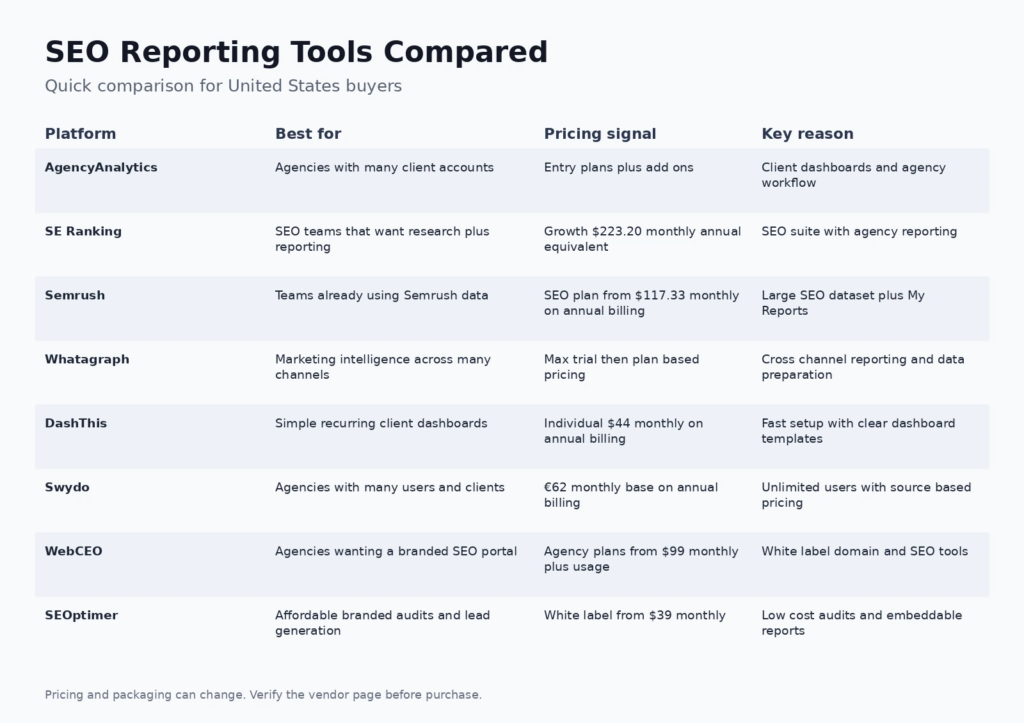
Best SEO reporting and white label tools at a glance
| Tool | Best for | Current pricing signal | Why it stands out |
|---|---|---|---|
| AgencyAnalytics | Agencies with many client accounts | Entry plans plus add ons | Client dashboards and agency workflow |
| SE Ranking | SEO teams that want research plus reporting | Growth $223.20 monthly annual equivalent | SEO suite with agency reporting |
| Semrush | Teams already using Semrush data | SEO plan from $117.33 monthly on annual billing | Large SEO dataset plus My Reports |
| Whatagraph | Marketing intelligence across many channels | Max trial then plan based pricing | Cross channel reporting and data preparation |
| DashThis | Simple recurring client dashboards | Individual $44 monthly on annual billing | Fast setup with clear dashboard templates |
| Swydo | Agencies with many users and clients | €62 monthly base on annual billing | Unlimited users with source based pricing |
| WebCEO | Agencies wanting a branded SEO portal | Agency plans from $99 monthly plus usage | White label domain and SEO tools |
| SEOptimer | Affordable branded audits and lead generation | White label from $39 monthly | Low cost audits and embeddable reports |
If your team is still building a measurement foundation, review the FCA guide to SEO fundamentals and measurement concepts and the broader SEO training resource. The older course framing is not a substitute for current platform documentation, but the core measurement concepts remain useful when defining what a client report should explain.
How we evaluated these platforms
We did not rank tools by the number of integrations on a marketing page. The evaluation focuses on the operating reality of an agency. A reporting system is valuable when it shortens production time, preserves trustworthy definitions and makes client communication easier. We reviewed current vendor capabilities, pricing structure, white label controls, automation, client access, SEO data depth and the likely effort required to maintain a reporting template.
We also separated reporting platforms from SEO research suites. A platform can be excellent at presentation while depending on data from Google Analytics, Search Console, advertising networks or specialist SEO products. Another platform may collect much of the research itself. Neither approach is automatically better. The right choice depends on whether your agency wants one broad operating system or a flexible presentation layer over an existing stack.
Our structure follows Google guidance that review content should provide useful analysis rather than a thin summary of product pages. That means each pick includes fit, tradeoffs and a purchasing context instead of only a feature list.
1. AgencyAnalytics: best for agencies with many client accounts
AgencyAnalytics is built around the reporting rhythm of a marketing agency. It combines automated dashboards, scheduled reports, client access, campaign data, rank tracking and integrations in one client facing workspace. The value is less about having the deepest individual SEO database and more about making recurring reporting predictable across a growing book of accounts.
Where it fits: Choose it when account managers need to prepare consistent reports without rebuilding spreadsheets every month. It also works well when clients expect branded portals and a clear visual summary instead of raw exports.
Pricing: Entry plans plus add ons. Check the current AgencyAnalytics pricing page because allowances, annual billing discounts and add ons can change.
What to watch: The total cost can rise as an agency adds clients, data sources and specialist features. Teams that already own a broad SEO suite should compare overlap before paying for both data collection and presentation layers.
2. SE Ranking: best for seo teams that want research plus reporting
SE Ranking combines rank tracking, site auditing, competitor research, keyword research, backlink tools and report automation. Its agency oriented capabilities make it useful for teams that want the same platform to produce the underlying SEO analysis and the client deliverable.
Where it fits: It is a strong fit for agencies that do not want a separate reporting product layered on top of several SEO tools. White label capabilities, scheduled reporting and agency workflows reduce the handoff between analysts and account managers.
Pricing: Growth $223.20 monthly annual equivalent. Check the current SE Ranking pricing page because allowances, annual billing discounts and add ons can change.
What to watch: The plan should be sized around tracked keywords, projects and reporting needs. An agency that mostly needs polished dashboards but sources data elsewhere may find a dedicated reporting platform simpler.
3. Semrush: best for teams already using semrush data
Semrush remains one of the broadest SEO research environments, covering keywords, competitors, backlinks, site health, content and more. My Reports lets teams bring Semrush data and supported external sources into scheduled client reporting.
Where it fits: The practical advantage is consolidation. If an agency already depends on Semrush for research and audits, reporting from the same ecosystem can reduce data reconciliation and tool switching.
Pricing: SEO plan from $117.33 monthly on annual billing. Check the current Semrush pricing page because allowances, annual billing discounts and add ons can change.
What to watch: Reporting is not the only thing you are buying. My Reports and advanced report capabilities can add cost on top of the main subscription, so agencies should compare the combined spend with a lighter reporting stack.
4. Whatagraph: best for marketing intelligence across many channels
Whatagraph is designed for marketing teams that need to normalize, visualize and deliver data from many channels. It goes beyond a pure SEO dashboard by connecting search performance with paid media, social, ecommerce and broader marketing outcomes.
Where it fits: It makes sense for agencies whose clients evaluate SEO beside the rest of their acquisition mix. The platform is especially useful when reporting teams need reusable templates and consistent data definitions across accounts.
Pricing: Max trial then plan based pricing. Check the current Whatagraph pricing page because allowances, annual billing discounts and add ons can change.
What to watch: Its broader marketing scope can be unnecessary for an SEO only consultant. Buyers should confirm connector coverage, refresh requirements and the plan structure for their client volume before migrating reporting workflows.
5. DashThis: best for simple recurring client dashboards
DashThis focuses on making recurring marketing dashboards easy to build and easy for clients to read. Its templates and integrations cover common SEO, advertising, analytics and social reporting needs without demanding a complex business intelligence setup.
Where it fits: Small agencies and consultants often benefit from its straightforward workflow. A team can standardize a report, clone it for new clients and schedule delivery without training every account manager on a large analytics platform.
Pricing: Individual $44 monthly on annual billing. Check the current DashThis pricing page because allowances, annual billing discounts and add ons can change.
What to watch: Teams that need advanced data transformation, deep SEO research or very granular custom analytics may outgrow it. Treat it primarily as a reporting layer rather than a complete SEO operating system.
6. Swydo: best for agencies with many users and clients
Swydo takes a data source based approach to agency reporting. It supports dashboards, automated reports, goals, monitoring and branded delivery while allowing agencies to organize work across many clients and users.
Where it fits: This model can be attractive when the number of internal users or client logins would make seat based pricing uncomfortable. It also encourages agencies to think carefully about which data sources truly belong in a recurring report.
Pricing: €62 monthly base on annual billing. Check the current Swydo pricing page because allowances, annual billing discounts and add ons can change.
What to watch: Costs can scale with connected sources, so a client with many separate advertising and analytics accounts may consume more of the pricing allowance. Map the real source count before comparing it with flat dashboard plans.
7. WebCEO: best for agencies wanting a branded seo portal
WebCEO combines SEO analysis, rank monitoring, auditing and agency reporting with strong branding options. Its white label environment is designed for agencies that want clients to interact with a branded portal rather than a vendor branded dashboard.
Where it fits: It is useful when the reporting experience itself is part of the service proposition. Agencies can centralize SEO work and present it through their own identity, which is valuable for retainers and reseller style services.
Pricing: Agency plans from $99 monthly plus usage. Check the current WebCEO pricing page because allowances, annual billing discounts and add ons can change.
What to watch: The pricing structure includes usage considerations and optional white label capabilities. Calculate the expected project and data volume rather than choosing a plan only from the headline monthly figure.
8. SEOptimer: best for affordable branded audits and lead generation
SEOptimer is best known for website audits, but its white label reports and embeddable audit capabilities make it useful for smaller agencies that use audits to start sales conversations. It can produce a branded diagnostic experience without the cost of a large enterprise reporting stack.
Where it fits: Freelancers, local agencies and lead generation focused teams can use it to standardize prospect audits and basic client reviews. The value is strongest when the audit itself is a repeatable acquisition or onboarding asset.
Pricing: White label from $39 monthly. Check the current SEOptimer pricing page because allowances, annual billing discounts and add ons can change.
What to watch: It is not a substitute for a deep enterprise SEO data platform. Agencies with complex reporting requirements will likely pair it with analytics, rank tracking or broader research tools.
How to choose an SEO reporting platform for an agency
Decide whether reporting or research is the primary job
An agency that already uses several specialist research products usually needs a reporting layer that can pull those signals together. An agency that wants fewer subscriptions may prefer a suite such as SE Ranking, Semrush or WebCEO. Write down where your keyword, backlink, site audit, conversion and revenue data currently lives before comparing dashboards. Otherwise you may buy duplicate functionality while still missing the connector that matters most.
Model cost using real client volume
Headline prices hide the variable that drives reporting cost. Depending on the vendor, that variable may be clients, dashboards, data sources, projects, keywords, seats or premium reports. Build a simple model with your current client count and a realistic twelve month growth estimate. Include the number of properties each client connects because a single brand can have several analytics, advertising and search accounts.
Define the white label standard before buying
White label can mean a logo on a PDF, a branded email, a custom dashboard domain, a client portal or a fully branded interface. Those are very different levels of control. Decide what clients will actually see. If the portal is part of your agency experience, domain and email branding may matter. If reports are sent as PDFs before a monthly call, a simpler level of branding can be enough.
Design reports around decisions, not data availability
A useful report answers what changed, why it matters and what the team will do next. It does not need every widget a connector can provide. For most SEO retainers, a small set of visibility, traffic, conversion, technical health and authority signals is easier to discuss than a forty page export. The FCA digital marketing overview is also useful for understanding how SEO sits beside paid, social and email activity when a client wants one marketing view.
Test the monthly workflow before migrating every client
Use a trial with one simple client and one complicated client. Build the report, schedule it, change a date range, fix a connector, invite a client and export the final version. A platform that looks efficient in a sales demo can still create hidden work when permissions or data refreshes fail. A small pilot reveals those costs before the agency changes its reporting process.
A practical reporting template for SEO retainers
A strong monthly template can stay compact. Start with an executive summary that names the meaningful movements and the actions planned next. Follow with search visibility, organic traffic and conversions. Add a technical section only for issues that need a decision. Include authority or backlink data when it connects to the strategy. Close with completed work, current risks and the next period priorities. This structure makes the report a management document rather than a data dump.
Agencies building a broader service model can also review FCA resources on digital marketing channel fundamentals and practical marketing workflows. Those pages reflect the site’s earlier training focus, but they can help junior team members understand how reporting connects to channel execution and hands on work.
Frequently asked questions
What is white label SEO reporting software?
White label SEO reporting software lets an agency present search performance data using its own branding. Depending on the platform, this can include logos, colors, branded email delivery, custom domains, client portals and report templates.
Which SEO reporting tool is best for a small agency?
A small agency should prioritize simple setup and predictable pricing. DashThis and SEOptimer are attractive when the reporting need is focused. AgencyAnalytics is a stronger choice when the agency expects client volume and reporting complexity to grow.
Is AgencyAnalytics an SEO tool or a reporting tool?
It is primarily an agency reporting and client management environment with SEO capabilities such as rank tracking and integrations. Teams that need very deep keyword or competitor research may still use specialist SEO research products beside it.
Can Semrush create white label client reports?
Semrush supports report creation through My Reports, and advanced reporting capabilities depend on the subscription and reporting configuration. Agencies should compare the total cost of the core plan and report features they need.
What should an SEO client report include?
A useful report normally includes an executive summary, search visibility, organic traffic, conversion outcomes, material technical issues, authority signals when relevant, completed work and the next actions. The exact metrics should reflect the client objective.
How often should SEO reports be sent?
Monthly reporting is common for retainers because it balances trend visibility with enough time for work to produce measurable movement. Faster reporting can make sense for launches, migrations, incidents or high volume campaigns.
Do I need a separate reporting tool if I already use Looker Studio?
Not always. Looker Studio can be effective when a team has the skill and time to maintain connectors, templates and permissions. A dedicated agency reporting platform becomes more attractive when client management, scheduled delivery, white label portals and support are worth the additional subscription.
What is the difference between an SEO dashboard and an SEO report?
A dashboard is usually an interactive view that can update continuously. A report is a curated communication artifact for a specific period. Agencies often use dashboards for ongoing access and scheduled reports for the monthly narrative and decisions.
How important is a custom domain for white label reporting?
It matters when clients regularly log into a portal and the agency wants the experience to feel fully branded. It matters less when the main deliverable is a PDF or a scheduled email that already carries agency branding.
Should agencies report rankings for every tracked keyword?
Usually no. Reporting every keyword can bury the story. Group keywords by topic, intent, landing page or strategic priority, then highlight meaningful changes. Keep the full tracking data available for analysis without forcing it into the client summary.
How should an agency compare reporting tool pricing?
Compare the annual cost using your real client count, data source count, user count and expected growth. Include add ons for white labeling, report generation, connectors, rank tracking or extra projects. The cheapest headline plan may not be the cheapest operating model.
Can SEO reporting tools replace strategy meetings?
No. Automation can prepare and distribute data, but a report still needs interpretation. The agency should explain why a change matters, what evidence supports the explanation and what work will happen next.
Final recommendation
Choose AgencyAnalytics when client reporting is the center of the workflow. Choose SE Ranking when you want one SEO suite to handle analysis and reporting. Use Semrush reporting when your team already relies heavily on Semrush data. Consider Whatagraph when SEO must sit inside a wider marketing intelligence view, DashThis when speed and simplicity matter, Swydo when source based pricing matches your account structure, WebCEO when branded SEO portals are central to the service, and SEOptimer when affordable audits support sales and onboarding.
The best platform is the one that reduces reporting labor without reducing explanation quality. Pilot it with real client data before making it the default for every account.