Integration Platform as a Service products connect applications, APIs, databases, files, events, and business processes without forcing every team to build and maintain custom point to point code. In 2026 the category is also absorbing AI orchestration, agent connectivity, API management, data movement, and governance. That makes platform selection more complex because a tool that is excellent for department automation may be the wrong foundation for high volume enterprise integration.
Gartner current 2026 Magic Quadrant for iPaaS evaluates a broad field that includes established enterprise vendors and newer automation platforms. The practical buying question is not which logo appears in the category, but which platform matches your integration patterns, error handling requirements, governance model, deployment needs, and predictable cost at production scale.
This guide focuses on enterprise integration rather than the lighter workflow automation topic already covered elsewhere. Developers can connect the ideas to FCA guides on Python API integration, Java API development, MERN front end and back end integration, and the full stack integration syllabus.
Best integration platform as a service tools at a glance
| Platform | Best for | Current pricing approach | Primary strength | Main consideration |
|---|---|---|---|---|
| Workato | Enterprises that want integration, automation, orchestration, and agentic workflows in one platform | Self service Pro from $75 monthly for 2,500 credits, enterprise pricing uses platform and usage components | Broad orchestration, governance, connectors, and AI agent integration | Credit and usage modeling requires careful production estimates |
| Boomi | Enterprises that want a mature integration platform with API, data, EDI, and workflow capabilities | Pay As You Go from $99 monthly plus usage | Broad enterprise integration suite and mature hybrid deployment model | Platform breadth can require specialist administration |
| MuleSoft Anypoint Platform | Large enterprises with API led integration and complex hybrid architecture | Custom contract with usage based packages available | API management, integration lifecycle, and enterprise governance | High implementation and governance overhead for smaller organizations |
| Celigo | Mid market and enterprise teams that want predictable application integration pricing | Custom flat rate pricing based on endpoints and flows | Process centric integration with predictable scaling model | Exact price requires sales quote |
| SnapLogic | Enterprises that need application, data, API, and AI integration with package based pricing | Custom package pricing across Essential, Professional, and Enterprise One | Broad integration with reusable connectors and enterprise automation | No public dollar price for enterprise packages |
| Jitterbit Harmony | Organizations that want iPaaS, API management, EDI, and application building in one platform | Custom quote | Unified integration and automation platform with hybrid capabilities | Broad feature set needs disciplined governance |
| Tray.ai | Teams that want composable enterprise automation and integration with developer flexibility | Custom quote | Flexible workflow composition and embedded integration patterns | Cost and packaging require sales discovery |
| Azure Logic Apps | Microsoft centered organizations that want cloud native integration inside Azure | Consumption and Standard pricing depend on executions, connectors, and hosting | Deep Azure integration, enterprise connectors, and cloud governance | Cost can be difficult to estimate without workload modeling |
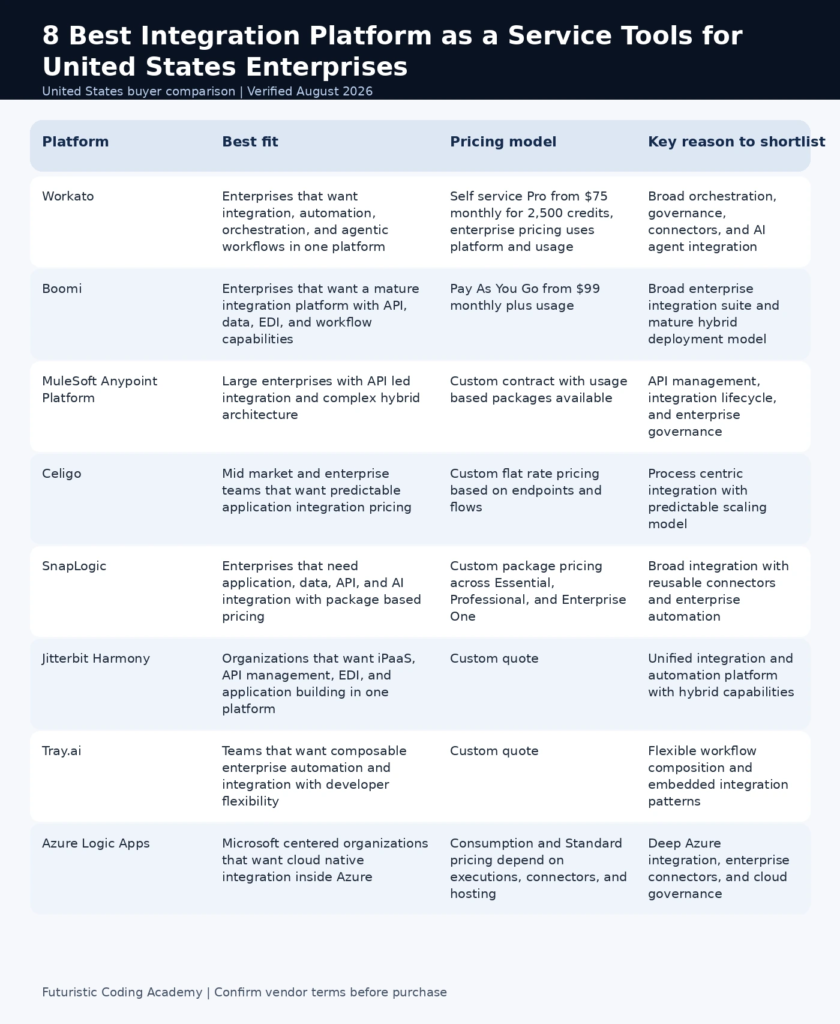
Infographic: Best integration platform as a service tools at a glance
How we evaluated these options
Current enterprise iPaaS comparisons emphasize connector breadth, integration design, API management, event and data support, governance, observability, hybrid deployment, security, developer extensibility, and pricing at scale. We used those dimensions and deliberately separated enterprise integration from simple app automation.
A strong proof of concept should include at least one difficult integration, not only a happy path SaaS connector. Test authentication refresh, pagination, schema change, retry behavior, dead letter handling, alerting, API rate limits, data mapping, secret management, version control, deployment between environments, and support escalation.
- Application and data connector depth
- API, event, file, and database integration patterns
- Error handling, retry, monitoring, and observability
- Security, governance, roles, and auditability
- Hybrid and on premises connectivity
- Developer extensibility and custom connectors
- Environment promotion and lifecycle management
- Pricing predictability at expected production volume
Workato and Boomi now offer usage based or self service entry options, while Celigo emphasizes pricing by endpoints and flows rather than per task volume. Other enterprise vendors use package or custom pricing. Cost modeling must therefore use a representative workload, not a simple monthly list price.
All pricing and product details below were checked in August 2026. Enterprise contracts can vary by volume, support, region, and negotiated terms.
1. Workato
Best for: Enterprises that want integration, automation, orchestration, and agentic workflows in one platform
Workato combines application integration, workflow automation, API capabilities, data operations, enterprise governance, and newer agentic orchestration. It can serve both business automation teams and central IT when the organization wants one platform that spans departmental workflows and more controlled enterprise integration.
Why it stands out
- Large connector and recipe ecosystem
- Application integration and process automation
- API and orchestration capabilities
- Enterprise security and governance
- AI and agentic workflow features
Pricing and buying considerations
Workato current self service plans include a free one time credit allocation and Pro options starting at $75 per month for 2,500 credits, with higher credit bundles available. Direct enterprise customers use a platform edition fee plus usage based pricing. Model tasks, API calls, rows, and agent actions in a proof of concept.
Limitations to consider
The breadth of the platform can create complexity, and credit economics need to be tested with real workloads. A small team with simple app connections may not need the enterprise governance layer.
Bottom line: Choose Workato when integration, automation, and AI orchestration need to share one governed platform.
2. Boomi
Best for: Enterprises that want a mature integration platform with API, data, EDI, and workflow capabilities
Boomi Enterprise Platform covers application and data integration, API management, data hub capabilities, EDI, workflow, and automation. It has a long history in enterprise integration and supports cloud and hybrid patterns through its runtime architecture. In 2026 Boomi also continues to expand AI related platform capabilities.
Why it stands out
- Application and data integration
- API management
- EDI and B2B integration
- Hybrid runtime options
- Low code mapping and workflow capabilities
Pricing and buying considerations
Boomi currently offers a 30 day free trial and Pay As You Go starting at $99 per month plus usage. Official documentation describes a unified Boomi Message rate for self service usage, while larger subscription plans are negotiated by capability and scale.
Limitations to consider
Enterprises may need platform expertise to design reusable integrations and governance correctly. Cost should be tested using real message and process volumes.
Bottom line: Choose Boomi when the organization needs a mature integration foundation that spans applications, data, APIs, and B2B processes.
3. MuleSoft Anypoint Platform
Best for: Large enterprises with API led integration and complex hybrid architecture
MuleSoft Anypoint Platform is an enterprise integration and API management platform that supports APIs, applications, data, gateways, cloud runtimes, and hybrid deployment. It is particularly relevant to organizations that treat APIs as managed products and need a structured lifecycle across design, implementation, security, deployment, and monitoring.
Why it stands out
- API design and management
- Application and data integration
- CloudHub and hybrid runtime options
- Gateway and policy management
- Enterprise governance and monitoring
Pricing and buying considerations
MuleSoft documentation confirms usage based pricing packages for current Anypoint offerings, while commercial pricing is negotiated based on package, runtime, API, and usage requirements. A procurement evaluation should request a workload based cost model rather than a single platform quote.
Limitations to consider
The platform is usually too complex and costly for small teams that only need SaaS workflow automation. Successful adoption also requires architecture standards and skilled platform ownership.
Bottom line: Choose MuleSoft when API lifecycle, hybrid enterprise integration, and governance are strategic architecture requirements.
4. Celigo
Best for: Mid market and enterprise teams that want predictable application integration pricing
Celigo is an integration and automation platform focused on business process connectivity across applications and data. Its current pricing model emphasizes endpoints and flows rather than task or transaction volume, which can be attractive when a business wants more predictable cost as integrations run more frequently.
Why it stands out
- Application and data integration
- Prebuilt integration applications and connectors
- API Builder and advanced platform features
- Sandbox and enterprise governance on higher editions
- Current AI and agent related capabilities
Pricing and buying considerations
Celigo does not publish a fixed dollar price for Standard, Professional, and Enterprise editions. Pricing is based on endpoints and flows, and the company states that it does not charge task or transaction overages. A 30 day free trial is available.
Limitations to consider
The commercial model is predictable in concept but still requires a quote. Buyers should count endpoints, flows, environments, and future integration growth before negotiating.
Bottom line: Choose Celigo when predictable application integration economics and business process automation are priorities.
5. SnapLogic
Best for: Enterprises that need application, data, API, and AI integration with package based pricing
SnapLogic combines application integration, data integration, API management, automation, and AI capabilities around its connector ecosystem. Its current pricing page emphasizes unlimited pipelines, data movement, and transformations within package based offerings, which aims to reduce the fear of transaction based cost spikes.
Why it stands out
- Application and data integration
- Large prebuilt connector ecosystem
- API management and automation
- AI related orchestration capabilities
- Package based enterprise pricing model
Pricing and buying considerations
SnapLogic sells Essential, Professional, and Enterprise One packages through a sales process. Its current pricing model emphasizes predictable bundles and unlimited pipelines, data movement, and transformations within the purchased package. Buyers still need a written quote for connectors, environments, support, and advanced capabilities.
Limitations to consider
The absence of public dollar pricing makes quick comparison difficult. A proof of concept should also test custom connector behavior and observability for failure scenarios.
Bottom line: Choose SnapLogic when broad integration and predictable package economics matter to a larger enterprise.
6. Jitterbit Harmony
Best for: Organizations that want iPaaS, API management, EDI, and application building in one platform
Jitterbit Harmony combines iPaaS, API management, EDI, application development, and automation. It supports cloud and private agents, making it relevant when applications and data exist across SaaS and internal environments. Current 2026 releases continue to add integration, observability, and platform improvements.
Why it stands out
- Application and data integration
- API management
- EDI and B2B capabilities
- Private agents for hybrid integration
- App Builder and automation options
Pricing and buying considerations
Jitterbit uses custom pricing based on platform scope and enterprise requirements. Ask for a quote that separates iPaaS, API, EDI, app building, environments, support, and usage so the organization can compare total cost with other platforms.
Limitations to consider
A unified suite can create overlap if the business already owns separate API management or EDI platforms. Define which Harmony components will actually replace existing tools.
Bottom line: Choose Jitterbit when integration, APIs, EDI, and business automation need to be consolidated under one enterprise platform.
7. Tray.ai
Best for: Teams that want composable enterprise automation and integration with developer flexibility
Tray.ai provides an enterprise automation and integration platform with workflow building, connectors, APIs, and embedded integration options. It can fit teams that need more composability than a simple no code automation product but want a visual integration layer that business and technical users can share.
Why it stands out
- Visual workflow and integration builder
- Connector ecosystem
- API and custom integration support
- Embedded integration options
- Enterprise governance controls
Pricing and buying considerations
Tray.ai pricing is quote based and varies with platform package, usage, connectors, and embedded requirements. Procurement should test representative high volume workflows and request clear overage rules.
Limitations to consider
Teams with simple departmental automations may find lighter tools easier and cheaper. Enterprise value depends on governance and reuse, not just building many isolated workflows.
Bottom line: Choose Tray.ai when flexible composable integration and embedded use cases are central to the roadmap.
8. Azure Logic Apps
Best for: Microsoft centered organizations that want cloud native integration inside Azure
Azure Logic Apps is a cloud workflow and integration service for connecting applications, services, data, APIs, and systems through visual workflows. It is particularly compelling for organizations already standardized on Azure, Microsoft identity, networking, monitoring, and cloud governance.
Why it stands out
- Visual workflow design
- Azure and enterprise connectors
- Consumption and Standard deployment models
- Hybrid and enterprise integration patterns
- Connection to Azure monitoring and security services
Pricing and buying considerations
Microsoft publishes Logic Apps pricing by execution model, connectors, and hosting choice. The pricing calculator should be used with expected action counts, connector types, integration accounts, and Standard plan resources. Microsoft notes that published figures are estimates and actual contract pricing can vary.
Limitations to consider
Consumption based workflow cost can become hard to predict at high action volumes, and architecture tied deeply to Azure may be less portable to another cloud.
Bottom line: Choose Azure Logic Apps when Microsoft cloud alignment and native Azure governance outweigh cross platform portability.
How to evaluate iPaaS with a production proof of concept
Do not judge an integration platform by connecting two popular SaaS applications in a demo. The hard part of enterprise integration is what happens when authentication expires, an API changes, a payload is malformed, a downstream service throttles, or an integration must be promoted from development to production without losing governance.
- Choose one high value integration with realistic data volume
- Include at least one custom API or database connection
- Simulate a failed dependency and verify retry behavior
- Test alerting, logs, traceability, and replay
- Change a schema and observe failure handling
- Promote the integration between environments
- Measure developer and operator time as well as platform usage
- Estimate annual cost using real production volume
iPaaS versus workflow automation
Workflow automation tools are excellent for user level tasks and departmental productivity. iPaaS becomes necessary when the organization needs managed APIs, hybrid connectivity, complex mapping, reusable components, lifecycle controls, observability, security policies, environment promotion, and centralized governance across many teams. The categories overlap, but the operational expectations differ.
Integration architecture skills still matter
Low code does not remove architecture. Teams still need to understand APIs, data models, authentication, idempotency, rate limits, retries, transactions, and security. FCA resources on working with APIs in Java, Python API integration, and front end and backend integration in MERN provide useful foundations for evaluating what an iPaaS is doing behind the visual designer.
Governance questions to answer before standardizing on iPaaS
Enterprise integration platforms can reduce custom code while creating a new shared dependency. Define who can create production connections, who owns credentials, how integrations are reviewed, which environments exist, how changes are promoted, and who responds when a downstream system fails. Without those rules, a low code platform can create the same maintenance problem as unmanaged scripts, only at a larger scale.
Ask vendors how audit logs, role controls, secrets, private network connectivity, regional data processing, deployment history, and rollback behave in the exact package being quoted. Also identify an exit path. Integrations should be documented well enough that the business can migrate critical flows if commercial or technical requirements change.
Frequently Asked Questions
What is iPaaS?
Integration Platform as a Service is a cloud delivered platform for connecting applications, APIs, data, events, and business processes with centralized design, execution, monitoring, and governance.
What is the best iPaaS platform overall?
Workato is a strong overall choice for organizations that want integration, automation, and agentic orchestration together. Boomi and MuleSoft remain strong enterprise choices for broad integration architecture.
What is the difference between iPaaS and Zapier style automation?
Department automation focuses on user workflows between apps. Enterprise iPaaS adds deeper integration patterns, governance, observability, hybrid connectivity, API management, lifecycle control, and scale.
Which iPaaS is best for Microsoft Azure?
Azure Logic Apps is the most natural fit when the organization is already standardized on Azure identity, monitoring, networking, and cloud services.
Which iPaaS is best for ecommerce integration?
Celigo is a strong option for application and business process integration in ecommerce and mid market environments. Workato, Boomi, and other platforms can also support these use cases.
How much does iPaaS cost?
Pricing ranges from self service plans around $75 to $99 per month plus usage to large custom enterprise contracts. Total cost depends on messages, actions, connectors, endpoints, flows, runtimes, support, and governance.
What should an iPaaS proof of concept test?
Test a real integration with authentication, pagination, mapping, rate limits, failure recovery, alerting, logging, schema changes, deployment between environments, and realistic production volume.
Can iPaaS connect on premises systems?
Many enterprise platforms support private agents, gateways, runtime fabrics, or hybrid connectivity. Confirm network architecture and security requirements for the specific product.
Does iPaaS replace API management?
Some platforms include API management, but not every organization should replace a dedicated API platform. Compare gateway, policy, developer portal, lifecycle, analytics, and security requirements.
Can business users build integrations safely?
Yes when governance defines approved connectors, credentials, environments, policies, ownership, and monitoring. Citizen integration without controls can create shadow IT and unmanaged data movement.
How do we estimate iPaaS cost at scale?
Model representative workflows using expected messages, actions, rows, API calls, concurrency, connectors, environments, and support. Include failure retries and peak periods rather than using average volume only.
What is the biggest mistake when choosing iPaaS?
Choosing on connector count or demo simplicity without testing operational behavior. Error handling, observability, governance, deployment lifecycle, and cost at production volume usually determine long term success.
Final recommendation
Workato offers the broadest combination of integration, automation, governance, and newer agentic workflows for many enterprises. Boomi is a mature platform with a flexible self service entry path, MuleSoft is strongest when API lifecycle and hybrid enterprise architecture are strategic, and Celigo stands out for predictable endpoint and flow pricing. SnapLogic, Jitterbit, Tray.ai, and Azure Logic Apps each become compelling when their platform model matches the organization architecture.
Run a production style proof of concept before signing a long contract. The right iPaaS should make integrations easier to build, easier to operate, easier to govern, and easier to understand when something fails.