Password managers have become part of identity security rather than a convenience app. A business vault can generate unique credentials, store passkeys, secure shared secrets, support multi factor authentication, connect to identity providers, automate onboarding and offboarding, and give administrators visibility that browser spreadsheets and shared documents cannot provide.
United States teams should evaluate these tools as security infrastructure. The strongest product is not the one with the longest feature list. It is the one that employees will actually use while meeting the organization requirement for recovery, administration, logging, access control, and incident response. NIST current digital identity guidance explicitly allows password managers and autofill, and NIST notes that password managers increase the likelihood that users choose stronger passwords.
This guide compares seven current options for teams. For technical context, the FCA computer courses guide introduces networking and cybersecurity concepts, while the Java full stack guide covers JWT and OAuth2 authentication patterns that help developers understand how application authentication differs from storing user credentials.
Best password managers and identity tools at a glance
| Platform | Best for | Current pricing approach | Primary strength | Main consideration |
|---|---|---|---|---|
| 1Password | Businesses that want polished user experience with strong administration | Business from $8.99 per user monthly on annual billing | Strong usability, admin controls, integrations, and developer options | Higher per user cost than value focused competitors |
| Bitwarden | Security conscious teams that value open source transparency and strong price efficiency | Teams $4 per user monthly, Enterprise $6 per user monthly on annual billing | Open source ecosystem, broad platform support, and competitive business pricing | Administration can feel more technical than consumer first products |
| Keeper | Organizations that want strong enterprise controls and security add ons | Current business plans start around $2 per user monthly for Starter on annual billing | Enterprise administration, security reporting, and optional privileged access products | Best capabilities can require multiple product modules |
| Dashlane | Teams that want password management plus credential risk monitoring | Omnix Password Management from $8 per user monthly | Credential protection, risk visibility, and business administration | Current business packaging is more security platform oriented than simple vault pricing |
| NordPass | Small and mid sized teams that want straightforward business credential management | Teams, Business, and Enterprise plans with current price shown dynamically | Accessible interface with business policies and sharing | Enterprise identity depth should be compared carefully with larger rivals |
| Proton Pass | Privacy focused teams that want password management within the Proton ecosystem | Business plans and bundles vary by package, with trials available | Privacy focused ecosystem, passkeys, aliases, and secure sharing | Enterprise ecosystem is narrower than dedicated identity platforms |
| LastPass | Teams that want a familiar enterprise password management platform | Business pricing varies by current package and seat requirements | Broad business deployment familiarity and administrative controls | Security buyers should perform careful vendor risk review before renewal or migration |
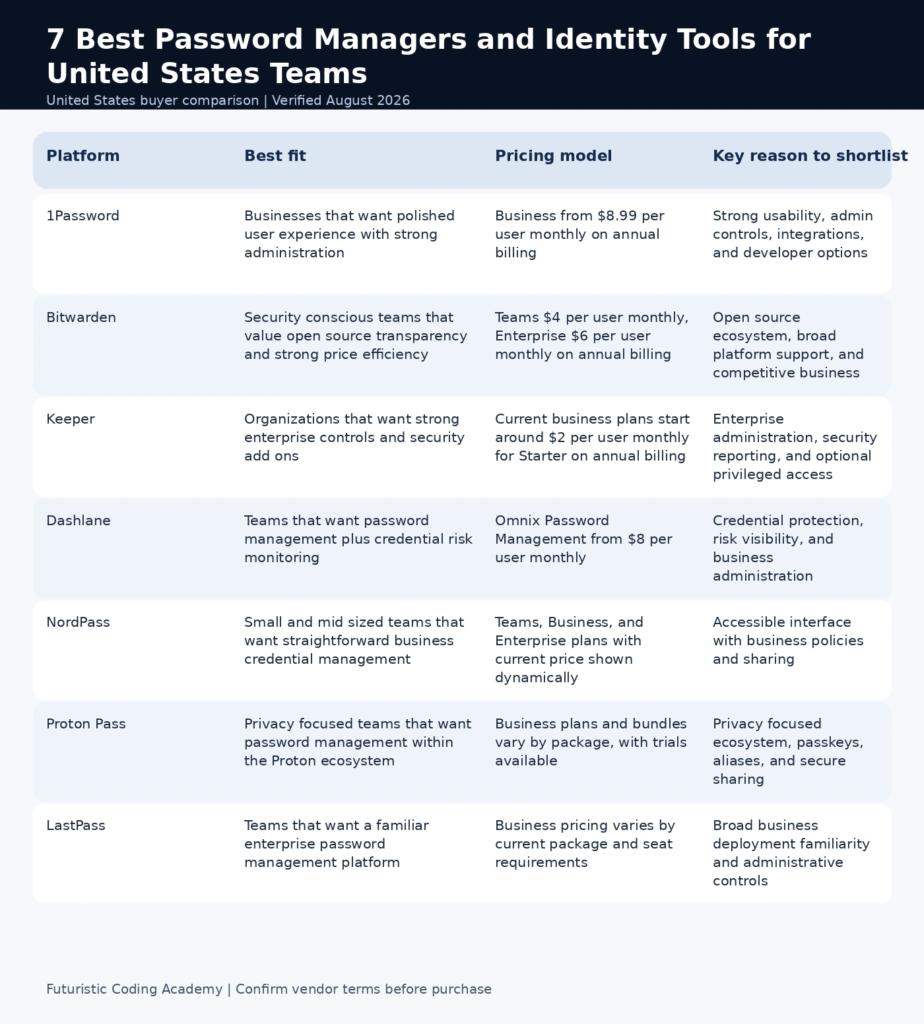
Infographic: Best password managers and identity tools at a glance
How we evaluated these options
Current buyer guides emphasize encryption, secure sharing, multi factor authentication, passkeys, recovery, breach alerts, device support, administration, and price. For business use, we added SSO, SCIM or directory provisioning, role controls, auditability, and the quality of offboarding controls.
We used official vendor documentation and current plan pages for product claims. We did not claim that one encryption design makes a product impossible to breach. A password manager concentrates valuable secrets, so the security model also depends on master credentials, multi factor authentication, endpoint security, recovery design, and administrator practices.
- Strong encryption and zero knowledge design where applicable
- Multi factor authentication and passkey support
- Secure team sharing and permissions
- SSO, SCIM, or directory integration for larger teams
- Administrative reporting and event visibility
- Recovery and emergency access design
- Cross platform usability and browser support
- Transparent business pricing and deployment fit
NIST recommends long master passphrases, unique generated passwords, multi factor authentication, and careful protection of the password vault because it is a high value target. Those controls matter regardless of vendor.
Pricing was checked in August 2026. Business plan features and minimum seat rules can change, so verify the current vendor page before rollout.
1. 1Password
Best for: Businesses that want polished user experience with strong administration
1Password Business combines user friendly vaults with team administration, secure sharing, SSO and directory integrations, reporting, developer secrets workflows, and broad device support. It is a strong option when adoption matters because security controls have little value if employees bypass them. The platform also supports passkeys and can fit both traditional office users and technical teams.
Why it stands out
- Business vaults and role based permissions
- SSO and identity provider integrations
- SCIM and directory provisioning options
- Passkey and multi factor authentication support
- Developer and secrets related capabilities
Pricing and buying considerations
1Password currently lists Business at $8.99 per user per month with annual billing. Smaller teams can also evaluate its Teams Starter offering. Enterprise buyers should check identity integration and support requirements before selecting the plan.
Limitations to consider
It is more expensive per user than Bitwarden or Keeper entry business plans. Organizations focused mainly on lowest cost credential storage may not need the broader experience and integration layer.
Bottom line: Choose 1Password when secure adoption, polished usability, and enterprise administration are equally important.
2. Bitwarden
Best for: Security conscious teams that value open source transparency and strong price efficiency
Bitwarden is an open source password manager with business vaults, secure sharing, directory integration, SSO options, passkeys, and self hosting possibilities for organizations that need additional deployment control. It is especially attractive for technical teams and cost conscious organizations that still need serious enterprise capabilities.
Why it stands out
- Open source client and server ecosystem
- Teams and Enterprise organization controls
- Passkey and multi factor authentication support
- Directory and SSO options
- Self hosting available for qualified use cases
Pricing and buying considerations
Bitwarden currently lists Teams at $4 per user per month and Enterprise at $6 per user per month with annual billing. Personal accounts also have a free tier, which can make employee onboarding more familiar.
Limitations to consider
Self hosting adds operational responsibility and should not be chosen merely because it is possible. Some organizations may also prefer a more guided administrative experience.
Bottom line: Choose Bitwarden when price efficiency, transparency, and deployment flexibility are top priorities.
3. Keeper
Best for: Organizations that want strong enterprise controls and security add ons
Keeper provides business password management with encrypted vaults, secure sharing, administration, policy enforcement, SSO integrations, and optional products for secrets and privileged access. It is a practical choice for organizations that want to grow from password management into a broader credential security program.
Why it stands out
- Business and enterprise vault administration
- Role and policy controls
- Security audit and reporting features
- SSO and directory integration options
- Optional secrets and privileged access products
Pricing and buying considerations
Keeper official 2026 materials list Starter around $2 per user per month on annual billing, Business around $4, and Enterprise around $6, with exact packaging and add ons varying by requirement. Verify current checkout or sales pricing before procurement.
Limitations to consider
The product family is broad, so buyers should distinguish password management from optional secrets, connection, and privileged access modules when calculating total cost.
Bottom line: Choose Keeper when strong administrative security controls and room to expand into broader credential security matter.
4. Dashlane
Best for: Teams that want password management plus credential risk monitoring
Dashlane has repositioned its business offering around credential protection rather than only password storage. Its current professional products combine password management with security monitoring, administrative controls, and features designed to reduce risky employee credential behavior. This can be useful for organizations that want security teams to see and act on credential risk rather than simply distribute a vault.
Why it stands out
- Business password management
- Credential risk monitoring
- Admin policy controls
- Passkey and modern authentication support
- Security focused reporting
Pricing and buying considerations
Dashlane current professional pricing lists Omnix Password Management at $8 per user per month and Credential Protection at $4 per user per month, while larger enterprise requirements can be quoted separately.
Limitations to consider
Teams that only need basic secure sharing can find lower cost options. Buyers should also map which Omnix modules are actually required before comparing total price.
Bottom line: Choose Dashlane when credential risk visibility is as important as the password vault itself.
5. NordPass
Best for: Small and mid sized teams that want straightforward business credential management
NordPass Business provides team vaults, secure sharing, administrative controls, activity visibility, multi factor authentication, and business policy features in a familiar interface. It can be a practical choice for teams that want to improve password hygiene quickly without deploying a complex identity platform.
Why it stands out
- Team credential vaults
- Secure sharing and permissions
- Business policy controls
- Activity visibility and administration
- Passkey support
Pricing and buying considerations
NordPass sells Teams, Business, and Enterprise tiers. Current prices can be displayed dynamically by term and seat count, so procurement teams should use the official calculator rather than relying on an older fixed figure.
Limitations to consider
Large enterprises should validate SSO, provisioning, reporting, and support requirements against 1Password, Keeper, or Bitwarden Enterprise before standardizing.
Bottom line: Choose NordPass when ease of deployment and everyday usability are the main objectives.
6. Proton Pass
Best for: Privacy focused teams that want password management within the Proton ecosystem
Proton Pass combines password storage, passkeys, secure notes, email aliases, and team sharing with Proton broader privacy focused services. Business editions add administration and can be attractive for teams that already use Proton Mail, VPN, or related products.
Why it stands out
- Password and passkey storage
- Secure team sharing
- Email alias integration
- Business administration
- Connection to wider Proton privacy services
Pricing and buying considerations
Proton offers Pass business plans and broader Proton business bundles, with minimum user requirements on some packages and trials for evaluation. Because bundle pricing changes by product combination, compare the exact business package instead of a consumer subscription.
Limitations to consider
Organizations that need deep privileged access management, extensive directory automation, or a large enterprise integration catalog may prefer a more specialized business password platform.
Bottom line: Choose Proton Pass when privacy alignment and the broader Proton ecosystem are important to the organization.
7. LastPass
Best for: Teams that want a familiar enterprise password management platform
LastPass remains a widely known business password manager with shared vaults, policies, directory integrations, SSO related capabilities, and administration features. Because password managers sit at the center of organizational credentials, buyers should review current security architecture, incident history, product improvements, and contract terms with the same rigor used for any other identity security vendor.
Why it stands out
- Business vaults and shared folders
- Administrative policies
- Directory and identity integrations
- Multi factor authentication support
- Business reporting features
Pricing and buying considerations
LastPass business packaging can change based on current plans and enterprise requirements. Use the official pricing page or sales quote for the current per user rate and included identity features.
Limitations to consider
Security conscious organizations should include vendor risk assessment, incident response history, security architecture, and current independent assurance in procurement rather than choosing on familiarity alone.
Bottom line: Consider LastPass when its current controls and commercial terms fit your organization after a complete security review.
What NIST guidance means for password manager adoption
NIST current digital identity guidance allows password managers and autofill and recognizes that password managers can increase the likelihood that users create stronger passwords. That does not make the vault risk free. A stolen master credential, compromised endpoint, weak recovery process, or poorly protected administrator account can still create serious exposure.
- Require a strong master passphrase
- Require multi factor authentication for business vault access
- Use managed provisioning and immediate offboarding
- Limit who can export or recover shared secrets
- Review event logs and suspicious access
- Keep endpoint security and browser updates current
Password manager versus identity provider
A password manager stores and protects credentials, while an identity provider can centralize authentication through SSO and lifecycle controls. Mature organizations often use both. The identity provider reduces the number of passwords employees need, and the password manager secures the credentials and secrets that still exist outside SSO.
Passkeys reduce password dependence
Passkeys can remove reusable passwords from supported services, which reduces phishing and credential reuse risk. A business manager should make passkey adoption easy without breaking account recovery and ownership processes.
Offboarding is a critical buying test
Ask how quickly administrators can suspend access, transfer shared vault ownership, revoke sessions, rotate exposed secrets, and preserve audit records when an employee leaves.
How developers should handle application secrets
Application secrets should not be copied into source code or shared through personal vault notes as a substitute for a proper secrets workflow. FCA material on JWT and OAuth2, MERN authentication, and cloud and DevOps practices can help developers distinguish user authentication, service credentials, and deployment secrets.
How to roll out a password manager without creating a new security gap
A password manager rollout should be treated as an identity project, not a browser extension deployment. Start by identifying shared accounts, privileged credentials, service accounts, recovery contacts, and applications that already support single sign on or passkeys. Move human users away from reused passwords first, then address shared operational credentials with clear owners and rotation rules.
Run a pilot with employees from IT, finance, operations, and a normal business team. Their experience will expose browser compatibility, mobile access, recovery, sharing, and onboarding problems before a company wide mandate. Require multi factor authentication from the first day and document what happens when a user loses every enrolled device.
For administrators, test suspension, vault transfer, session revocation, export controls, audit logging, and emergency access. An offboarding process should remove access in minutes, not after someone remembers to clean up shared folders. If the organization uses an identity provider, connect provisioning so account lifecycle is driven by the authoritative employee directory.
Finally, separate workforce passwords from application secrets. Developers working with APIs, databases, and deployment systems should use purpose built secrets management where automation requires non human credentials. The FCA full stack integration and DevOps guide provides useful context for authentication and deployment responsibilities.
Frequently Asked Questions
What is the best password manager for businesses?
1Password is a strong overall choice for many businesses because it balances usability with administration. Bitwarden is especially attractive when price and open source transparency matter.
Are password managers recommended by NIST?
NIST current guidance permits password managers and autofill and notes that password managers can increase the likelihood of stronger password use. Organizations still need strong master credentials, multi factor authentication, and endpoint security.
Is a business password manager safer than a spreadsheet?
Yes in most cases because a business manager is designed for encrypted storage, access control, secure sharing, logging, and revocation. A spreadsheet cannot provide the same credential lifecycle controls.
What is zero knowledge password management?
Zero knowledge generally means the provider designs the service so it does not possess the secrets needed to decrypt the customer vault. Buyers should still examine the exact architecture and recovery model.
Should employees use personal password managers for work?
Businesses should provide and manage an approved business vault so ownership, sharing, recovery, and offboarding can be controlled. Personal vaults create ownership and recovery problems.
Do password managers support passkeys?
Many leading products now store and use passkeys. Support varies by browser, device, operating system, and business policy, so test the actual employee environment.
What is the difference between SSO and a password manager?
SSO centralizes authentication for supported applications, while a password manager secures credentials for systems that still require them. They are complementary rather than identical tools.
Which password manager is best for small teams?
Bitwarden, Keeper, NordPass, and 1Password Teams are all practical candidates. Compare minimum seats, sharing, recovery, and admin controls rather than choosing solely on price.
Which password manager is best for developers?
1Password and Bitwarden are strong developer choices because they support technical workflows and secure sharing. Dedicated secrets management may still be required for production applications.
How should a company roll out a password manager?
Pilot with a representative group, enforce multi factor authentication, define vault ownership, migrate shared credentials, train users, integrate provisioning, and create a clear offboarding process.
Can a password manager be hacked?
Any software can face vulnerabilities or account compromise. Strong cryptography helps, but organizations must also protect master credentials, endpoints, recovery methods, administrators, and vendor access.
What should we verify before buying an enterprise password manager?
Review encryption design, security assessments, SSO, SCIM, data residency, recovery, audit logs, export controls, support, breach response, mobile policies, and contract terms.
Final recommendation
1Password is the best balanced option for teams that prioritize both usability and business controls. Bitwarden offers exceptional value and flexibility, Keeper is strong for broader credential security, and Dashlane is compelling when credential risk monitoring is part of the goal.
The product choice is only half of the security outcome. Require multi factor authentication, make offboarding immediate, keep endpoints secure, reduce the number of shared credentials, and use SSO or passkeys wherever the application supports them.