Project management software in 2026 is increasingly a system for coordinating work, knowledge, automation, and AI assistance rather than a simple task list. United States teams can choose from lightweight collaboration tools, software delivery platforms, portfolio systems, agency focused suites, and flexible workspaces. The best product is the one that matches how your team plans, assigns, reviews, and reports work without creating a second job maintaining the tool.
A 2026 review of practitioner literature on generative AI in software project management found that practitioners mainly describe AI as an assistant rather than a project manager replacement. Reported use cases include routine automation, predictive analytics, communication support, and agile practices, while concerns remain around hallucinations, privacy, ethics, and human judgment. That framing is useful when evaluating the growing AI features inside work management platforms.
This guide is written for a United States audience. Prices are shown in United States dollars where a public price was available. Vendors can change pricing and packaging, so confirm current terms on the linked official page before purchasing.
8 Best Options at a Glance
| Tool | Best for | Pricing approach | Key strength |
|---|---|---|---|
| ClickUp | Teams wanting many work methods in one platform | Free plan, paid from about $10 per user monthly | Flexible views and broad feature set |
| monday.com | New and cross functional teams | Free plan, paid from about $12 per seat monthly | Visual setup and workflow templates |
| Asana | Cross functional collaboration and integrations | Free plan, paid from about $13.49 per user monthly | Clear task relationships and team planning |
| Jira | Software and agile delivery teams | Free for up to 10 users, Standard about $7.91 per user monthly | Deep issue tracking and agile workflows |
| Smartsheet | Spreadsheet oriented project and portfolio management | Paid plans from about $12 per member monthly | Grid based planning with enterprise controls |
| Zoho Projects | Budget conscious small and mid sized businesses | Free plan, paid from about $5 per user monthly | Affordable planning inside Zoho ecosystem |
| Teamwork.com | Agencies and client service businesses | Free plan, paid from about $13.99 per user monthly | Client work, budgets, and profitability context |
| Notion | Knowledge plus lightweight project management | Free plan, paid from about $12 per user monthly | Flexible docs, databases, and team knowledge |
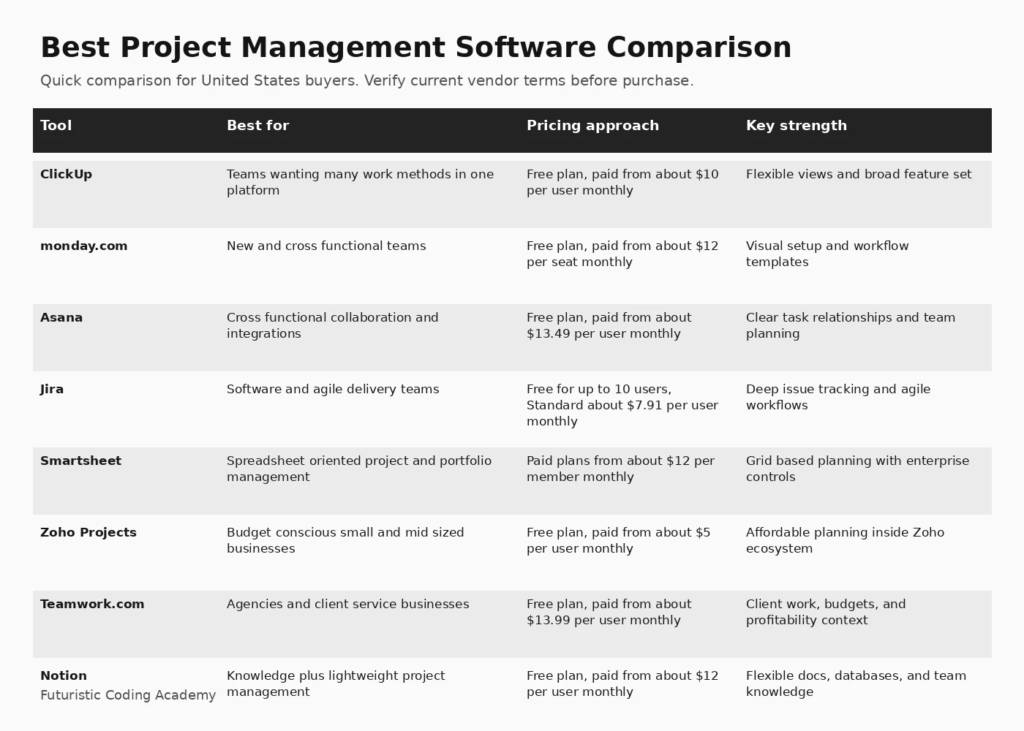
Infographic: 8 Best Options at a Glance
How We Evaluated Best Project Management Software
We evaluated platforms using planning views, task relationships, collaboration, automation, reporting, resource visibility, integrations, permissions, AI capabilities, price, and fit for different operating models. Current 2026 comparison pages from Forbes Advisor emphasize use case fit, pricing, free plans, integrations, automations, and support. Those dimensions are included here alongside direct vendor information.
We also considered how clearly each platform explains limitations, deployment requirements, pricing, and the work required after the initial setup. A useful buyer guide should help a team eliminate poor fits, not simply list popular vendors.
1. ClickUp
Best for: Teams wanting many work methods in one platform
ClickUp combines tasks, docs, dashboards, goals, forms, whiteboards, automation, and AI features in one workspace. It is useful for teams that want to adapt the same platform to agile delivery, marketing campaigns, operations, client work, and recurring processes rather than maintaining separate tools.
Why it stands out
Flexible views and broad feature set is the main reason to shortlist this platform. The value should still be tested against the workflows, integrations, governance requirements, and team skills in your organization.
Pricing and buying considerations
Pricing: Free plan, paid from about $10 per user monthly. Review the official ClickUp website for current plan details, limits, and trial availability.
Limitations
The breadth can make workspaces feel complex if every feature is enabled. Teams should create a clear hierarchy, naming system, permission model, and limited set of views before rolling it out widely.
2. monday.com
Best for: New and cross functional teams
monday.com is approachable for teams that want visual boards, timelines, forms, automations, dashboards, and templates without a highly technical setup. It is particularly useful for operations, marketing, project offices, and teams that want to model their own workflows using configurable columns and automations.
Why it stands out
Visual setup and workflow templates is the main reason to shortlist this platform. The value should still be tested against the workflows, integrations, governance requirements, and team skills in your organization.
Pricing and buying considerations
Pricing: Free plan, paid from about $12 per seat monthly. Review the official monday.com website for current plan details, limits, and trial availability.
Limitations
Pricing can rise with seat requirements and higher tier features. Complex environments should test governance, portfolio reporting, dependency management, and how many boards are required for a complete operating model.
3. Asana
Best for: Cross functional collaboration and integrations
Asana provides projects, tasks, dependencies, timelines, portfolios, forms, automation, goals, and a large integration ecosystem. It is a strong fit for organizations that want structured work management without the engineering specific conventions of Jira.
Why it stands out
Clear task relationships and team planning is the main reason to shortlist this platform. The value should still be tested against the workflows, integrations, governance requirements, and team skills in your organization.
Pricing and buying considerations
Pricing: Free plan, paid from about $13.49 per user monthly. Review the official Asana website for current plan details, limits, and trial availability.
Limitations
Advanced resource planning, portfolios, governance, and reporting require higher plans. Teams should calculate paid seat counts carefully and confirm that guest collaboration works for their client or partner model.
4. Jira
Best for: Software and agile delivery teams
Jira remains a leading option for software teams that need backlogs, boards, issue types, workflows, releases, reporting, and integrations across the development lifecycle. Atlassian now includes Rovo AI capabilities in paid cloud plans, which adds search, chat, and agent features to the broader teamwork environment.
Why it stands out
Deep issue tracking and agile workflows is the main reason to shortlist this platform. The value should still be tested against the workflows, integrations, governance requirements, and team skills in your organization.
Pricing and buying considerations
Pricing: Free for up to 10 users, Standard about $7.91 per user monthly. Review the official Jira website for current plan details, limits, and trial availability.
Limitations
Jira can become difficult to govern when every team creates its own fields and workflows. Successful implementations usually need standards for project types, permissions, automation, and reporting.
5. Smartsheet
Best for: Spreadsheet oriented project and portfolio management
Smartsheet combines familiar grid based planning with forms, automation, dashboards, resource management, approvals, and portfolio reporting. It can work well for program offices and operational teams that are comfortable with spreadsheet concepts but need more structure and governance.
Why it stands out
Grid based planning with enterprise controls is the main reason to shortlist this platform. The value should still be tested against the workflows, integrations, governance requirements, and team skills in your organization.
Pricing and buying considerations
Pricing: Paid plans from about $12 per member monthly. Review the official Smartsheet website for current plan details, limits, and trial availability.
Limitations
Teams seeking a conversational task experience or developer focused issue tracking may find other platforms more natural. Advanced portfolio and resource capabilities may also require additional products or higher plans.
6. Zoho Projects
Best for: Budget conscious small and mid sized businesses
Zoho Projects provides tasks, milestones, Gantt charts, timesheets, automation, collaboration, and integrations at a relatively low starting price. Businesses already using Zoho CRM, Books, Desk, or other Zoho applications can gain additional value from the shared ecosystem.
Why it stands out
Affordable planning inside Zoho ecosystem is the main reason to shortlist this platform. The value should still be tested against the workflows, integrations, governance requirements, and team skills in your organization.
Pricing and buying considerations
Pricing: Free plan, paid from about $5 per user monthly. Review the official Zoho Projects website for current plan details, limits, and trial availability.
Limitations
Organizations with complex portfolio governance or highly customized enterprise workflows should compare reporting depth, permissions, and integration requirements carefully.
7. Teamwork.com
Best for: Agencies and client service businesses
Teamwork.com is built around project delivery for client service organizations. Along with tasks and project planning, it emphasizes time tracking, budgets, utilization, workload, client access, and profitability. Agencies that need to connect project status with billable work should include it in the shortlist.
Why it stands out
Client work, budgets, and profitability context is the main reason to shortlist this platform. The value should still be tested against the workflows, integrations, governance requirements, and team skills in your organization.
Pricing and buying considerations
Pricing: Free plan, paid from about $13.99 per user monthly. Review the official Teamwork.com website for current plan details, limits, and trial availability.
Limitations
Product and engineering teams that do not bill clients may not need the financial and service delivery emphasis. Evaluate the platform against the actual operating model rather than generic feature counts.
8. Notion
Best for: Knowledge plus lightweight project management
Notion combines documents, wikis, databases, projects, calendars, and AI in one flexible workspace. It is strong when project work and knowledge are tightly connected, such as product planning, content operations, startup execution, and team documentation.
Why it stands out
Flexible docs, databases, and team knowledge is the main reason to shortlist this platform. The value should still be tested against the workflows, integrations, governance requirements, and team skills in your organization.
Pricing and buying considerations
Pricing: Free plan, paid from about $12 per user monthly. Review the official Notion website for current plan details, limits, and trial availability.
Limitations
Notion is less opinionated than dedicated project management tools, which is both a strength and a risk. Teams may spend too much time designing systems unless ownership and templates are standardized.
How to Choose the Right Best Project Management Software
Choose the Operating Model First
Agile software delivery, agency client work, marketing campaigns, construction programs, and executive portfolio management have different needs. Define the workflow before choosing software.
Calculate the Real Seat Cost
Many platforms advertise attractive starting prices but charge by user, member, creator, or seat. Include contractors, guests, managers, approvers, and occasional collaborators in the model.
Test Reporting With Real Stakeholders
Create the reports your leadership actually needs during the trial. If the tool cannot answer status, risk, capacity, budget, and dependency questions without manual exports, the implementation will create ongoing administrative work.
Limit Customization Before Scaling
Flexible platforms can become inconsistent. Standardize naming, statuses, custom fields, templates, permissions, and automation before allowing every team to design its own system.
Evaluate AI as an Assistant
AI can summarize updates, find information, draft tasks, and support planning, but it should not replace accountable project decisions. Measure whether it removes repetitive administration rather than adding another interface to manage.
Related FCA Resources
For broader technology context, see Full Stack Project Ideas, MERN Stack Full Course, Full Stack Web Development Roadmap, MERN Stack vs Full Stack, FCA Blog Library, Computer Courses Guide. These resources cover development, data, marketing, and practical technology foundations that support better software buying decisions.
Frequently Asked Questions
What is the best project management software overall?
ClickUp and monday.com are strong general purpose choices, Asana is excellent for cross functional collaboration, and Jira is a leading option for software delivery. The best platform depends on team workflow.
What is the best free project management software?
ClickUp, monday.com, Asana, Jira, Zoho Projects, Teamwork, and Notion offer free entry points with different limits. Compare user caps, storage, automation, and reporting before choosing.
Which project management tool is best for software teams?
Jira is purpose built for software delivery and agile workflows. ClickUp can also support engineering teams that want a broader workspace, while Notion is useful for connecting product documentation with lighter project tracking.
Which tool is best for agencies?
Teamwork.com is designed around client delivery, budgets, time, and profitability. ClickUp and Asana can also work well for agencies when configured with client workspaces and approval workflows.
Is monday.com better than Asana?
monday.com is highly visual and configurable, while Asana offers a structured task and project model with strong integrations. The better choice depends on how much customization your team wants.
Can Jira be used outside software development?
Yes. Jira can manage many types of work, especially with configurable project templates and workflows. However, non technical teams may prefer a simpler interface if they do not need detailed issue tracking.
What should a small business look for?
Small businesses should prioritize ease of setup, a usable free or lower cost tier, clear task ownership, basic automation, file and communication integrations, and reporting that does not require an administrator.
Do project management tools replace Slack or Microsoft Teams?
Usually not. Project management tools record structured work and decisions, while chat platforms support rapid conversation. The strongest setup defines which information belongs in each system.
How long should a project management software trial last?
Two to four weeks is usually enough to test a complete planning and delivery cycle. Use real projects, real collaborators, and actual reporting requirements rather than a demo workspace.
How important are automations?
Automations are valuable when they remove repetitive status updates, assignments, reminders, routing, and notifications. Too many rules can become difficult to maintain, so teams should automate stable processes first.
Can AI manage projects automatically?
AI can assist with summaries, planning suggestions, search, drafting, and routine administration. Human owners still need to make tradeoffs, manage stakeholders, resolve ambiguity, and accept accountability for delivery.
How do I migrate project management tools?
Start with active projects and required historical data. Map users, statuses, fields, attachments, automations, and integrations. Run a pilot migration and freeze changes during the final cutover to avoid duplicate or missing work.
Final Recommendation
There is no universal winner for best project management software. Start with the use case, asset or workflow requirements, team skills, and projected scale. Shortlist two or three platforms, run a realistic trial, and measure the quality of the decision support or operational improvement they create. That approach is more reliable than choosing the product with the longest feature list.
Editorial note: Futuristic Coding Academy may update this guide as products, pricing, and buyer requirements change. Inclusion does not guarantee a paid placement or ranking position.