Social media scheduling software has moved well beyond choosing a date and time for a post. United States marketing teams now expect a scheduler to handle multiple networks, short form video, approvals, analytics, reusable content, team roles, and increasingly AI assisted creation. The best platform depends less on the longest feature list and more on how many channels, brands, clients, and collaborators your team actually manages.
DataReportal’s Digital 2026 United States report estimates 254 million social media user identities in the country, equal to about 73 percent of the population. That scale explains why scheduling is now an operational system for many marketing teams rather than a convenience. Pew Research Center also continues to publish current 2026 research on how Americans use major social platforms.
This guide is written for a United States audience. Prices are shown in United States dollars where a public price was available. Vendors can change pricing and packaging, so confirm current terms on the linked official page before purchasing.
8 Best Options at a Glance
| Tool | Best for | Pricing approach | Key strength |
|---|---|---|---|
| Buffer | Creators and small teams | Free plan, paid from about $5 per channel monthly | Simple publishing workflow |
| Later | Visual first Instagram and TikTok teams | Paid plans start around $18.75 monthly | Visual planning and creator focused workflow |
| Hootsuite | Larger cross platform social teams | Standard plans around $199 monthly | Broad management and reporting suite |
| Sprout Social | Enterprise brands and agencies | Plans start around $199 per seat monthly | Analytics, engagement, and team workflow |
| SocialBee | Evergreen content queues and small businesses | Paid plans start around $24 monthly | Content categories and recurring queues |
| Metricool | Data focused marketers and creators | Free plan, paid plans from about $18 monthly | Scheduling plus analytics and reporting |
| SocialPilot | Agencies managing many client accounts | Tiered paid plans with trials | Agency friendly account management |
| Vista Social | Teams wanting publishing, engagement, and listening in one tool | Paid plans with profile and user limits | Broad feature set at mid market positioning |
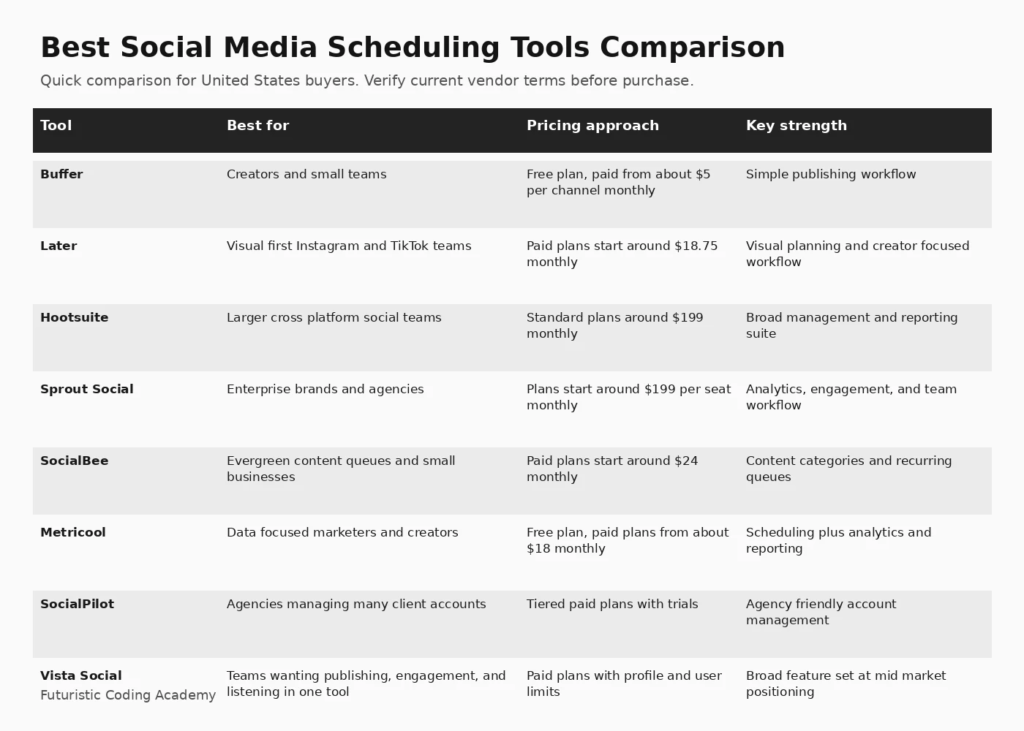
Infographic: 8 Best Options at a Glance
How We Evaluated Best Social Media Scheduling Tools
We compared scheduling tools using platform coverage, calendar and queue design, approval workflow, analytics, engagement features, collaboration, agency support, pricing approach, and usability. Current first page guides from Buffer and Later consistently emphasize price, free plans, calendar quality, bulk scheduling, approvals, and analytics, so those dimensions are included here while the recommendations remain independently written.
We also considered how clearly each platform explains limitations, deployment requirements, pricing, and the work required after the initial setup. A useful buyer guide should help a team eliminate poor fits, not simply list popular vendors.
1. Buffer
Best for: Creators and small teams
Buffer remains one of the easiest social media scheduling tools to adopt. Its calendar, queue based publishing, channel support, collaboration features, and straightforward interface make it a strong starting point for creators and smaller United States businesses. Buffer is especially useful when the team values a clean workflow over a large enterprise suite.
Why it stands out
Simple publishing workflow is the main reason to shortlist this platform. The value should still be tested against the workflows, integrations, governance requirements, and team skills in your organization.
Pricing and buying considerations
Pricing: Free plan, paid from about $5 per channel monthly. Review the official Buffer website for current plan details, limits, and trial availability.
Limitations
Per channel pricing can become more expensive as a business manages many profiles. Teams that need deep listening, enterprise governance, or highly customized reporting may outgrow the simpler workflow.
2. Later
Best for: Visual first Instagram and TikTok teams
Later is a natural fit for teams whose social strategy is highly visual. It combines scheduling, calendar planning, media organization, analytics, link in bio tools, and creator oriented features. Brands that plan Instagram and TikTok content around campaigns can benefit from seeing the visual sequence before posts are published.
Why it stands out
Visual planning and creator focused workflow is the main reason to shortlist this platform. The value should still be tested against the workflows, integrations, governance requirements, and team skills in your organization.
Pricing and buying considerations
Pricing: Paid plans start around $18.75 monthly. Review the official Later website for current plan details, limits, and trial availability.
Limitations
The value is strongest for visual channels. Teams that prioritize enterprise listening, complex customer care, or broad governance should compare Later with larger management suites.
3. Hootsuite
Best for: Larger cross platform social teams
Hootsuite is built for organizations that need more than a simple scheduler. It combines publishing, engagement, analytics, social listening options, team workflows, and governance. The platform can work well for brands managing many networks, business units, or approval paths from one system.
Why it stands out
Broad management and reporting suite is the main reason to shortlist this platform. The value should still be tested against the workflows, integrations, governance requirements, and team skills in your organization.
Pricing and buying considerations
Pricing: Standard plans around $199 monthly. Review the official Hootsuite website for current plan details, limits, and trial availability.
Limitations
Pricing is substantially higher than lightweight schedulers. Smaller teams should confirm that they will actually use the reporting, listening, collaboration, and governance features that justify the cost.
4. Sprout Social
Best for: Enterprise brands and agencies
Sprout Social combines scheduling with engagement, analytics, reporting, collaboration, and social intelligence. It is often evaluated by agencies and larger brands that need consistent governance across customer care and marketing teams. Strong reporting can help stakeholders understand performance without exporting data into separate dashboards.
Why it stands out
Analytics, engagement, and team workflow is the main reason to shortlist this platform. The value should still be tested against the workflows, integrations, governance requirements, and team skills in your organization.
Pricing and buying considerations
Pricing: Plans start around $199 per seat monthly. Review the official Sprout Social website for current plan details, limits, and trial availability.
Limitations
Per seat pricing puts Sprout in a premium category. Small organizations may get more value from Buffer, Metricool, SocialBee, or SocialPilot unless they need Sprout level reporting and workflow depth.
5. SocialBee
Best for: Evergreen content queues and small businesses
SocialBee is useful for teams that publish a mix of evergreen and campaign content. Its category based queues help marketers maintain a consistent posting rhythm without manually scheduling every recurring topic. It also includes content creation assistance, workspaces, analytics, and platform integrations.
Why it stands out
Content categories and recurring queues is the main reason to shortlist this platform. The value should still be tested against the workflows, integrations, governance requirements, and team skills in your organization.
Pricing and buying considerations
Pricing: Paid plans start around $24 monthly. Review the official SocialBee website for current plan details, limits, and trial availability.
Limitations
Teams that need deep enterprise listening or sophisticated customer service workflows may need another platform. The category based approach is most valuable when the content strategy has repeatable themes.
6. Metricool
Best for: Data focused marketers and creators
Metricool combines planning and scheduling with analytics, competitor tracking, reporting, and advertising data in a relatively accessible package. It is useful for marketers who want publishing and measurement close together without moving immediately to an enterprise product.
Why it stands out
Scheduling plus analytics and reporting is the main reason to shortlist this platform. The value should still be tested against the workflows, integrations, governance requirements, and team skills in your organization.
Pricing and buying considerations
Pricing: Free plan, paid plans from about $18 monthly. Review the official Metricool website for current plan details, limits, and trial availability.
Limitations
Organizations with advanced role governance, formal approval chains, or complex service teams should test whether collaboration features are deep enough before consolidating all social operations in the platform.
7. SocialPilot
Best for: Agencies managing many client accounts
SocialPilot is designed around multi account publishing, approvals, analytics, and agency workflows. It can be cost effective for teams that need to manage a larger number of social profiles without paying enterprise prices per seat. Client management and reporting features are particularly relevant for agencies.
Why it stands out
Agency friendly account management is the main reason to shortlist this platform. The value should still be tested against the workflows, integrations, governance requirements, and team skills in your organization.
Pricing and buying considerations
Pricing: Tiered paid plans with trials. Review the official SocialPilot website for current plan details, limits, and trial availability.
Limitations
The interface and listening depth may not match premium enterprise suites. Agencies should test client approval, white label reporting, and the exact profile limits of the chosen plan.
8. Vista Social
Best for: Teams wanting publishing, engagement, and listening in one tool
Vista Social combines publishing, a content calendar, inbox management, reviews, listening, analytics, and collaboration. It appeals to teams looking for broader management capabilities without immediately moving to the highest priced enterprise products.
Why it stands out
Broad feature set at mid market positioning is the main reason to shortlist this platform. The value should still be tested against the workflows, integrations, governance requirements, and team skills in your organization.
Pricing and buying considerations
Pricing: Paid plans with profile and user limits. Review the official Vista Social website for current plan details, limits, and trial availability.
Limitations
As with any broad platform, buyers should test the specific networks and analytics that matter to their business. Feature availability and usage limits differ by plan, so account counts should be modeled before purchase.
How to Choose the Right Best Social Media Scheduling Tools
Count Profiles Before Comparing Prices
Many schedulers charge by channel, social profile, user, workspace, or a combination. Build a realistic inventory of current accounts plus the profiles you expect to add over the next year before comparing headline prices.
Match the Tool to Your Publishing Workflow
A creator may need a simple queue and visual calendar. An agency may need client approvals and separate workspaces. A larger brand may need governance, listening, engagement, and reporting. Paying for enterprise depth makes sense only when the workflow requires it.
Check Native Support for Your Priority Networks
Do not assume every platform supports every post format. Verify Instagram Reels, TikTok, YouTube Shorts, LinkedIn documents, Pinterest, Threads, X, Bluesky, first comments, alt text, tagging, and other formats that matter to your strategy.
Evaluate Analytics at the Decision Level
Basic engagement metrics are widely available. The key question is whether reports help your team decide what to publish next. Test export options, cross channel reporting, campaign views, competitor data, and whether stakeholders can understand the output.
Test Approvals With Real Content
Run a trial using a complete weekly content cycle. Include a designer, writer, approver, and publisher if those roles exist. This quickly exposes whether permissions, comments, revisions, and approvals are genuinely easier than your current process.
Related FCA Resources
For broader technology context, see Digital Marketing Course Guide, Digital Marketing Institute Guide, FCA Blog Library, Computer Courses Guide, Full Stack Project Ideas. These resources cover development, data, marketing, and practical technology foundations that support better software buying decisions.
Frequently Asked Questions
What is the best social media scheduling tool overall?
Buffer is a strong general choice for creators and small teams because it is easy to learn. Larger organizations may prefer Hootsuite or Sprout Social, while agencies should also compare SocialPilot and Vista Social.
What is the best free social media scheduler?
Buffer and Metricool both offer free entry points that can work for individuals and very small teams. Free plan limits change, so verify the number of channels, scheduled posts, and analytics features before choosing.
Can one tool schedule Instagram, TikTok, Facebook, and LinkedIn?
Yes. Most leading schedulers support those major networks, but specific post types and publishing permissions vary. Always test the exact formats your team uses.
Is social media scheduling safe for reach?
Scheduling itself does not automatically reduce reach. Content quality, audience fit, timing, format, and engagement matter more. Use a reputable tool with official platform integrations.
What is the best scheduler for agencies?
SocialPilot, Vista Social, Hootsuite, Sprout Social, and some Later plans are worth evaluating for agencies. The deciding factors are usually client workspaces, approvals, reporting, profile limits, and cost per client.
Which scheduler is best for Instagram?
Later is particularly strong for visual planning, while Buffer and Metricool are simpler choices for smaller teams. The best option depends on whether the business also needs TikTok, LinkedIn, YouTube, or client approvals.
Do social media schedulers include analytics?
Most paid scheduling platforms include analytics, but depth varies. Some focus on post performance while others add competitor analysis, listening, custom reporting, or advertising data.
How far in advance should social posts be scheduled?
Many teams plan one to four weeks ahead while leaving room for timely content. Regulated or approval heavy organizations may schedule further ahead, while news driven brands need more flexibility.
Can scheduling tools publish short form video?
Many leading tools support Reels, TikTok, and YouTube Shorts, but features such as music, stickers, trending audio, product tags, and collaboration may still require native platform steps.
What should a small business pay for social scheduling?
A small business can often start with a free plan or a lower cost paid plan. Compare the total cost for all required channels rather than only the advertised starting price.
Are social media management and scheduling tools the same?
Scheduling is one part of social media management. Broader management platforms may also include inboxes, listening, customer care, team permissions, analytics, advocacy, and governance.
How should a team evaluate a scheduler?
Use a real content week during the trial. Schedule several formats, route posts for approval, respond to comments if supported, export a report, and calculate cost for the full account inventory.
Final Recommendation
There is no universal winner for best social media scheduling tools. Start with the use case, asset or workflow requirements, team skills, and projected scale. Shortlist two or three platforms, run a realistic trial, and measure the quality of the decision support or operational improvement they create. That approach is more reliable than choosing the product with the longest feature list.
Editorial note: Futuristic Coding Academy may update this guide as products, pricing, and buyer requirements change. Inclusion does not guarantee a paid placement or ranking position.