No code app builders are no longer limited to simple forms and prototypes. In 2026, United States businesses use them for client portals, internal operations, mobile apps, SaaS MVPs, dashboards, and AI assisted workflows. The difficult part is choosing a platform whose technical ceiling matches the application you plan to build. A tool that is ideal for a simple internal portal may be the wrong foundation for a customer facing product with complex permissions and integrations.
Current 2026 research on low code and no code development highlights both the opportunity and the tradeoffs. A May 2026 academic paper on BESSER notes that model driven development can reduce handwritten code while also pointing to common commercial platform concerns such as vendor lock in and limited extensibility. That is why this guide evaluates technical ceiling and portability rather than only ease of use.
This guide is written for a United States audience. Prices are shown in United States dollars where a public price was available. Vendors can change pricing and packaging, so confirm current terms on the linked official page before purchasing.
8 Best Options at a Glance
| Tool | Best for | Pricing approach | Key strength |
|---|---|---|---|
| Bubble | Powerful web applications and SaaS MVPs | Free plan, paid plans from about $59 monthly | Deep visual logic and plugin ecosystem |
| Softr | Client portals and business apps | Free plan, paid plans from about $49 monthly | Fast business application assembly |
| Glide | Mobile friendly operational apps | Free plan, paid options available | Fast spreadsheet and database driven apps |
| FlutterFlow | Cross platform mobile and web apps | Free plan, paid plans from about $29.25 monthly | Code export and Flutter foundation |
| WeWeb | Front end web apps connected to flexible backends | Free development options and paid deployment plans | Frontend flexibility with external backend choice |
| Backendless | Apps needing strong backend controls | Free plan, paid plans from about $15 monthly | Database, APIs, logic, and backend services |
| Adalo | Native style mobile app prototypes | Free builder with paid publishing plans | Accessible mobile app design |
| Thunkable | Visual mobile app creation and education | Free and paid plans available | Block based cross platform mobile logic |
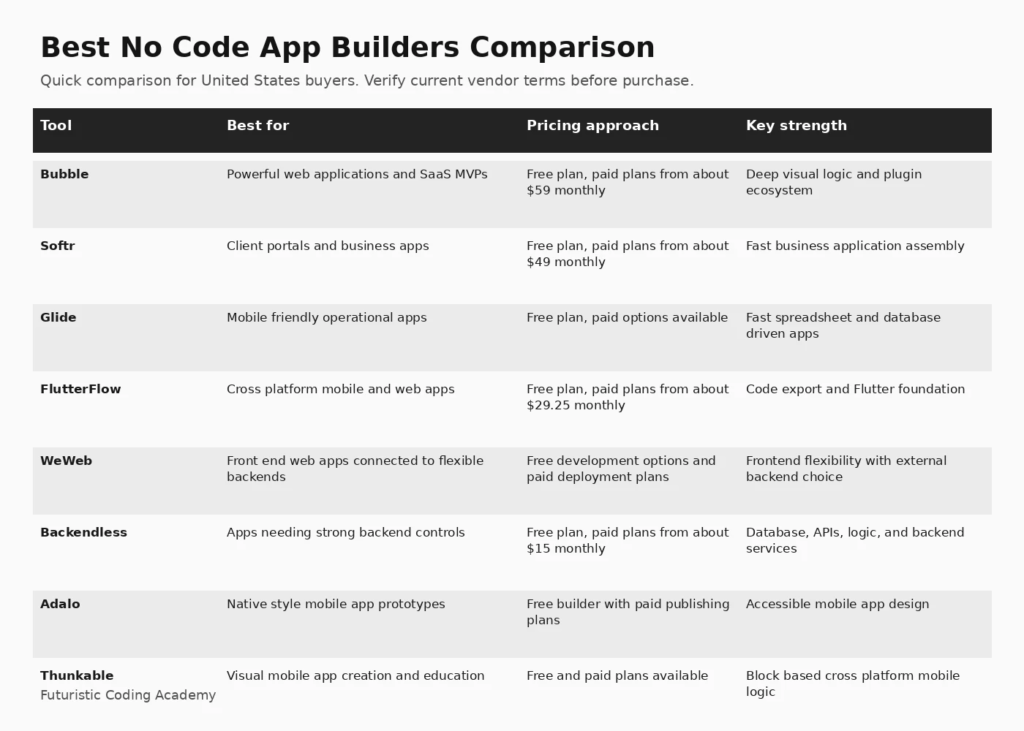
Infographic: 8 Best Options at a Glance
How We Evaluated Best No Code App Builders
We compared no code builders using application type, visual flexibility, database model, workflow logic, authentication, integrations, mobile support, code extensibility, ownership options, AI assisted building, and pricing. Current high ranking 2026 guides from Zapier and Jotform emphasize use case fit, pricing, technical ceiling, testing methodology, and the difference between web and mobile outputs. Those patterns informed the evaluation framework without copying their rankings.
We also considered how clearly each platform explains limitations, deployment requirements, pricing, and the work required after the initial setup. A useful buyer guide should help a team eliminate poor fits, not simply list popular vendors.
1. Bubble
Best for: Powerful web applications and SaaS MVPs
Bubble remains one of the most capable general purpose no code web application builders. It combines a visual interface, database, workflows, user authentication, APIs, plugins, and hosting. Founders can build marketplaces, SaaS applications, portals, and operational systems without starting with a traditional codebase.
Why it stands out
Deep visual logic and plugin ecosystem is the main reason to shortlist this platform. The value should still be tested against the workflows, integrations, governance requirements, and team skills in your organization.
Pricing and buying considerations
Pricing: Free plan, paid plans from about $59 monthly. Review the official Bubble website for current plan details, limits, and trial availability.
Limitations
The flexibility creates a learning curve. Teams should understand Bubble specific architecture, workload based pricing, performance tuning, and the long term implications of platform lock in before using it for a mission critical product.
2. Softr
Best for: Client portals and business apps
Softr is designed for business applications such as client portals, directories, internal tools, membership products, and lightweight customer experiences. It provides templates, permissions, data connections, workflows, and AI assisted building with a relatively approachable learning curve.
Why it stands out
Fast business application assembly is the main reason to shortlist this platform. The value should still be tested against the workflows, integrations, governance requirements, and team skills in your organization.
Pricing and buying considerations
Pricing: Free plan, paid plans from about $49 monthly. Review the official Softr website for current plan details, limits, and trial availability.
Limitations
Teams needing highly custom application behavior or pixel level interface control may reach platform boundaries sooner than they would in Bubble or a code extensible tool.
3. Glide
Best for: Mobile friendly operational apps
Glide is excellent for turning structured business data into polished applications. It works well for field operations, inventory, directories, dashboards, request workflows, and internal mobile experiences. The builder emphasizes speed and visual quality, which helps non technical teams launch useful apps quickly.
Why it stands out
Fast spreadsheet and database driven apps is the main reason to shortlist this platform. The value should still be tested against the workflows, integrations, governance requirements, and team skills in your organization.
Pricing and buying considerations
Pricing: Free plan, paid options available. Review the official Glide website for current plan details, limits, and trial availability.
Limitations
Highly custom consumer applications, advanced backend logic, or unusual integrations may require workarounds. Buyers should test row, user, and update limits against expected scale.
4. FlutterFlow
Best for: Cross platform mobile and web apps
FlutterFlow is a strong choice when a team wants visual development but also wants a path toward source code ownership. It builds on Flutter, supports mobile and web targets, integrates with common backends, and provides code export on paid plans. This makes it appealing to founders who expect developers to become more involved later.
Why it stands out
Code export and Flutter foundation is the main reason to shortlist this platform. The value should still be tested against the workflows, integrations, governance requirements, and team skills in your organization.
Pricing and buying considerations
Pricing: Free plan, paid plans from about $29.25 monthly. Review the official FlutterFlow website for current plan details, limits, and trial availability.
Limitations
Building production applications still requires understanding data models, authentication, APIs, responsive behavior, and app store requirements. Visual development does not remove software architecture decisions.
5. WeWeb
Best for: Front end web apps connected to flexible backends
WeWeb focuses on building modern web application front ends while allowing teams to connect backends such as Supabase, Xano, APIs, and other data services. It can be a good fit for teams that want more control over data architecture than an all in one no code platform provides.
Why it stands out
Frontend flexibility with external backend choice is the main reason to shortlist this platform. The value should still be tested against the workflows, integrations, governance requirements, and team skills in your organization.
Pricing and buying considerations
Pricing: Free development options and paid deployment plans. Review the official WeWeb website for current plan details, limits, and trial availability.
Limitations
The separated frontend and backend model is powerful but increases architectural responsibility. Teams need to understand authentication, permissions, database security, and API design.
6. Backendless
Best for: Apps needing strong backend controls
Backendless combines visual application building with database management, APIs, user services, business logic, messaging, and deployment controls. It is useful for builders who want a no code or low code experience while keeping more attention on the backend layer.
Why it stands out
Database, APIs, logic, and backend services is the main reason to shortlist this platform. The value should still be tested against the workflows, integrations, governance requirements, and team skills in your organization.
Pricing and buying considerations
Pricing: Free plan, paid plans from about $15 monthly. Review the official Backendless website for current plan details, limits, and trial availability.
Limitations
The platform has more concepts to learn than simple page builders. Teams should evaluate development speed against the operational flexibility they gain.
7. Adalo
Best for: Native style mobile app prototypes
Adalo is designed to help non developers create mobile and web applications using visual components, database collections, actions, and integrations. It can be effective for prototypes, simple marketplaces, membership products, and mobile first business ideas.
Why it stands out
Accessible mobile app design is the main reason to shortlist this platform. The value should still be tested against the workflows, integrations, governance requirements, and team skills in your organization.
Pricing and buying considerations
Pricing: Free builder with paid publishing plans. Review the official Adalo website for current plan details, limits, and trial availability.
Limitations
Complex logic, large data sets, and advanced performance requirements can expose limitations. Teams should test production scale and app store needs before committing to the platform.
8. Thunkable
Best for: Visual mobile app creation and education
Thunkable uses visual components and block based logic to build mobile applications for Android and iOS. It is approachable for beginners while still offering APIs, device features, data sources, and publishing workflows that can support real projects.
Why it stands out
Block based cross platform mobile logic is the main reason to shortlist this platform. The value should still be tested against the workflows, integrations, governance requirements, and team skills in your organization.
Pricing and buying considerations
Pricing: Free and paid plans available. Review the official Thunkable website for current plan details, limits, and trial availability.
Limitations
Teams building complex SaaS products may need more advanced backend architecture and source control than the platform is designed to provide. It is strongest when the mobile experience and visual logic fit its component model.
How to Choose the Right Best No Code App Builders
Decide What You Are Actually Building
Separate websites, internal tools, customer portals, mobile apps, and SaaS products before comparing platforms. The data model, authentication, performance, and publishing requirements differ significantly.
Map the Technical Ceiling
Ask what happens after the MVP. Review API support, custom code options, backend flexibility, database limits, permissions, performance, and whether source code can be exported. A fast prototype can become expensive if the platform blocks the next stage of the product.
Model Vendor Lock In
All hosted platforms create some dependency. Understand how data can be exported, whether code is portable, what happens if pricing changes, and how difficult migration would be. Lock in is not automatically bad, but it should be an intentional tradeoff.
Test Permissions and Security
Customer and employee apps need more than attractive screens. Test authentication, row level permissions, role management, secrets, API security, backups, and the platform responsibility model before storing sensitive business data.
Build One Real Workflow During the Trial
Do not evaluate only the homepage or AI demo. Build a workflow with authentication, real data, an external API, a permission rule, a form, and a reporting view. That exercise reveals the actual learning curve and technical constraints.
Related FCA Resources
For broader technology context, see Full Stack Project Ideas, MERN Stack Full Course, MERN Stack vs Full Stack, Full Stack Web Development Roadmap, .NET Full Stack Developer Guide, FCA Blog Library. These resources cover development, data, marketing, and practical technology foundations that support better software buying decisions.
Frequently Asked Questions
What is the best no code app builder overall?
Bubble is one of the strongest general purpose web app builders, while FlutterFlow is attractive for cross platform mobile applications. Softr and Glide are easier choices for business portals and operational apps.
Can no code tools build a real SaaS product?
Yes, many SaaS products start or operate on no code platforms. The important question is whether the platform can support the expected data model, permissions, integrations, performance, and future development needs.
Which no code builder is best for mobile apps?
FlutterFlow, Adalo, and Thunkable are common mobile focused options. Glide also works well for mobile friendly business applications. Compare app store publishing, native device features, and code ownership.
Which no code builder is easiest for beginners?
Softr and Glide are generally easier to learn for straightforward business applications. Bubble provides more flexibility but requires more time to understand workflows, data, and responsive design.
Can developers use no code tools?
Yes. Developers often use no code and low code platforms to accelerate internal tools, prototypes, admin panels, and standard business workflows while reserving custom code for areas where it adds real value.
What is the difference between no code and low code?
No code aims to let users build primarily through visual interfaces. Low code expects some coding for advanced logic or customization. In practice, many modern platforms sit somewhere between the two.
Is no code cheaper than custom development?
It can be much cheaper for early versions and standard workflows, but long term cost depends on platform pricing, user volume, data usage, integrations, and whether limitations eventually require a rebuild.
Can no code apps scale?
Some can scale to substantial usage, but scalability depends on architecture and platform limits. Teams should test workload pricing, database performance, concurrency, caching, API limits, and support options before assuming unlimited scale.
What should I check before choosing a no code platform?
Check application type, data model, authentication, permissions, API access, mobile requirements, code export, data export, pricing at projected scale, support, and migration options.
Do no code builders support AI features?
Many platforms now include AI assisted generation, workflow building, or integrations with model APIs. AI can speed development, but generated logic still needs validation, security review, and testing.
Can I connect a no code app to my existing database?
Some platforms connect directly to services such as Airtable, Supabase, Xano, SQL databases, or APIs. Others prefer their own built in database. Confirm supported authentication and permission models.
When should a business choose custom code instead?
Custom development is often preferable when the product has unusual performance requirements, complex domain logic, strict infrastructure constraints, advanced security needs, or strategic intellectual property that should not depend on a hosted builder.
Final Recommendation
There is no universal winner for best no code app builders. Start with the use case, asset or workflow requirements, team skills, and projected scale. Shortlist two or three platforms, run a realistic trial, and measure the quality of the decision support or operational improvement they create. That approach is more reliable than choosing the product with the longest feature list.
Editorial note: Futuristic Coding Academy may update this guide as products, pricing, and buyer requirements change. Inclusion does not guarantee a paid placement or ranking position.