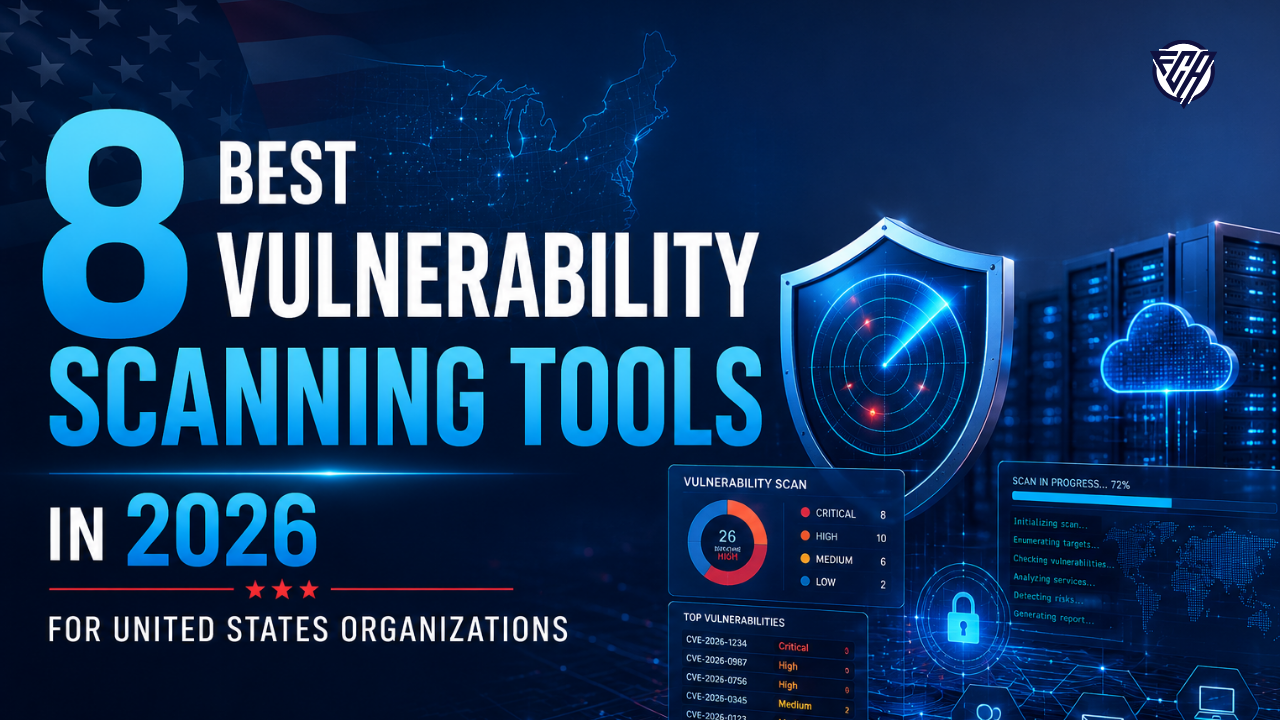
A vulnerability scanner is valuable only when it helps a security team find the right exposure and move it toward remediation. United States organizations now face a market that ranges from classic network scanners to endpoint vulnerability management, cloud exposure platforms, and web application scanners. The best choice therefore depends on what you need to scan, how quickly findings must be prioritized, and which team owns the fix. This guide separates those use cases instead of pretending that every product solves the same problem.
CISA maintains the Known Exploited Vulnerabilities catalog to help organizations prioritize vulnerabilities with evidence of active exploitation. Recent 2026 research on vulnerability management also shows why prioritization matters: one AgenticVM evaluation reduced thousands of raw findings into a much smaller high priority queue, illustrating the operational value of context and triage rather than raw alert volume.
This guide is written for a United States audience. Prices are shown in United States dollars where a public price was available. Vendors can change pricing and packaging, so confirm current terms on the linked official page before purchasing.
8 Best Options at a Glance
| Tool | Best for | Pricing approach | Key strength |
|---|---|---|---|
| Tenable Vulnerability Management | Broad enterprise vulnerability coverage | Quote based subscription | Mature scanning and risk prioritization |
| Qualys VMDR | Unified asset inventory and vulnerability management | Quote based subscription | Cloud platform with broad asset context |
| Rapid7 InsightVM | Security teams that want remediation oriented workflows | Quote based subscription | Risk scoring and remediation projects |
| Microsoft Defender Vulnerability Management | Microsoft centered endpoint environments | Microsoft licensing or add on | Native endpoint and exposure context |
| Wiz | Cloud native exposure and vulnerability context | Enterprise quote | Cloud asset relationships and exposure paths |
| Invicti | Web application vulnerability scanning | Quote based subscription | Dynamic application security testing |
| Intruder | Small and mid sized teams seeking simpler external scanning | Subscription plans with asset based limits | Accessible continuous attack surface scanning |
| Greenbone OpenVAS | Open source oriented teams with security expertise | Community edition available | Open source scanning foundation |
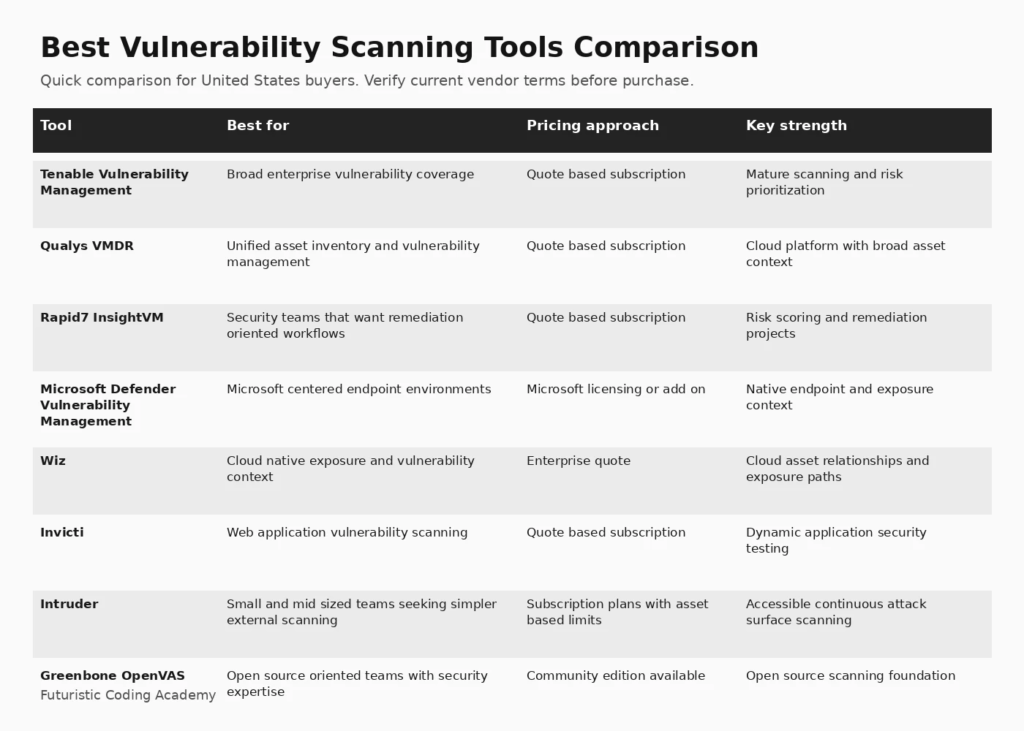
Infographic: 8 Best Options at a Glance
How We Evaluated Best Vulnerability Scanning Tools
We compared products using coverage breadth, authenticated scanning, asset discovery, risk prioritization, remediation workflow, deployment model, integrations, reporting, and suitability for United States organizations. We also reviewed current vulnerability scanner category patterns on G2, Microsoft documentation, CISA risk guidance, and recent research on alert reduction and exploit based prioritization.
We also considered how clearly each platform explains limitations, deployment requirements, pricing, and the work required after the initial setup. A useful buyer guide should help a team eliminate poor fits, not simply list popular vendors.
1. Tenable Vulnerability Management
Best for: Broad enterprise vulnerability coverage
Tenable Vulnerability Management is a strong fit for security teams that want continuous asset discovery, vulnerability assessment, prioritization, and reporting in one established platform. It is especially relevant when an organization has a large mix of servers, endpoints, network devices, cloud assets, and internet facing infrastructure. The platform builds on the Nessus scanning ecosystem and adds centralized management, risk context, dashboards, and workflow features for larger environments.
Why it stands out
Mature scanning and risk prioritization is the main reason to shortlist this platform. The value should still be tested against the workflows, integrations, governance requirements, and team skills in your organization.
Pricing and buying considerations
Pricing: Quote based subscription. Review the official Tenable Vulnerability Management website for current plan details, limits, and trial availability.
Limitations
The platform can require meaningful tuning in large environments, and licensing can become a material budget item as asset counts grow. Teams should validate reporting, asset licensing rules, scan windows, and remediation integrations during evaluation.
2. Qualys VMDR
Best for: Unified asset inventory and vulnerability management
Qualys VMDR combines asset discovery, vulnerability detection, prioritization, remediation tracking, and cloud delivered management. It is particularly useful for organizations that already use other Qualys modules because vulnerability data can sit inside a broader security and compliance platform. Continuous inventory and agent based visibility can help teams understand which assets are actually exposed before creating remediation work.
Why it stands out
Cloud platform with broad asset context is the main reason to shortlist this platform. The value should still be tested against the workflows, integrations, governance requirements, and team skills in your organization.
Pricing and buying considerations
Pricing: Quote based subscription. Review the official Qualys VMDR website for current plan details, limits, and trial availability.
Limitations
The breadth of the platform can increase implementation complexity. Buyers should test report usability, agent coverage, exception handling, and the workflow for turning findings into owned remediation tasks rather than judging only scan volume.
3. Rapid7 InsightVM
Best for: Security teams that want remediation oriented workflows
Rapid7 InsightVM is designed to move vulnerability data toward action. It combines scanning, asset context, dashboards, risk scoring, and remediation projects that can be assigned to operational teams. The approach is useful for organizations that need more than a list of CVEs and want security findings translated into practical work queues for IT and engineering.
Why it stands out
Risk scoring and remediation projects is the main reason to shortlist this platform. The value should still be tested against the workflows, integrations, governance requirements, and team skills in your organization.
Pricing and buying considerations
Pricing: Quote based subscription. Review the official Rapid7 InsightVM website for current plan details, limits, and trial availability.
Limitations
Large environments still need careful asset grouping, credentialed scanning, and ownership rules. Teams should test how well the platform fits existing ticketing systems and whether its prioritization model matches their own exposure and business criticality criteria.
4. Microsoft Defender Vulnerability Management
Best for: Microsoft centered endpoint environments
Microsoft Defender Vulnerability Management is attractive for organizations already operating Microsoft Defender because vulnerability assessment can use the same endpoint and exposure context. Microsoft states that the service supports discovery, recommendations, continuous monitoring, software inventory, remediation tracking, and risk based prioritization, with premium capabilities available through relevant Defender plans or the standalone service.
Why it stands out
Native endpoint and exposure context is the main reason to shortlist this platform. The value should still be tested against the workflows, integrations, governance requirements, and team skills in your organization.
Pricing and buying considerations
Pricing: Microsoft licensing or add on. Review the official Microsoft Defender Vulnerability Management website for current plan details, limits, and trial availability.
Limitations
The value is strongest inside a Microsoft security stack. Organizations with mixed endpoint and network requirements should confirm which assets are covered, which capabilities require premium licensing, and whether another scanner is still needed for infrastructure outside the Defender footprint.
5. Wiz
Best for: Cloud native exposure and vulnerability context
Wiz is a cloud security platform that brings vulnerabilities together with cloud configuration, identity, network exposure, secrets, and workload context. For cloud first organizations, this relationship data can be more useful than a scanner that treats every vulnerability as an isolated finding. G2 currently lists Wiz prominently in vulnerability scanner and exposure management categories.
Why it stands out
Cloud asset relationships and exposure paths is the main reason to shortlist this platform. The value should still be tested against the workflows, integrations, governance requirements, and team skills in your organization.
Pricing and buying considerations
Pricing: Enterprise quote. Review the official Wiz website for current plan details, limits, and trial availability.
Limitations
Wiz is not a direct replacement for every traditional network or endpoint scanner. Organizations should map required asset types first and decide whether they need cloud exposure management, classic authenticated infrastructure scanning, application scanning, or a combination.
6. Invicti
Best for: Web application vulnerability scanning
Invicti focuses on web application and API security rather than general endpoint vulnerability management. It is a strong candidate when the primary goal is to scan production web applications, identify exploitable application weaknesses, integrate findings into development workflows, and reduce manual validation effort through proof based scanning capabilities.
Why it stands out
Dynamic application security testing is the main reason to shortlist this platform. The value should still be tested against the workflows, integrations, governance requirements, and team skills in your organization.
Pricing and buying considerations
Pricing: Quote based subscription. Review the official Invicti website for current plan details, limits, and trial availability.
Limitations
Because the product is application focused, it should not be treated as a complete network vulnerability management platform. Security teams often combine an application scanner with endpoint, cloud, and infrastructure coverage.
7. Intruder
Best for: Small and mid sized teams seeking simpler external scanning
Intruder aims to make vulnerability scanning easier for teams that do not want to operate a large enterprise platform. It provides external and internal scanning options, cloud integrations, attack surface monitoring, prioritization, and reporting. The simpler operating model can appeal to smaller security teams and managed service providers.
Why it stands out
Accessible continuous attack surface scanning is the main reason to shortlist this platform. The value should still be tested against the workflows, integrations, governance requirements, and team skills in your organization.
Pricing and buying considerations
Pricing: Subscription plans with asset based limits. Review the official Intruder website for current plan details, limits, and trial availability.
Limitations
Buyers should compare scan depth, authenticated coverage, compliance requirements, and reporting needs against larger enterprise platforms. A simpler interface is valuable only if the scanner still covers the assets and vulnerability classes that matter to the organization.
8. Greenbone OpenVAS
Best for: Open source oriented teams with security expertise
Greenbone provides the OpenVAS based Community Edition for organizations that want an open source vulnerability scanning foundation. It can be useful for laboratories, smaller environments, security education, and teams that have the expertise to operate and maintain scanning infrastructure themselves.
Why it stands out
Open source scanning foundation is the main reason to shortlist this platform. The value should still be tested against the workflows, integrations, governance requirements, and team skills in your organization.
Pricing and buying considerations
Pricing: Community edition available. Review the official Greenbone OpenVAS website for current plan details, limits, and trial availability.
Limitations
Open source does not mean zero operational cost. Feed coverage, scanner maintenance, tuning, credentials, reporting, and infrastructure all require attention. Teams should compare community feed coverage with commercial Greenbone services before relying on it for enterprise risk decisions.
How to Choose the Right Best Vulnerability Scanning Tools
Start With Asset Coverage
List the assets that must be covered before comparing vendors. Network devices, employee endpoints, cloud workloads, containers, web applications, APIs, and internet facing assets often require different scanning methods. A tool that is excellent for cloud exposure can still leave gaps in legacy infrastructure, while a traditional scanner may lack application depth.
Prioritize Exploitability, Not Only Severity
CVSS is useful technical context, but security teams increasingly combine it with exposure, asset importance, CISA Known Exploited Vulnerabilities, and exploit probability. A scanner should make those signals easy to operationalize so teams do not spend the same effort on every finding.
Test Credentialed Scanning and Agents
Unauthenticated scans can miss important configuration and software details. During a trial, compare credentialed scan success, endpoint agent coverage, cloud connectors, scan duration, and the number of assets that remain unknown.
Evaluate Remediation Workflow
The strongest program is not the one with the most findings. Test whether the product can group duplicates, assign ownership, integrate with ticketing systems, track exceptions, verify fixes, and report risk reduction over time.
Run a Proof of Value
Use a representative asset sample and seed known issues where appropriate. Compare detection, false positive handling, prioritization, reporting, and the time required to move a finding from discovery to validated remediation.
Related FCA Resources
For broader technology context, see Computer Courses Guide, Full Stack Project Ideas, MERN Stack Full Course, .NET Full Stack Developer Guide, Full Stack Web Development Roadmap, FCA Blog Library. These resources cover development, data, marketing, and practical technology foundations that support better software buying decisions.
Frequently Asked Questions
What is a vulnerability scanning tool?
A vulnerability scanning tool discovers assets or applications and checks them for known weaknesses, insecure configurations, missing patches, exposed services, or application flaws. Some products focus on networks and endpoints, while others specialize in cloud or web applications.
What is the difference between vulnerability scanning and vulnerability management?
Scanning finds weaknesses. Vulnerability management adds prioritization, ownership, remediation workflow, exception handling, reporting, and verification so the organization can reduce risk over time.
Which vulnerability scanner is best for enterprises?
Tenable, Qualys, and Rapid7 are common enterprise evaluation candidates for broad infrastructure coverage. Microsoft can be compelling for Defender centered environments, while Wiz is strong for cloud exposure context. The right answer depends on asset mix and workflow.
Is OpenVAS still useful in 2026?
Yes. Greenbone OpenVAS remains useful for teams that want an open source scanning foundation and have the expertise to operate it. Enterprise buyers should compare community feed coverage and support with commercial alternatives.
Should a scanner use CISA KEV data?
Yes. Known Exploited Vulnerabilities are a strong prioritization signal because they identify vulnerabilities with evidence of exploitation. They should be combined with asset exposure and business criticality rather than used alone.
What is authenticated vulnerability scanning?
Authenticated scanning logs into a target using approved credentials so the scanner can inspect installed software, configuration, patch state, and local security settings that may not be visible from the network.
How often should vulnerability scans run?
Frequency depends on asset change rate and risk. Internet facing and cloud assets often need continuous or frequent assessment, while stable internal environments may use scheduled scans plus continuous agent monitoring.
Can vulnerability scanners replace penetration testing?
No. Scanners are effective for repeatable detection of known classes of issues, but penetration testing adds human reasoning, attack chaining, business logic testing, and validation that automated tools can miss.
What should small businesses look for?
Small teams should prioritize easy deployment, clear remediation guidance, manageable pricing, useful reporting, cloud integrations, and low operational overhead. A smaller tool that gets used consistently can be more effective than a complex platform that is poorly maintained.
How do false positives affect vulnerability programs?
False positives consume analyst and engineering time and can reduce trust in the platform. Buyers should test validation features, suppression workflows, asset context, and how easily findings can be verified or closed.
Do vulnerability scanners find zero day vulnerabilities?
Most scanners are strongest at known vulnerabilities and detectable misconfigurations. Some platforms add behavioral or exposure analysis, but organizations still need threat intelligence, monitoring, security testing, and incident response for unknown threats.
What metrics should a vulnerability management team track?
Useful metrics include coverage of known assets, credentialed scan success, age of critical exposures, time to remediate exploited vulnerabilities, overdue remediation, exception volume, repeat findings, and verified risk reduction.
Final Recommendation
There is no universal winner for best vulnerability scanning tools. Start with the use case, asset or workflow requirements, team skills, and projected scale. Shortlist two or three platforms, run a realistic trial, and measure the quality of the decision support or operational improvement they create. That approach is more reliable than choosing the product with the longest feature list.
Editorial note: Futuristic Coding Academy may update this guide as products, pricing, and buyer requirements change. Inclusion does not guarantee a paid placement or ranking position.A vulnerability scanner is valuable only when it helps a security team find the right exposure and move it toward remediation. United States organizations now face a market that ranges from classic network scanners to endpoint vulnerability management, cloud exposure platforms, and web application scanners. The best choice therefore depends on what you need to scan, how quickly findings must be prioritized, and which team owns the fix. This guide separates those use cases instead of pretending that every product solves the same problem.
CISA maintains the Known Exploited Vulnerabilities catalog to help organizations prioritize vulnerabilities with evidence of active exploitation. Recent 2026 research on vulnerability management also shows why prioritization matters: one AgenticVM evaluation reduced thousands of raw findings into a much smaller high priority queue, illustrating the operational value of context and triage rather than raw alert volume.
This guide is written for a United States audience. Prices are shown in United States dollars where a public price was available. Vendors can change pricing and packaging, so confirm current terms on the linked official page before purchasing.
8 Best Options at a Glance
| Tool | Best for | Pricing approach | Key strength |
|---|---|---|---|
| Tenable Vulnerability Management | Broad enterprise vulnerability coverage | Quote based subscription | Mature scanning and risk prioritization |
| Qualys VMDR | Unified asset inventory and vulnerability management | Quote based subscription | Cloud platform with broad asset context |
| Rapid7 InsightVM | Security teams that want remediation oriented workflows | Quote based subscription | Risk scoring and remediation projects |
| Microsoft Defender Vulnerability Management | Microsoft centered endpoint environments | Microsoft licensing or add on | Native endpoint and exposure context |
| Wiz | Cloud native exposure and vulnerability context | Enterprise quote | Cloud asset relationships and exposure paths |
| Invicti | Web application vulnerability scanning | Quote based subscription | Dynamic application security testing |
| Intruder | Small and mid sized teams seeking simpler external scanning | Subscription plans with asset based limits | Accessible continuous attack surface scanning |
| Greenbone OpenVAS | Open source oriented teams with security expertise | Community edition available | Open source scanning foundation |
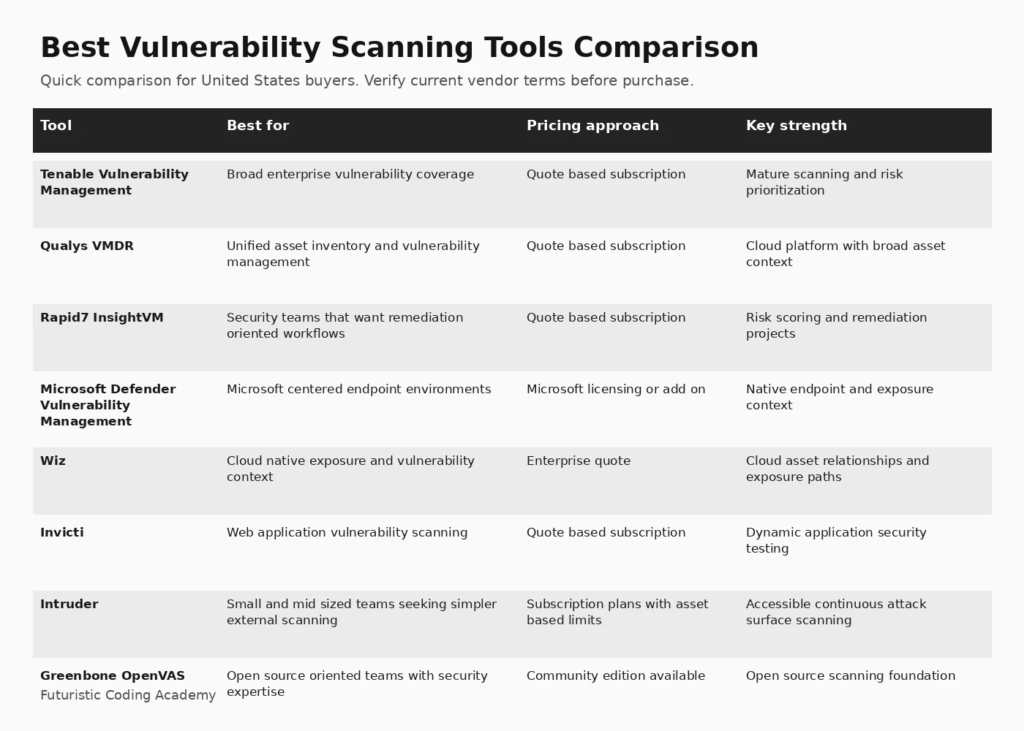
Infographic: 8 Best Options at a Glance
How We Evaluated Best Vulnerability Scanning Tools
We compared products using coverage breadth, authenticated scanning, asset discovery, risk prioritization, remediation workflow, deployment model, integrations, reporting, and suitability for United States organizations. We also reviewed current vulnerability scanner category patterns on G2, Microsoft documentation, CISA risk guidance, and recent research on alert reduction and exploit based prioritization.
We also considered how clearly each platform explains limitations, deployment requirements, pricing, and the work required after the initial setup. A useful buyer guide should help a team eliminate poor fits, not simply list popular vendors.
1. Tenable Vulnerability Management
Best for: Broad enterprise vulnerability coverage
Tenable Vulnerability Management is a strong fit for security teams that want continuous asset discovery, vulnerability assessment, prioritization, and reporting in one established platform. It is especially relevant when an organization has a large mix of servers, endpoints, network devices, cloud assets, and internet facing infrastructure. The platform builds on the Nessus scanning ecosystem and adds centralized management, risk context, dashboards, and workflow features for larger environments.
Why it stands out
Mature scanning and risk prioritization is the main reason to shortlist this platform. The value should still be tested against the workflows, integrations, governance requirements, and team skills in your organization.
Pricing and buying considerations
Pricing: Quote based subscription. Review the official Tenable Vulnerability Management website for current plan details, limits, and trial availability.
Limitations
The platform can require meaningful tuning in large environments, and licensing can become a material budget item as asset counts grow. Teams should validate reporting, asset licensing rules, scan windows, and remediation integrations during evaluation.
2. Qualys VMDR
Best for: Unified asset inventory and vulnerability management
Qualys VMDR combines asset discovery, vulnerability detection, prioritization, remediation tracking, and cloud delivered management. It is particularly useful for organizations that already use other Qualys modules because vulnerability data can sit inside a broader security and compliance platform. Continuous inventory and agent based visibility can help teams understand which assets are actually exposed before creating remediation work.
Why it stands out
Cloud platform with broad asset context is the main reason to shortlist this platform. The value should still be tested against the workflows, integrations, governance requirements, and team skills in your organization.
Pricing and buying considerations
Pricing: Quote based subscription. Review the official Qualys VMDR website for current plan details, limits, and trial availability.
Limitations
The breadth of the platform can increase implementation complexity. Buyers should test report usability, agent coverage, exception handling, and the workflow for turning findings into owned remediation tasks rather than judging only scan volume.
3. Rapid7 InsightVM
Best for: Security teams that want remediation oriented workflows
Rapid7 InsightVM is designed to move vulnerability data toward action. It combines scanning, asset context, dashboards, risk scoring, and remediation projects that can be assigned to operational teams. The approach is useful for organizations that need more than a list of CVEs and want security findings translated into practical work queues for IT and engineering.
Why it stands out
Risk scoring and remediation projects is the main reason to shortlist this platform. The value should still be tested against the workflows, integrations, governance requirements, and team skills in your organization.
Pricing and buying considerations
Pricing: Quote based subscription. Review the official Rapid7 InsightVM website for current plan details, limits, and trial availability.
Limitations
Large environments still need careful asset grouping, credentialed scanning, and ownership rules. Teams should test how well the platform fits existing ticketing systems and whether its prioritization model matches their own exposure and business criticality criteria.
4. Microsoft Defender Vulnerability Management
Best for: Microsoft centered endpoint environments
Microsoft Defender Vulnerability Management is attractive for organizations already operating Microsoft Defender because vulnerability assessment can use the same endpoint and exposure context. Microsoft states that the service supports discovery, recommendations, continuous monitoring, software inventory, remediation tracking, and risk based prioritization, with premium capabilities available through relevant Defender plans or the standalone service.
Why it stands out
Native endpoint and exposure context is the main reason to shortlist this platform. The value should still be tested against the workflows, integrations, governance requirements, and team skills in your organization.
Pricing and buying considerations
Pricing: Microsoft licensing or add on. Review the official Microsoft Defender Vulnerability Management website for current plan details, limits, and trial availability.
Limitations
The value is strongest inside a Microsoft security stack. Organizations with mixed endpoint and network requirements should confirm which assets are covered, which capabilities require premium licensing, and whether another scanner is still needed for infrastructure outside the Defender footprint.
5. Wiz
Best for: Cloud native exposure and vulnerability context
Wiz is a cloud security platform that brings vulnerabilities together with cloud configuration, identity, network exposure, secrets, and workload context. For cloud first organizations, this relationship data can be more useful than a scanner that treats every vulnerability as an isolated finding. G2 currently lists Wiz prominently in vulnerability scanner and exposure management categories.
Why it stands out
Cloud asset relationships and exposure paths is the main reason to shortlist this platform. The value should still be tested against the workflows, integrations, governance requirements, and team skills in your organization.
Pricing and buying considerations
Pricing: Enterprise quote. Review the official Wiz website for current plan details, limits, and trial availability.
Limitations
Wiz is not a direct replacement for every traditional network or endpoint scanner. Organizations should map required asset types first and decide whether they need cloud exposure management, classic authenticated infrastructure scanning, application scanning, or a combination.
6. Invicti
Best for: Web application vulnerability scanning
Invicti focuses on web application and API security rather than general endpoint vulnerability management. It is a strong candidate when the primary goal is to scan production web applications, identify exploitable application weaknesses, integrate findings into development workflows, and reduce manual validation effort through proof based scanning capabilities.
Why it stands out
Dynamic application security testing is the main reason to shortlist this platform. The value should still be tested against the workflows, integrations, governance requirements, and team skills in your organization.
Pricing and buying considerations
Pricing: Quote based subscription. Review the official Invicti website for current plan details, limits, and trial availability.
Limitations
Because the product is application focused, it should not be treated as a complete network vulnerability management platform. Security teams often combine an application scanner with endpoint, cloud, and infrastructure coverage.
7. Intruder
Best for: Small and mid sized teams seeking simpler external scanning
Intruder aims to make vulnerability scanning easier for teams that do not want to operate a large enterprise platform. It provides external and internal scanning options, cloud integrations, attack surface monitoring, prioritization, and reporting. The simpler operating model can appeal to smaller security teams and managed service providers.
Why it stands out
Accessible continuous attack surface scanning is the main reason to shortlist this platform. The value should still be tested against the workflows, integrations, governance requirements, and team skills in your organization.
Pricing and buying considerations
Pricing: Subscription plans with asset based limits. Review the official Intruder website for current plan details, limits, and trial availability.
Limitations
Buyers should compare scan depth, authenticated coverage, compliance requirements, and reporting needs against larger enterprise platforms. A simpler interface is valuable only if the scanner still covers the assets and vulnerability classes that matter to the organization.
8. Greenbone OpenVAS
Best for: Open source oriented teams with security expertise
Greenbone provides the OpenVAS based Community Edition for organizations that want an open source vulnerability scanning foundation. It can be useful for laboratories, smaller environments, security education, and teams that have the expertise to operate and maintain scanning infrastructure themselves.
Why it stands out
Open source scanning foundation is the main reason to shortlist this platform. The value should still be tested against the workflows, integrations, governance requirements, and team skills in your organization.
Pricing and buying considerations
Pricing: Community edition available. Review the official Greenbone OpenVAS website for current plan details, limits, and trial availability.
Limitations
Open source does not mean zero operational cost. Feed coverage, scanner maintenance, tuning, credentials, reporting, and infrastructure all require attention. Teams should compare community feed coverage with commercial Greenbone services before relying on it for enterprise risk decisions.
How to Choose the Right Best Vulnerability Scanning Tools
Start With Asset Coverage
List the assets that must be covered before comparing vendors. Network devices, employee endpoints, cloud workloads, containers, web applications, APIs, and internet facing assets often require different scanning methods. A tool that is excellent for cloud exposure can still leave gaps in legacy infrastructure, while a traditional scanner may lack application depth.
Prioritize Exploitability, Not Only Severity
CVSS is useful technical context, but security teams increasingly combine it with exposure, asset importance, CISA Known Exploited Vulnerabilities, and exploit probability. A scanner should make those signals easy to operationalize so teams do not spend the same effort on every finding.
Test Credentialed Scanning and Agents
Unauthenticated scans can miss important configuration and software details. During a trial, compare credentialed scan success, endpoint agent coverage, cloud connectors, scan duration, and the number of assets that remain unknown.
Evaluate Remediation Workflow
The strongest program is not the one with the most findings. Test whether the product can group duplicates, assign ownership, integrate with ticketing systems, track exceptions, verify fixes, and report risk reduction over time.
Run a Proof of Value
Use a representative asset sample and seed known issues where appropriate. Compare detection, false positive handling, prioritization, reporting, and the time required to move a finding from discovery to validated remediation.
Related FCA Resources
For broader technology context, see Computer Courses Guide, Full Stack Project Ideas, MERN Stack Full Course, .NET Full Stack Developer Guide, Full Stack Web Development Roadmap, FCA Blog Library. These resources cover development, data, marketing, and practical technology foundations that support better software buying decisions.
Frequently Asked Questions
What is a vulnerability scanning tool?
A vulnerability scanning tool discovers assets or applications and checks them for known weaknesses, insecure configurations, missing patches, exposed services, or application flaws. Some products focus on networks and endpoints, while others specialize in cloud or web applications.
What is the difference between vulnerability scanning and vulnerability management?
Scanning finds weaknesses. Vulnerability management adds prioritization, ownership, remediation workflow, exception handling, reporting, and verification so the organization can reduce risk over time.
Which vulnerability scanner is best for enterprises?
Tenable, Qualys, and Rapid7 are common enterprise evaluation candidates for broad infrastructure coverage. Microsoft can be compelling for Defender centered environments, while Wiz is strong for cloud exposure context. The right answer depends on asset mix and workflow.
Is OpenVAS still useful in 2026?
Yes. Greenbone OpenVAS remains useful for teams that want an open source scanning foundation and have the expertise to operate it. Enterprise buyers should compare community feed coverage and support with commercial alternatives.
Should a scanner use CISA KEV data?
Yes. Known Exploited Vulnerabilities are a strong prioritization signal because they identify vulnerabilities with evidence of exploitation. They should be combined with asset exposure and business criticality rather than used alone.
What is authenticated vulnerability scanning?
Authenticated scanning logs into a target using approved credentials so the scanner can inspect installed software, configuration, patch state, and local security settings that may not be visible from the network.
How often should vulnerability scans run?
Frequency depends on asset change rate and risk. Internet facing and cloud assets often need continuous or frequent assessment, while stable internal environments may use scheduled scans plus continuous agent monitoring.
Can vulnerability scanners replace penetration testing?
No. Scanners are effective for repeatable detection of known classes of issues, but penetration testing adds human reasoning, attack chaining, business logic testing, and validation that automated tools can miss.
What should small businesses look for?
Small teams should prioritize easy deployment, clear remediation guidance, manageable pricing, useful reporting, cloud integrations, and low operational overhead. A smaller tool that gets used consistently can be more effective than a complex platform that is poorly maintained.
How do false positives affect vulnerability programs?
False positives consume analyst and engineering time and can reduce trust in the platform. Buyers should test validation features, suppression workflows, asset context, and how easily findings can be verified or closed.
Do vulnerability scanners find zero day vulnerabilities?
Most scanners are strongest at known vulnerabilities and detectable misconfigurations. Some platforms add behavioral or exposure analysis, but organizations still need threat intelligence, monitoring, security testing, and incident response for unknown threats.
What metrics should a vulnerability management team track?
Useful metrics include coverage of known assets, credentialed scan success, age of critical exposures, time to remediate exploited vulnerabilities, overdue remediation, exception volume, repeat findings, and verified risk reduction.
Final Recommendation
There is no universal winner for best vulnerability scanning tools. Start with the use case, asset or workflow requirements, team skills, and projected scale. Shortlist two or three platforms, run a realistic trial, and measure the quality of the decision support or operational improvement they create. That approach is more reliable than choosing the product with the longest feature list.
Editorial note: Futuristic Coding Academy may update this guide as products, pricing, and buyer requirements change. Inclusion does not guarantee a paid placement or ranking position.